 API-FOOTBALL
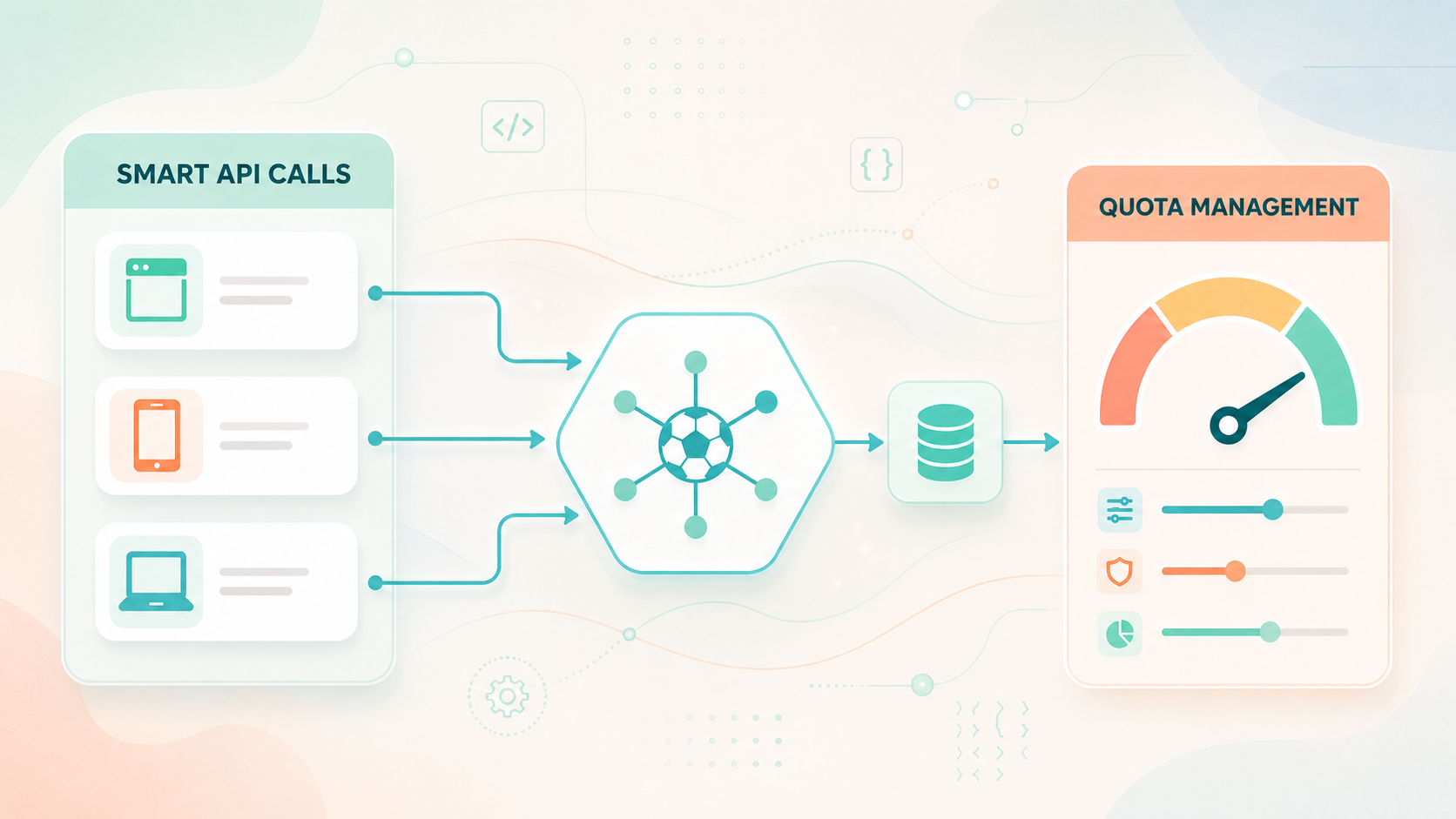
An efficient API-SPORTS integration is not just about retrieving data. It also needs to know which data to request, when to request it, how often to update it, and how to avoid consuming quota on calls that do not bring real value.
This is especially important with sports data, because not all information changes at the same pace. A list of countries, seasons, or competitions can remain stable for a long time. A calendar can evolve at key moments. A live score, match events, or live statistics are much more closely tied to data freshness.
The goal is therefore not simply to make fewer calls. The goal is to make more useful calls: better targeted, better planned, and better controlled. This is the logic that allows an application to remain fast, reliable, and sustainable while using its quota intelligently.
Start by checking the available coverage
Before building a feature, you need to check whether the data is available for the targeted competition and season. This is the role of coverage.
With API-Football, the /leagues endpoint lets you retrieve information about a competition, but also its coverage object. This object indicates which types of data are supported for a given league and season.
For example, for the 2026 World Cup, you can start by checking the league and season coverage with this call:
GET https://v3.football.api-sports.io/leagues?id=1&season=2026
"response": [
        {
            "league": {
                "id": 1,
                "name": "World Cup",
                "type": "Cup",
                "logo": "https://media.api-sports.io/football/leagues/1.png"
            },
            "country": {
                "name": "World",
                "code": null,
                "flag": null
            },
            "seasons": [
                {
                    "year": 2026,
                    "start": "2026-06-11",
                    "end": "2026-07-19",
                    "current": true,
                    "coverage": {
                        "fixtures": {
                            "events": true,
                            "lineups": true,
                            "statistics_fixtures": true,
                            "statistics_players": true
                        },
                        "standings": true,
                        "players": true,
                        "top_scorers": true,
                        "top_assists": true,
                        "top_cards": true,
                        "injuries": true,
                        "predictions": true,
                        "odds": true
                    }
                }
            ]
        }
    ]
}
This step is important because it prevents you from building a feature around data that is not available in the selected context. For example, if an interface is expected to display predictions, lineups, events or player statistics, it should first check that the corresponding coverage is enabled for that competition and season.
However, coverage should be interpreted with context. When a competition has not started yet, some fields can still be set to false, including events, lineups, /fixtures/statistics, /players/statistics, /players/topscorers, … These values may be updated progressively once the competition begins.
For future or recently started competitions, previous seasons can give a useful indication of the data that may be available, but they should not be treated as a guarantee. Even when a coverage field is enabled, the data may not be available immediately for every match. For example, lineups can sometimes be missing before kick-off, even when the competition covers lineups. In that case, they are updated as soon as the data becomes available, either during the match or after it.
Classify endpoints before optimizing
Once coverage has been checked, the next step is to classify endpoints. This classification gives you a simple method for deciding what should be cached, what should be refreshed regularly, and what should only be called when the user actually needs it.
Endpoints can be grouped into three different categories:
Static: These are reference data. They rarely change and can be loaded at startup, during a scheduled synchronization, or at longer intervals. Calling them on every page view usually brings no additional value to the user. Examples include countries or other basic information the application needs in order to work.
Semi-dynamic: This is data that changes regularly, but not constantly. These endpoints require a more refined strategy. They can be refreshed at regular intervals, but the frequency should depend on the context. Examples include standings, injuries, and similar data.
Dynamic: These are data whose value is directly tied to freshness. These endpoints may require a higher refresh frequency, but only when they are actually displayed or used. Examples include /odds/live, /fixtures/events, and other live-related data.
This classification helps avoid the most common mistake: applying the same call frequency across the entire application. A country, a standing, and a live score do not change at the same pace. They should therefore not be called, cached, or refreshed in the same way.
Give every call a real purpose
Every request should have a clear reason to exist. It can be used to display visible data, update information that may actually have changed, respond to a user action, or prepare a screen that is about to be viewed. If a request does not serve one of these purposes, it may consume quota unnecessarily.
A page dedicated to the World Cup may need the calendar, standings, live matches, match details, teams, and players. But this does not mean that all this data should be retrieved as soon as the page loads. A more efficient integration first loads what structures the screen, then triggers more detailed calls only when they become useful.
For example, the general schedule can be loaded to build the main page:
GET https://v3.football.api-sports.io/fixtures?league=1&season=2026
But the full details of a match do not need to be requested for every match at load time. They can be retrieved when the user opens a match page, clicks on a fixture, or asks for more information.
This changes the integration logic significantly. It reduces the number of calls on the initial load, improves perceived page speed, and avoids consuming quota on data the user may never consult.
Target calls with the right parameters
An efficient request is a precise request. The closer the call is to the actual need, the less unnecessary data the application retrieves.
If the interface needs to display matches for a specific period, it is better to use the appropriate parameters instead of retrieving the entire season and then filtering on the application side. The fixtures endpoint supports parameters such as date, from/to and round.
For a specific day:
GET https://v3.football.api-sports.io/fixtures?league=1&season=2026&date=2026-06-11
For a period:
GET https://v3.football.api-sports.io/fixtures?league=1&season=2026&from=2026-06-12&to=2026-06-13
For a specific round:
GET https://v3.football.api-sports.io/fixtures?league=1&season=2026&round=Group Stage - 1
These parameters make calls clearer and more useful. They allow you to build a “matches of the day” page, a weekly view, a group-stage page, or a calendar module without retrieving more data than necessary.
Avoid duplicate calls
Optimization is not only about reducing call frequency. It is also about preventing multiple parts of the application from requesting the same data in parallel.
This often happens on rich pages. One component may call the calendar, another the standings, another match details, while a widget or secondary script may request data that has already been loaded. If these calls are not coordinated, the application consumes several requests to obtain identical or very similar information.
The solution is to centralize data fetching as much as possible. Data that has already been requested should be reusable by several components. If a competition calendar is loaded to display the match list, it can also provide the fixture_id values needed for match pages. If a page retrieves league information with its coverage, that response can be kept and reused to decide which blocks should be displayed.
For match-related data, you can also avoid splitting calls too early. When available for your plan, instead of calling /fixtures/events, /fixtures/lineups, /fixtures/statistics and /fixtures/players separately for the same matches, you can call /fixtures with the ids parameter. The value can contain one or several fixture_id values, separated with hyphens, with a maximum of 20 fixture IDs per request.
GET https://v3.football.api-sports.io/fixtures?ids=12345-12346-12347
This allows you to retrieve the available data for one or several matches in a single request, instead of multiplying endpoint-specific calls for each match.
The same logic applies on the server side. A backend can act as an intermediary layer between the frontend and the API. It can temporarily store responses, group certain needs, avoid identical simultaneous calls, and protect the API from overly frequent refreshes.
This approach is especially important on high-traffic pages. If several visitors view the same page at the same time, each visit should not trigger the exact same calls to the API.
Use caching as a quota strategy
Caching is not only about speeding up display. It also helps preserve quota by avoiding API calls when data can be reused.
The article “How To Optimize Widgets, Cache And Security Tutorial” presents a configuration with BunnyCDN. In this example, BunnyCDN adds the x-apisports-key header, calls the API as the origin, and then stores the response for a defined duration. During that period, identical requests can be served from the cache without reaching the API-SPORTS servers.
The benefit is direct: if several users request the same endpoint with the same parameters, a single request can serve multiple displays. The quota is then preserved for calls that genuinely need to query the API.
The cache duration should follow the endpoint classification. Static data can be kept longer. Semi-dynamic data requires a shorter duration adapted to the context. Dynamic data should be handled more carefully, especially when it concerns live data.
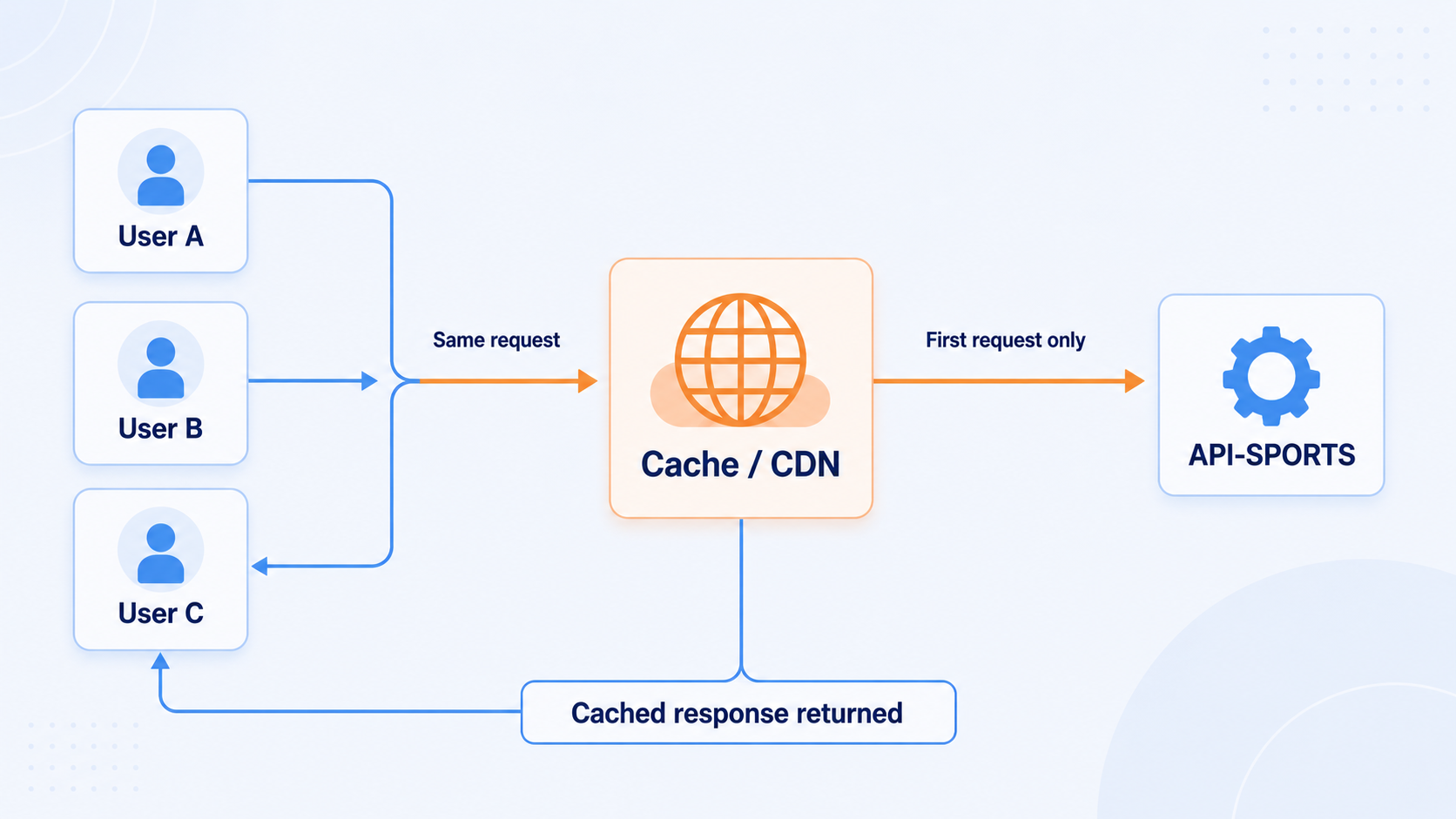 A cache layer can serve repeated requests directly, so only the first identical request needs to reach API-SPORTS during the cache lifetime.
Handle pagination properly
Pagination must also be included in the optimization strategy. Some endpoints can return several pages, and an integration should not assume that the first page always contains all the data.
API-FOOTBALL returns pagination information in its responses, including the current page and the total number of pages. The application should read this information before deciding whether it needs to request the next page.
GET https://v3.football.api-sports.io/players?league=1&season=2026&page=1
If a second page exists and is actually needed, the application can explicitly call it.
GET https://v3.football.api-sports.io/players?league=1&season=2026&page=2
However, it is important to distinguish between two use cases. A server-side synchronization may need to go through all pages to prepare a local database. A user-facing page, on the other hand, does not always need to load everything immediately. In that case, it is better to load progressively, or wait for a user action before calling the next pages.
Read headers to manage quota
Quota should not be discovered only when it has already been exceeded. It should be monitored and used as a management signal. API-SPORTS returns headers that indicate the limits and remaining consumption:
x-ratelimit-requests-limit: indicates the number of requests allocated per day according to the subscriptionx-ratelimit-requests-remaining: indicates the number of requests remaining for the dayX-RateLimit-Limit: indicates the maximum number of calls allowed per minuteX-RateLimit-Remaining: indicates the number of calls remaining before reaching this per-minute limit
This information allows the application to adapt its behavior. If the remaining quota becomes low, some secondary tasks can be postponed. If the per-minute limit is getting close, calls can be spaced out. If a page triggers too many requests on load, this can be detected and corrected.
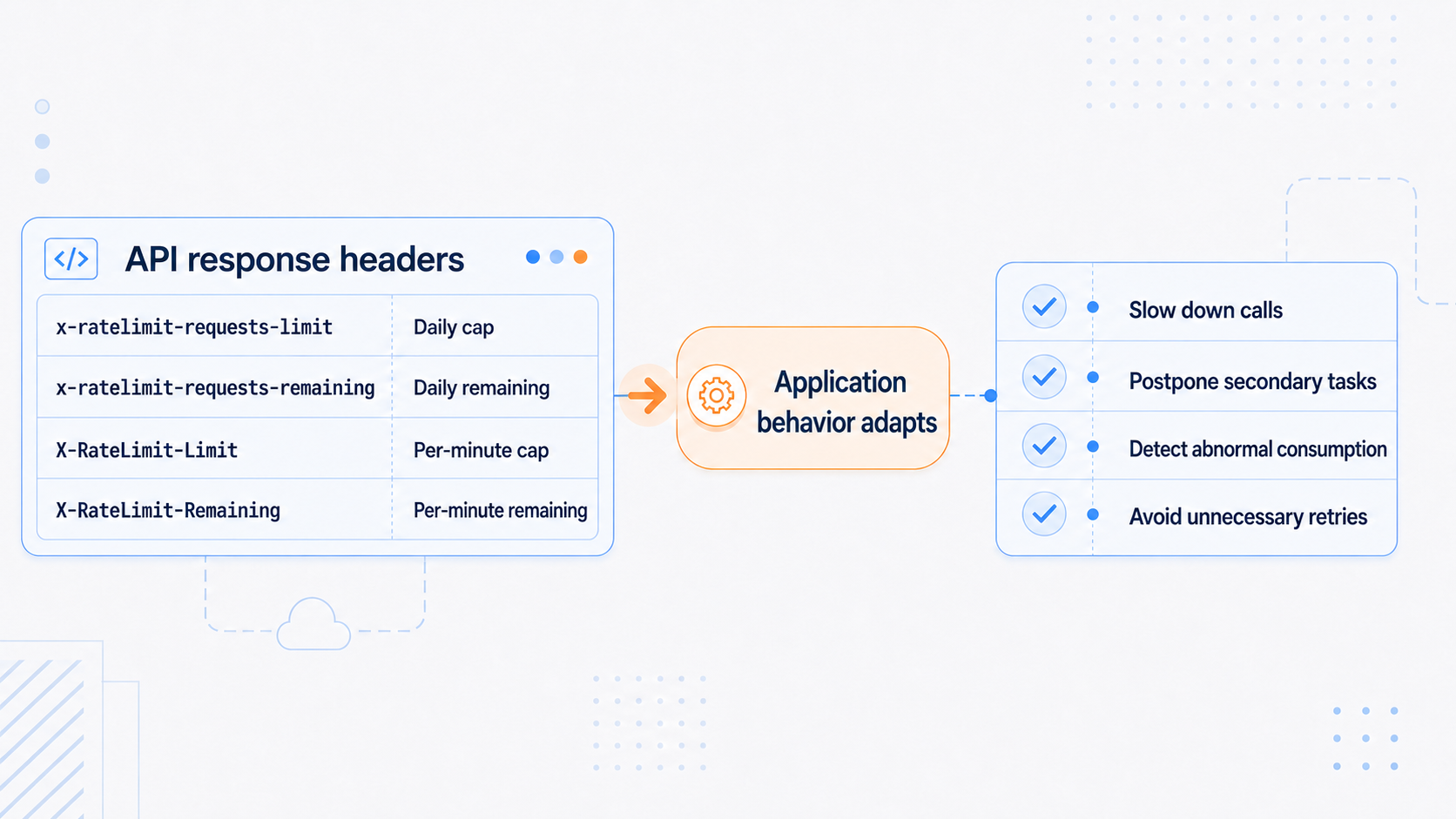 Rate limit headers help the application adjust its behavior before the daily quota or per-minute rate limit is reached.
The API-SPORTS daily quotas are:
- FREE plan: 100 requests per day and 10 requests per minute
- PRO Plan: 7 500 requests per day, 300 requests per minute and 5 requests per second
- ULTRA Plan: 75 000 requests per day, 450 requests per minute and 7,5 requests per second
- MEGA Plan: 150 000 requests per day, 900 requests per minute and 15 requests per second
- CUSTOM Plan: up to 1.5M requests per day, 1200 requests per minute and 20 requests per second
The API-SPORTS dashboard also allows you to monitor requests by day or by month, and the platform mentions the possibility of using custom email alerts based on consumption. These tools are useful for detecting an abnormal increase, a poor cache configuration, an application loop, or a page that generates more calls than expected.
Handle errors without increasing consumption
Error handling is part of optimization. A poor retry strategy can consume more quota than the initial error.
When a 429 Too Many Requests error appears, it means that too many requests have been sent in a short period of time. The official rate limit article recommends slowing down, spreading calls over time, and using retries with progressive backoff. For a deeper explanation of how rate limits are applied, you can read our dedicated article “HOW RATELIMIT WORKS”.
{
    "get": "",
    "parameters": [],
    "errors": {
        "rateLimit": "Too many requests. You have reached your per-minute request limit. Please wait a few seconds before retrying or upgrade your plan for higher limits."
    },
    "results": 0,
    "paging": {
        "current": 1,
        "total": 1
    },
    "response": []
}
You should not automatically retry the same request without understanding the cause of the problem. The API-FOOTBALL response structure includes, among others, errors, results, paging, and response. Reading errors before using response helps avoid repeating an invalid call caused by a wrong parameter or unavailable context.
Repeated limit violations or abnormal traffic spikes can lead to a temporary or permanent firewall block. This block can affect the API key, but also the IP address being used.
Protect the API key to protect the quota
The API key gives access to the quota. Protecting it is therefore part of the optimization process.
For widgets, a direct configuration can expose the key in the website’s source code. It is possible to restrict a key to specific domains from the dashboard, but this does not hide the key on the client side.
The official BunnyCDN tutorial proposes a more protective approach: using an intermediary URL that adds the key in the headers before forwarding the request to the API. The widget can then call this URL instead of directly calling the API with a visible key. This approach helps hide the key, enable caching, and better control usage.
Configure widgets with the same logic
API-SPORTS widgets simplify integration because they handle display, calls, and some interactions. But they should also be configured with a quota-aware logic.
The refresh parameter controls the automatic update frequency. Its default value is 15 seconds. It can be changed, for example with data-refresh="60", or disabled with data-refresh="false".
<api-sports-widget data-type="league"
  data-league="1"
  data-season="2026"
  data-refresh="15"
  data-target-game="modal"
  data-standings="true"
></api-sports-widget>

<!-- Configuration -->
<api-sports-widget data-type="config"
  data-key="xxxxxxxxxxxxxxxxxxxx"
  data-sport="football"
  data-lang="en"
  data-theme="white"
  data-show-errors="true"
  data-show-logos="true"
  data-favorite="true"
></api-sports-widget>
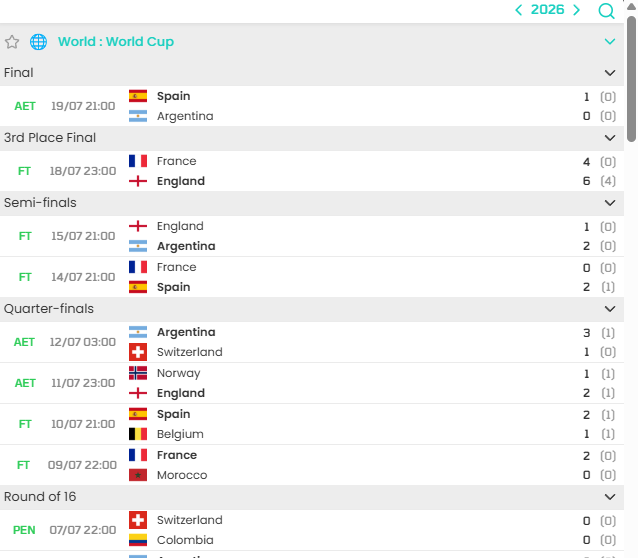 This configuration should depend on the context. A live page may justify frequent updates. A calendar, standings, or archive page does not have the same needs. On a high-traffic page, a refresh frequency that is too high can quickly multiply calls, especially if no intermediary cache is configured.
Conclusion
Optimizing an API-SPORTS integration is not just about reducing the number of requests. It is about building a logic in which every call has a reason to exist.
The right approach starts with coverage, to check what is actually available. It then continues with a classification of endpoints according to how often their data changes. From there come the architectural decisions: targeting calls with the right parameters, avoiding duplicate calls, handling pagination, caching responses, monitoring quota headers, and protecting the API key.
A well-designed integration does not simply endure its quota. It uses it as a resource to manage. This is what makes it possible to build an application that is faster, more stable, and better able to scale as traffic increases.
The API-SPORTS Team