 API-FOOTBALL

The FIBA Women's Basketball World Cup 2026 will take place in Berlin, Germany, from 4 to 13 September 2026. Over ten days, 16 women's national teams will play 36 games for one of the biggest titles in international basketball.
The tournament will combine a four-group opening phase with Qualification to Quarter-Finals games and a single-elimination final phase. For media platforms, sports applications and internal tools, API-Basketball can turn that schedule into structured data for fixtures, results, standings and tournament dashboards.
Tournament format and groups
The 16 teams are divided into four groups of four:
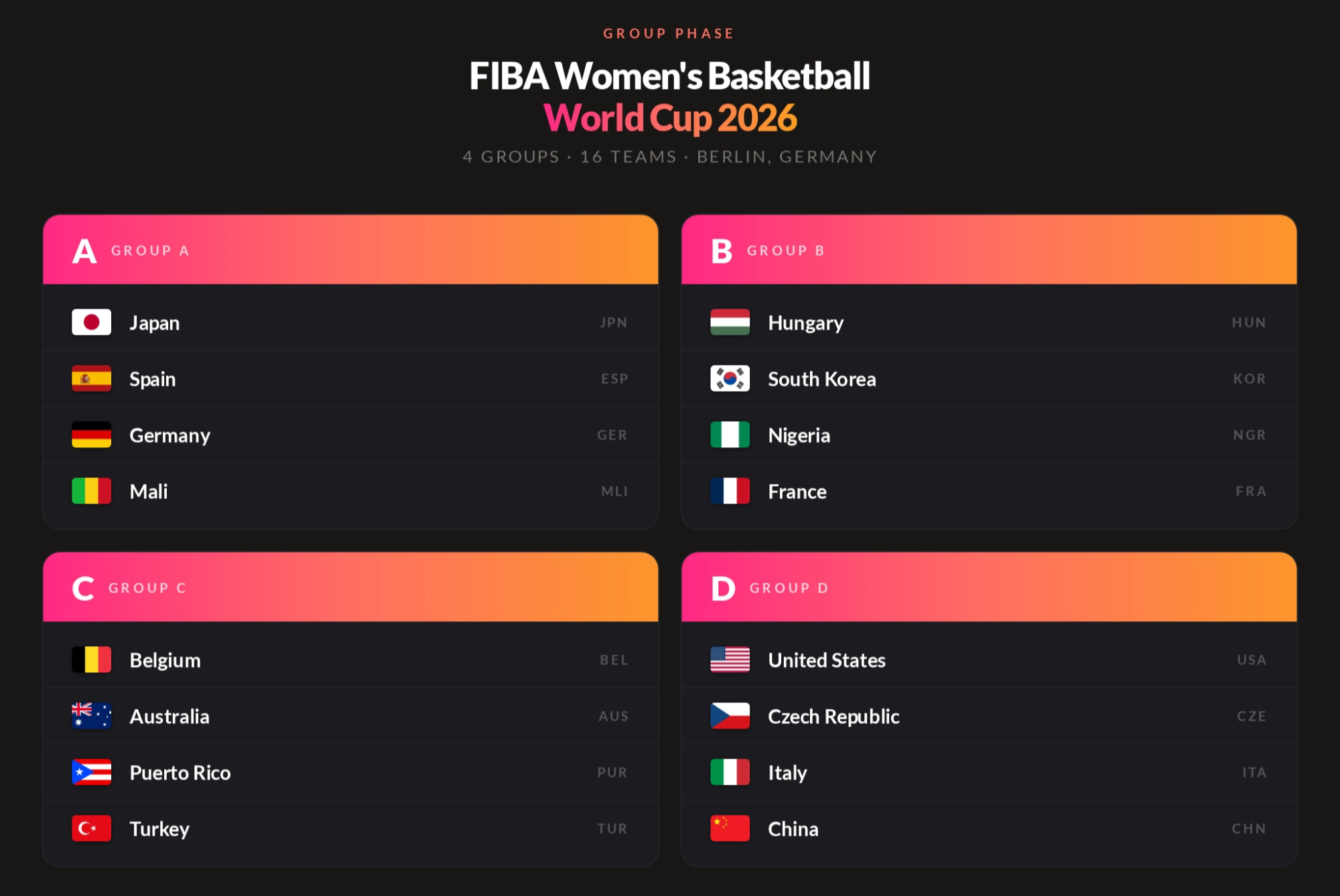 Each team will play the other three teams in its group. The first-placed team in each group will advance directly to the quarter-finals. The second- and third-placed teams will enter the Qualification to Quarter-Finals round, played as single-elimination crossovers between Groups A and B and between Groups C and D. The winners of those four games will join the group winners in the quarter-finals. The remainder of the tournament will also use a single-elimination format.
Key tournament dates
The official schedule is:
- 4-7 September: Group phase
- 8-9 September: Qualification to Quarter-Finals
- 10 September: Quarter-finals
- 12 September: Semi-finals
- 13 September: Third-place game and final
The full competition runs from 4 to 13 September 2026 in Berlin. There are no games scheduled for 11 September.
How to access tournament data with API-Basketball
API-Basketball can be used to build a match schedule, competition page, group table or tournament dashboard. A practical workflow is to identify the league and season first, then combine the teams, games and standings endpoints according to the needs of your application.
Every direct request requires an API key. With the API-SPORTS host, send it in the x-apisports-key request header: x-apisports-key: YOUR_API_KEY.
Step 1: identify the competition
Start by identifying the correct league ID and season. You can do this through the API-Basketball dashboard or with the leagues endpoint.
For the examples in this article, the competition is returned as league ID 284, with season 2026:
GET https://v1.basketball.api-sports.io/leagues?id=284&season=2026
 "response": [
        {
            "id": 284,
            "name": "World Cup Women",
            "type": "League",
            "logo": "https://media.api-sports.io/basketball/leagues/284.png",
            "country": {
                "id": 62,
                "name": "World",
                "code": " ",
                "flag": "https://media.api-sports.io/flags/ .svg"
            },
            "seasons": [
                {
                    "season": 2026,
                    "start": "2024-08-19",
                    "end": "2026-09-07",
                    "coverage": {
                        "games": {
                            "statistics": {
                                "teams": true,
                                "players": true
                            }
                        },
                        "standings": true,
                        "players": true,
                        "odds": false
                    }
                }
            ]
        }
    ]
}
This request confirms that the season exists and shows the coverage flags currently associated with it. These flags describe the available API coverage; they do not guarantee that every field will already be populated for every future game.
Step 2: retrieve the teams
Use the teams endpoint to retrieve the teams associated with the competition and season:
GET https://v1.basketball.api-sports.io/teams?league=284&season=2026
"response": [
        {
            "id": 3035,
            "name": "Australia W",
            "logo": "https://media.api-sports.io/basketball/teams/3035.png",
            "nationnal": true,
            "country": {
                "id": 1,
                "name": "Australia",
                "code": "AU",
                "flag": "https://media.api-sports.io/flags/au.svg"
            }
        },
        {
            "id": 3036,
            "name": "Belgium W",
            "logo": "https://media.api-sports.io/basketball/teams/3036.png",
            "nationnal": true,
            "country": {
                "id": 7,
                "name": "Belgium",
                "code": "BE",
                "flag": "https://media.api-sports.io/flags/be.svg"
            }
        },
        {
            "id": 3039,
            "name": "China W",
            "logo": "https://media.api-sports.io/basketball/teams/3039.png",
            "nationnal": true,
            "country": {
                "id": 11,
                "name": "China",
                "code": "CN",
                "flag": "https://media.api-sports.io/flags/cn.svg"
            }
        },
        {
            "id": 4177,
            "name": "Czech Republic W",
            "logo": "https://media.api-sports.io/basketball/teams/4177.png",
            "nationnal": true,
            "country": {
                "id": 12,
                "name": "Czech-Republic",
                "code": "CZ",
                "flag": "https://media.api-sports.io/flags/cz.svg"
            }
        },
 ...
The returned team IDs can be stored and reused with endpoints that accept a team filter. They also provide standardized names, logos and country information for your interface.
Step 3: retrieve the schedule and results
The games endpoint is central to tournament coverage. It returns scheduled games, dates, venues, teams and match statuses. Scores and period-by-period details are added when those data are available.
To retrieve the games scheduled for 4 September 2026:
GET https://v1.basketball.api-sports.io/games?league=284&season=2026&date=2026-09-04
 "response": [
        {
            "id": 498258,
            "date": "2026-09-04T09:30:00+00:00",
            "time": "09:30",
            "timestamp": 1788514200,
            "timezone": "UTC",
            "stage": null,
            "week": "1",
            "venue": "Max-Schmeling-Halle",
            "status": {
                "long": "Not Started",
                "short": "NS",
                "timer": null
            },
            "league": {
                "id": 284,
                "name": "World Cup Women",
                "type": "League",
                "season": 2026,
                "logo": "https://media.api-sports.io/basketball/leagues/284.png"
            },
            "country": {
                "id": 62,
                "name": "World",
                "code": " ",
                "flag": "https://media.api-sports.io/flags/ .svg"
            },
            "teams": {
                "home": {
                    "id": 3035,
                    "name": "Australia W",
                    "logo": "https://media.api-sports.io/basketball/teams/3035.png"
                },
                "away": {
                    "id": 3045,
                    "name": "Puerto Rico W",
                    "logo": "https://media.api-sports.io/basketball/teams/3045.png"
                }
            },
  ...
Here, NS means Not Started. The response uses UTC, so the 09:30 value corresponds to 11:30 in Berlin on that date. If your interface needs a particular local time, use the endpoint's timezone option or convert the returned timestamp in your application.
Depending on the query you need, the games endpoint can also be filtered by supported parameters such as team, h2h or date. Check the documentation for the valid parameter combinations before building a request.
Step 4: follow the group standings
During the group phase, use the standings endpoint when standings coverage is available for the selected league and season:
GET https://v1.basketball.api-sports.io/standings?league=284&season=2026
The response can be used to build group tables and connect results to each team's current position. If you want to display qualification scenarios, calculate them in your own application logic from the standings, remaining games and the official FIBA competition rules.
For the knockout phase, use the games response and its stage information to build a bracket or round-by-round view rather than relying on standings alone.
A faster option: API-Basketball Widgets
API-SPORTS also provides ready-to-use widgets for teams that want to display data without building every interface from scratch. A league widget can show a competition's games, while a standings widget can render its table when coverage is available.
The current Widgets v3 integration requires the widget script, the display widgets and a configuration block:
<script
  type="module"
  crossorigin
  src="https://widgets.api-sports.io/3.1.0/widgets.js"
></script>

<api-sports-widget data-type="league"></api-sports-widget>
<api-sports-widget data-type="standings"></api-sports-widget>

<api-sports-widget
  data-type="config"
  data-key="YOUR_API_KEY"
  data-sport="basketball"
  data-lang="en"
  data-theme="white"
  data-show-errors="true"
  data-show-logos="true"
  data-league="284"
  data-season="2026"
  data-standings="true"
></api-sports-widget>
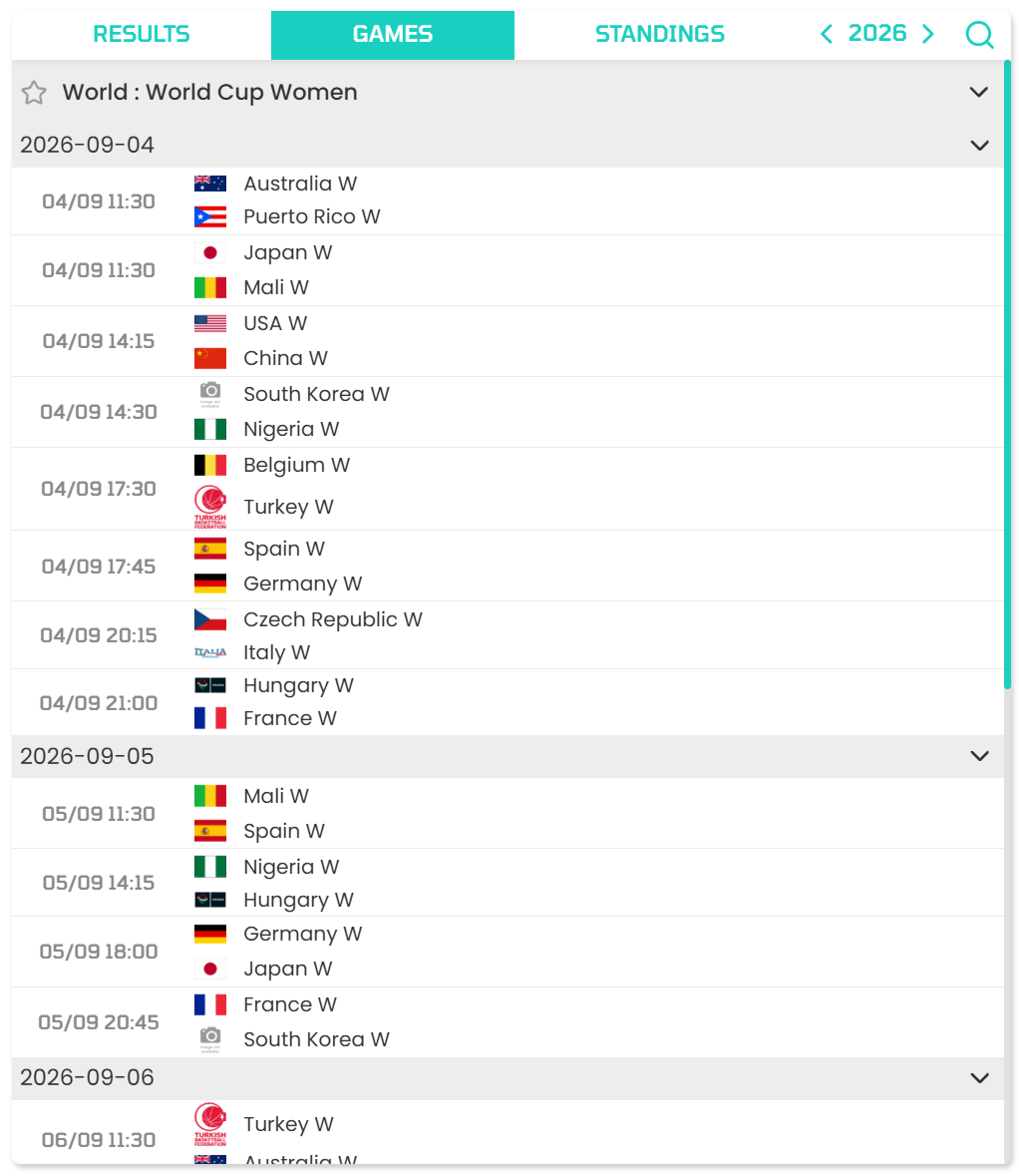 The configuration widget supplies the shared sport, league, season and display settings. The league and standings widgets then render the corresponding components on the page.
Widgets are useful for rapid integration, but direct API calls remain the better option when you need complete control over design, filtering, caching or business logic. Widget availability and output still depend on the coverage returned for the selected competition and season.
Remember that a browser-based widget exposes the API key in client-side code. Restrict the key to your authorized domains in the API-SPORTS dashboard. If the key must remain completely private, serve the data through a protected caching layer or proxy instead of exposing it directly to the browser.
Conclusion
The FIBA Women's Basketball World Cup 2026 is a strong example of how structured basketball data can support tournament coverage. With API-Basketball, developers and media teams can retrieve competition information, teams, games and standings to build tournament hubs, match centres, dashboards and editorial modules.
A reliable workflow is to identify the competition and season first, retrieve the teams and games, use standings during the group phase, and then choose between direct API integration and widgets according to the level of customization your project requires.
For further details, consult the API-Basketball documentation, the API-SPORTS widgets documentation and create a free account if you have not already done so.
The API-SPORTS Team