 API-FOOTBALL

Getting started with API-NFL is straightforward, even if this is your first time working with an API. This guide takes you from signup and authentication through every endpoint in the API, with practical use cases and common mistakes to avoid.
API-NFL covers both NFL and NCAA football. It provides quarter-by-quarter scores, historical games, conference and division standings, team and player statistics, injuries, and bookmaker odds through a consistent REST API.
A single API-SPORTS account and API key can be used across the sports APIs available in the dashboard. All you need to follow along is a free account. No credit card required. The API-NFL documentation contains the formal endpoint specifications. This guide explains how the pieces fit together.
What we'll cover
- Getting your API key in the dashboard
- Making your first call with cURL, Node.js and Python
- Testing without code with the Live Tester and Postman
- Understanding rate limits, errors, coverage flags and timezones
- Walking through every endpoint by purpose
- Building real applications without wasting requests
Getting your API key
To find your API key, go to Account → My Access in the left sidebar. That string of characters in the top-right corner is your api-key. Copy it and keep it somewhere safe, it goes into every request you make. If you ever suspect it's been exposed somewhere, you can regenerate it from the same page.
About the plans
The free tier gives you 100 requests per day and access to every endpoint and competition. The daily quota resets at 00:00 UTC, and unused requests do not roll over. The data access remains the same across the standard paid plans, but the official plans also differ by daily request volume, seats and per-minute limits.
| Plan | Price | Requests/day | Rate limit | Seats |
|---|---|---|---|---|
| FREE | $0 | 100 | 10/min | 1 |
| PRO | $15/month | 7,500 | 300/min | 1 |
| ULTRA | $25/month | 75,000 | 450/min | 2 |
| MEGA | $35/month | 150,000 | 900/min | 3 |
If you need more than 150,000 requests per day, custom plans are available for volumes of up to 1.5 million requests per day.
What's covered
Two competitions are available, both under the USA country: NFL and NCAA. Both include schedules, historical game data, game events, team and player game statistics, season player statistics, and standings. Injury coverage should be checked through coverage.injuries rather than assumed to be permanently available or unavailable for either competition. The /injuries endpoint returns only currently injured players and does not preserve injury history.
Making your first API call
The base URL for every request is https://v1.american-football.api-sports.io. Everything in this API is GET-only. Authentication happens through a single request header: x-apisports-key set to your API key.
One important detail: the API only allows the headers listed in the documentation, and x-apisports-key is the one you need. Some frameworks (especially in JS and Node.js) automatically add extra headers, you have to make sure to remove them in order to get a response from the API.
Let's make our first call. We'll request the NFL entry for the recent 2025 season so the example remains unambiguous in 2026.
cURL
curl --request GET
  --url 'https://v1.american-football.api-sports.io/leagues?id=1&season=2025'
  --header "x-apisports-key: YOUR_API_KEY_HERE"
Node.js 18+ (server-side)
const apiKey = process.env.API_SPORTS_KEY;

if (!apiKey) {
  throw new Error('Missing API_SPORTS_KEY environment variable');
}

const response = await fetch('https://v1.american-football.api-sports.io/leagues?id=1&season=2025', {
  method: 'GET',
  headers: {
    'x-apisports-key': apiKey,
  },
});

const data = await response.json();
console.log(data);
Keep this code on your server. Never embed an API key in browser JavaScript or a public repository.
Python
import requests

url = "https://v1.american-football.api-sports.io/leagues?id=1&season=2025"
headers = {
    "x-apisports-key": "YOUR_API_KEY_HERE"
}

response = requests.get(url, headers=headers)
print(response.json())
Here is an abridged response for the completed 2025 NFL season. Because this is a historical extract viewed in 2026, current is correctly set to false:
GET https://v1.american-football.api-sports.io/leagues?id=1&season=2025
"response": [
        {
            "league": {
                "id": 1,
                "name": "NFL",
                "logo": "https://media.api-sports.io/american-football/leagues/1.png"
            },
            "country": {
                "name": "USA",
                "code": "US",
                "flag": "https://media.api-sports.io/flags/us.svg"
            },
            "seasons": [
                {
                    "year": 2025,
                    "start": "2025-08-01",
                    "end": "2026-02-08",
                    "current": false,
                    "coverage": {
                        "games": {
                            "events": true,
                            "statisitcs": {
                                "teams": true,
                                "players": true
                            }
                        },
                        "statistics": {
                            "season": {
                                "players": true
                            }
                        },
                        "players": true,
                        "injuries": false,
                        "standings": true
                    }
                }
            ]
        }
    ]
}
Understanding the response structure
API-NFL responses share the same top-level fields. Their value types are not always identical across endpoints and outcomes: errors, for example, is an empty array on success but can be an object when an error occurs.
The get field echoes the endpoint path, parameters reports the filters applied, errors contains any API-level error, results gives the number of returned items, and response contains the data. Do not assume that parameters, errors or response always have the same type. Validate before parsing.
The pattern to internalize: check errors first, then read results to know how much came back, then drill into response for your data. Every endpoint, every time.
Checking your account from the API
There's one extra endpoint that doesn't appear in the endpoint list but is genuinely useful: status. Call it and you get your account details, your current subscription and your consumption for the day:
GET https://v1.american-football.api-sports.io/status
"response": {
        "account": {
            "firstname": "xxxxxxx",
            "lastname": "xxxxxx",
            "email": "xxxxxxxxx"
        },
        "subscription": {
            "plan": "xxx",
            "end": "xxxxxxxxxxxxxxxxxxxxxxx",
            "active": xxxx
        },
        "requests": {
            "current": xx,
            "limit_day": xxxxxx
        }
    }
}
This call does not count against the daily quota. Keep it server-side and restrict it to internal monitoring: the response includes the account holder's name and email address, subscription details and request consumption, so it must never feed a public page directly.
Testing endpoints without code
Before writing any application logic, spend time exploring endpoints interactively. This is one of the highest-leverage things you can do early on.
The Dashboard Live Tester
The fastest option is the Live API Tester built into your dashboard, available for the NFL API at dashboard.api-football.com/nfl/tester. No setup. No external tools. Select an endpoint from the list, fill in parameters using the form fields, and hit the call button. You get the full JSON response in your browser instantly.
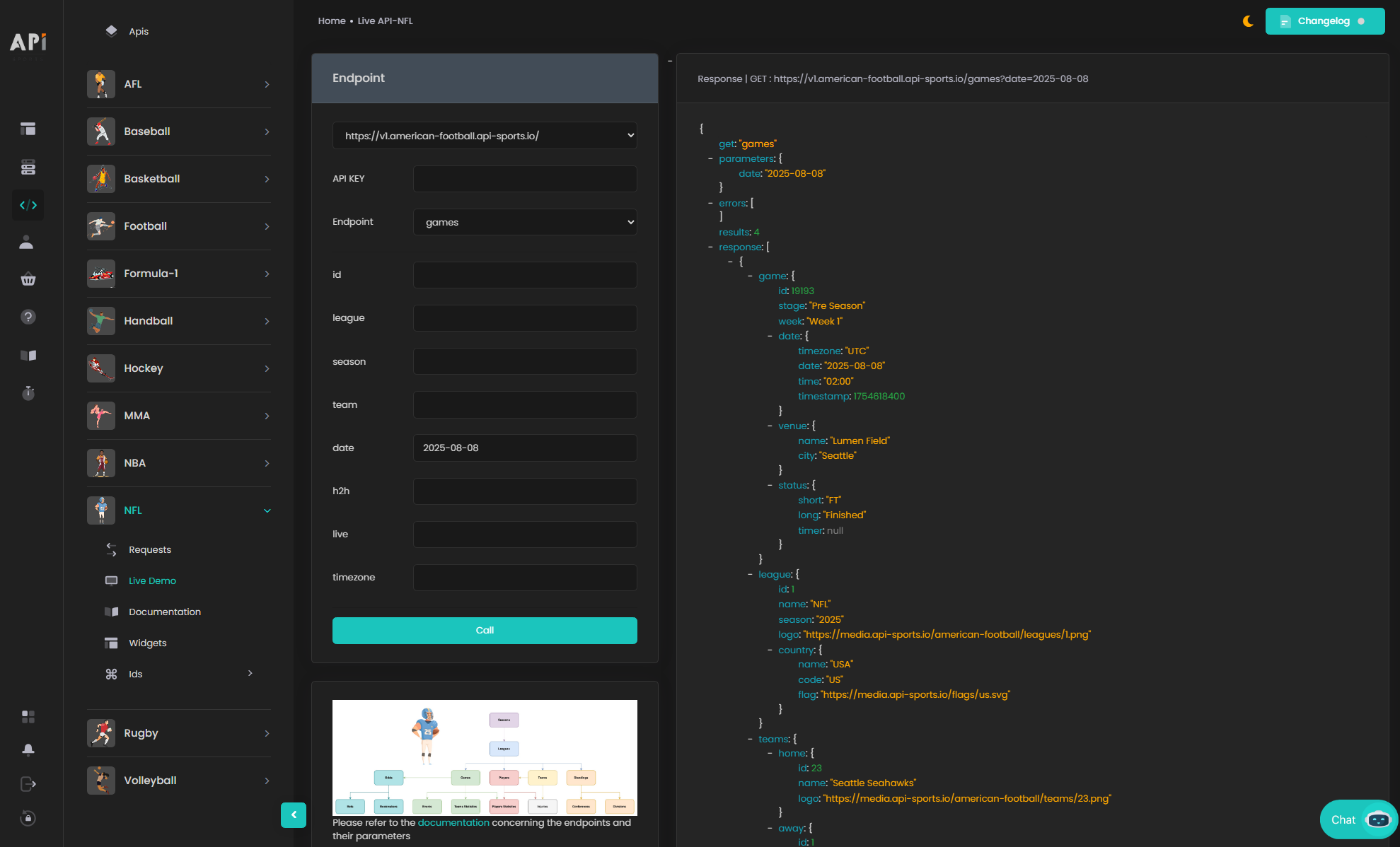 We strongly recommend spending real time here before writing your first integration. You'll see which fields are sometimes
 null, what a statistics group actually looks like, how parameter combinations interact, and which seasons have coverage. Understanding the response shapes before you start writing parsing logic saves hours of debugging later.
Postman
If you prefer a dedicated API client, Postman works perfectly. Create a new GET request, paste your full endpoint URL, go to the Headers tab and add x-apisports-key with your key as the value, then click Send. Postman lets you save requests into organized collections and quickly adjust parameters.
Remember the API header rule: keep your request clean and only send x-apisports-key. If Postman or your framework auto-adds headers that aren't allowed, you'll get an error from the API rather than data.
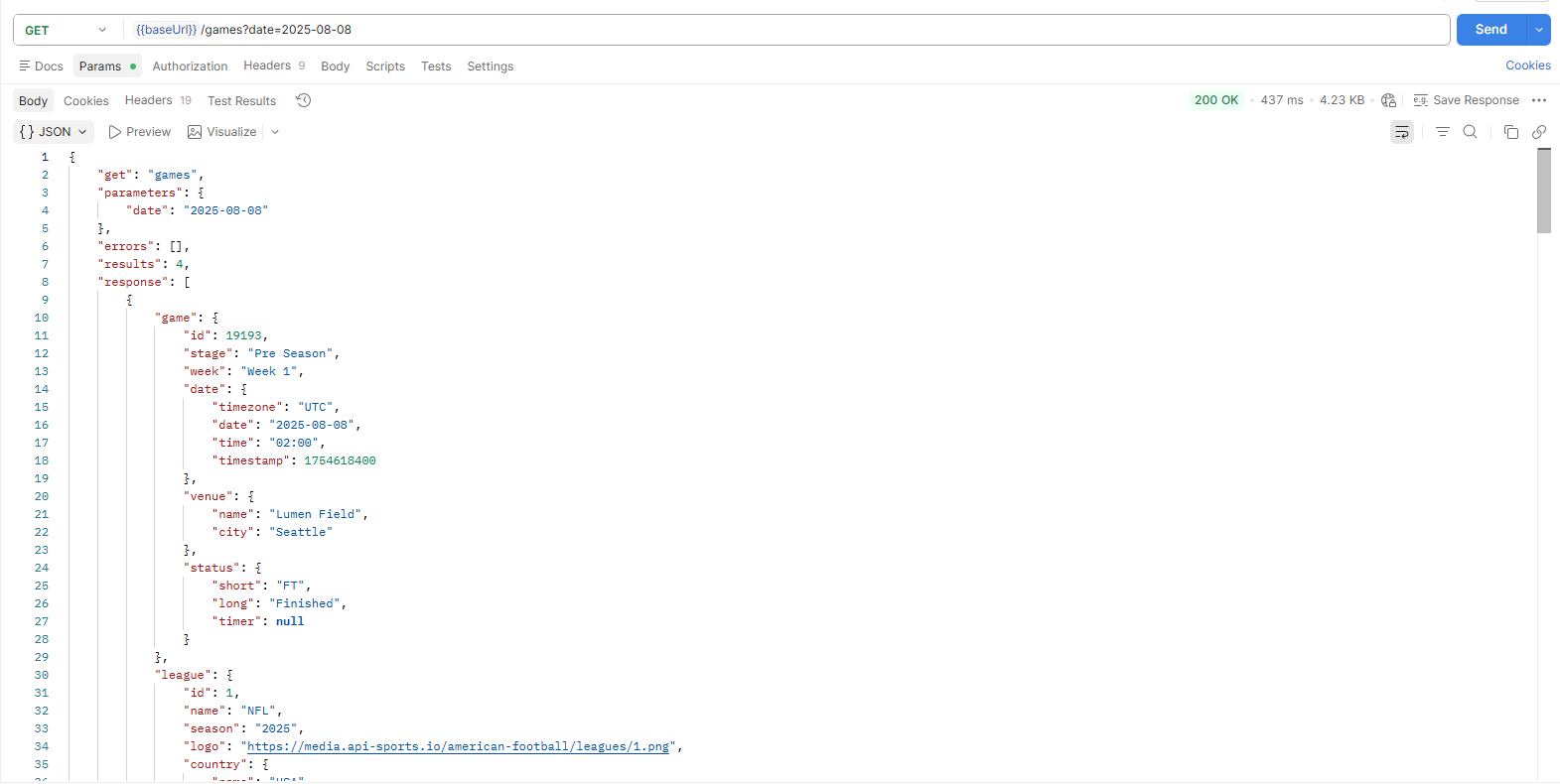 In either tool, focus on two things: results to know how many items came back, and errors to know if something went wrong.
Understanding how requests work
Rate limits
Your plan has two types of limits running simultaneously. The daily quota is the total number of requests you can make in a day, 100 on the free plan, up to 150 000 on Mega, resetting at 00:00 UTC. The per-minute cap is a ceiling on how fast you can fire requests, regardless of which plan you're on.
Both limits are reported in the response headers of every API call:
x-ratelimit-requests-limit: requests allocated per dayx-ratelimit-requests-remaining: requests remaining for the dayX-RateLimit-Limit: maximum calls per minuteX-RateLimit-Remaining: calls remaining in the current minute
In a server-side Node.js request, read these values directly from the response before parsing the body:
const dailyRemaining = response.headers.get('x-ratelimit-requests-remaining');
const minuteRemaining = response.headers.get('X-RateLimit-Remaining');

if (!response.ok) {
  const message = await response.text();
  throw new Error(`API-NFL ${response.status}: ${message}`);
}

console.log({ dailyRemaining, minuteRemaining });
Use the values for monitoring and throttling rather than displaying them publicly. They belong in application logs or an authenticated administration view, where they can guide alerts and prevent a burst of retries from exhausting the allowance. Build the habit of checking these headers, especially on the free plan, where those 100 daily requests disappear quickly during active development. Don't hammer the API, and don't retry failed requests in rapid succession.
Error codes
A 200 response can still contain zero results. This can happen because a filter is invalid, a parameter does not exist, or the requested data is legitimately unavailable.
The other documented status codes are:
403 Forbidden: the API-KEY is missing, mistyped429 Too Many Requests: slow down and retry with backoff500 Internal Server Error: retry once after a short wait, then report persistent failures
When something does go wrong, the errors object in the response body is more informative than the HTTP status code alone. Always log the full error message in development, it usually tells you exactly what the problem is.
Reading the coverage object before you build
/leagues returns, for every season of every competition, a coverage object. It's a set of boolean flags telling you exactly which data types exist for that league-season combination:
    {
                    "year": 2025,
                    "start": "2025-08-01",
                    "end": "2026-02-08",
                    "current": false,
                    "coverage": {
                        "games": {
                            "events": true,
                            "statisitcs": {
                                "teams": true,
                                "players": true
                            }
                        },
                        "statistics": {
                            "season": {
                                "players": true
                            }
                        },
                        "players": true,
                        "injuries": false,
                        "standings": true
                    }
Before calling any downstream endpoint, check the relevant flag first. The coverage object is your early-warning system, it tells you what the API can actually deliver before you make a single wasted call.
The timezone parameter
The /games endpoint accepts a timezone parameter. When you include it, the timestamps in the response are returned in the time zone of your choice. In case the timezone is not recognized, empty, or is not part of the timezone endpoint list, the UTC value will be applied by default.
The /timezone endpoint gives you the full list of 426 valid timezone strings. Always validate timezone strings against this list.
A practical implementation pattern is to detect the user's timezone in the browser with Intl.DateTimeFormat().resolvedOptions().timeZone, then send that string to your backend. The backend validates it against /timezone and makes the authenticated API-NFL request with the timezone parameter. This keeps the API key off the client while returning localized kickoff times.
Logos and images are free
Calls to team logos, league logos, player images and country flags do not count towards your daily quota and are provided for free. However these calls are subject to a rate per second and per minute, so it is recommended to save this data on your side in order not to slow down or impact the user experience of your application or website. Download them once, cache on your side, and serve from your own storage or a CDN such as Bunny. We even have a dedicated tutorial explaining how to set up your own media system with BunnyCDN: “Optimizing sports Websites: BunnyCDN & API-SPORTS Image Storage Guide”.
Complete endpoint walkthrough
Now let's walk through every endpoint, not as a spec sheet, but as a guided tour. We've grouped them by purpose so the relationships between endpoints make sense, and we'll explain each one as a real use case rather than a list of parameters.
Setting the stage: reference data
Before you can query anything interesting, you need IDs: league IDs, team IDs, season years. These first endpoints exist to give you that foundation. Think of them as bootstrap data, call them once, store the results, and refresh only occasionally. These calls still count toward your quota, but reference data changes infrequently and should not need frequent requests.
A good application architecture pattern is to load /timezone, /seasons, /leagues and the teams you need during setup, then refresh this reference data only when necessary.
/timezone: Purely reference data. It returns the list of timezones that can be used in the games endpoint, and requires no parameters at all. Call it once, store the strings locally, and use them to validate or populate a timezone picker in your UI.
/seasons: Returns the list of all available seasons for all competitions, as a flat array of integers. No parameters needed. All seasons are only 4-digit keys, so for a league whose season runs 2025-2026, the season in the API is 2025. All seasons can be used in other endpoints as filters. Use it to populate a season selector dropdown or to validate season values before passing them to other endpoints.
/leagues: This is where your real work starts. /leagues returns the list of all available competitions. The league id values are unique in the API and competitions keep them across all seasons, so NFL is always 1 and NCAA is always 2. You can safely hardcode those two once you've seen them. Each entry gives you the league (id, name, logo), the country (name, code, flag) and a seasons array. Each season carries its year, its start and end dates, a current boolean telling you whether it's the season in progress, and the coverage object we described above. Injury coverage can vary by league and season, so always check coverage.injuries for the relevant season in the /leagues response before relying on the /injuries endpoint.
You can filter by id or season, and use current=true to retrieve seasons in progress or current=false to retrieve non-current seasons.
GET https://v1.american-football.api-sports.io/leagues?current=true
Practically speaking, this is the call you make at application startup: it hands you the current season year and the coverage flags in one shot.
Remember that an API-NFL season is identified by the year in which it begins. Games played in January or February still belong to the previous year's season. For example, the playoffs played in early 2026 belong to season 2025. Querying /leagues?current=true is safer than deriving the season from the calendar year, especially around the playoffs and the transition to preseason.
/teams: Team profile data. One critical property of team IDs: they are unique in the API and teams keep them among all the competitions in which they participate. That makes team IDs your most stable long-term reference. Store them once and use them indefinitely. This endpoint requires at least one parameter. The most common pattern is league + season to get every team in a competition for a given year. You can also fetch a single team by id, filter by name or code, or search by name with search. Each profile can include the team's id, name, code, city, coach, owner, stadium, founding year, logo and country object.
The heart of the API: games
Everything in API-NFL ultimately connects back to games. A game ID is the master key that unlocks events, team statistics and player statistics for any specific matchup. This is the section worth reading slowly.
/games: This is the most important endpoint in the API, and the one you'll spend the most time with. One URL, countless use cases, the behavior changes entirely depending on which parameters you combine. It requires at least one of id, date, league, team, live or h2h.
Building a livescore feed: pass live=all and you get every game in progress, right now. This is your real-time heartbeat for a scoreboard app.
Building a schedule page: pass league + season for a full campaign, or add date (format YYYY-MM-DD) to narrow it down to a single day. Pass team to build a single franchise's schedule.
Building a rivalry page: pass h2h with two team IDs separated by a hyphen (h2h=2-3) and you get every historical meeting between those two teams.
Here's what a single game object gives you:
GET https://v1.american-football.api-sports.io/games?id=17377
"response": [
        {
            "game": {
                "id": 17377,
                "stage": "Regular Season",
                "week": "Week 4",
                "date": {
                    "timezone": "UTC",
                    "date": "2025-09-30",
                    "time": "00:15",
                    "timestamp": 1759191300
                },
                "venue": {
                    "name": "Empower Field at Mile High",
                    "city": "Denver"
                },
                "status": {
                    "short": "FT",
                    "long": "Finished",
                    "timer": null
                }
            },
            "league": {
                "id": 1,
                "name": "NFL",
                "season": "2025",
                "logo": "https://media.api-sports.io/american-football/leagues/1.png",
                "country": {
                    "name": "USA",
                    "code": "US",
                    "flag": "https://media.api-sports.io/flags/us.svg"
                }
            },
            "teams": {
                "home": {
                    "id": 28,
                    "name": "Denver Broncos",
                    "logo": "https://media.api-sports.io/american-football/teams/28.png"
                },
                "away": {
                    "id": 10,
                    "name": "Cincinnati Bengals",
                    "logo": "https://media.api-sports.io/american-football/teams/10.png"
                }
            },
            "scores": {
                "home": {
                    "quarter_1": 7,
                    "quarter_2": 14,
                    "quarter_3": 0,
                    "quarter_4": 7,
                    "overtime": null,
                    "total": 28
                },
                "away": {
                    "quarter_1": 3,
                    "quarter_2": 0,
                    "quarter_3": 0,
                    "quarter_4": 0,
                    "overtime": null,
                    "total": 3
                }
            }
        }
    ]
}
Three things to highlight here:
First, the score breakdown is per quarter. quarter_1 through quarter_4, plus overtime and total. You get a full box-score header for free in every games call, no extra endpoint needed. Before kickoff all of those are null, so guard your rendering logic.
Second, stage and week are how you organize the season. Group your fixture list by week and you have a matchday selector without any extra call.
Third, the status object drives your UI. The main values are:
NS: Not StartedQ1toQ4: First, Second, Third and Fourth QuarterHT: HalftimeOT: OvertimeFT: FinishedAOT: After Over TimeCANC: CancelledPST: Postponed
The documented update frequency for games is 30 seconds, which provides a sensible polling baseline. Polling faster than the documented update interval will usually consume requests without providing newer data.
/games/events: This is your scoring timeline endpoint. Pass the game id (required) and you get every scoring play in order.
GET https://v1.american-football.api-sports.io/games/events?id=17377
"response": [
        {
            "quarter": "First",
            "minute": "9:08",
            "team": {
                "id": 10,
                "name": "Cincinnati Bengals",
                "logo": "https://media.api-sports.io/american-football/teams/10.png"
            },
            "player": {
                "id": 747,
                "name": "Evan McPherson",
                "image": "https://media.api-sports.io/american-football/players/747.png"
            },
            "type": "FG",
            "comment": "Evan McPherson 26 Yd Field Goal",
            "score": {
                "home": 0,
                "away": 3
            }
        },
 ...
Call it when you detect a score change in your main /games poll to build score notifications or a live scoring timeline.
/games/statistics/teams: Once a game is underway or completed, pass its id to retrieve the team box score. The response covers:
- First downs (total, passing, rushing, from penalties, third down efficiency, fourth down efficiency)
- Plays
- Yards (total, yards per play, total drives)
- Passing (total, comp att, yards per pass, interceptions thrown, sacks yards lost)
- Rushings (total, attempts, yards per rush)
- Red zone
- Penalties
- Turnovers (total, lost fumbles, interceptions)
- Posession
- Interceptions
- Fumbles recovered
- Sacks
- Safeties
- Int touchdowns
- Points against
Add a team id if you only need one side.
/games/statistics/players: If events tell you what happened, this endpoint tells you who did it. Pass a game id (required) and you get individual statistics for the players who appeared.
Statistics are grouped by role, including:
- Defensive
- Fumbles
- Interceptions
- Kick returns
- Kicking
- Passing
- Punt returns
- Punting
- Receiving
- Rushing
You can narrow the response with group, a team id or a player id. For example, group=passing produces a smaller response for a quarterback comparison and reduces parsing work, but it still counts as one API request.
Players and season statistics
/players: The /players endpoint gives you player profiles. Player id values are unique in the API and are kept across all the competitions in which they participate, so once you've resolved a player you can store their id forever. This endpoint requires at least one parameter: id, name, team, season, or search.
GET https://v1.american-football.api-sports.io/players?id=686
 "response": [
        {
            "id": 686,
            "name": "Joe Mixon",
            "age": 29,
            "height": "6' 1"",
            "weight": "220 lbs",
            "college": "Oklahoma",
            "group": "Injured Reserve Or O",
            "position": "RB",
            "number": 28,
            "salary": "-",
            "experience": 9,
            "image": "https://media.api-sports.io/american-football/players/686.png"
        }
    ]
}
/players/statistics: Where /players gives you the profile, /players/statistics gives you the season performance. This endpoint requires at least two parameters: season, plus either player id or team. Season statistics are grouped into defense, kicking, passing, punting, receiving, returning, rushing and scoring.
Two things to plan around. Data for this endpoint starts from the 2022 season, so don't build a career-long statistical history expecting 2015 numbers. And note the teams array in the response: a player traded mid-season gets one block per team, so if you want combined totals you sum them yourself. Some values legitimately come back null, and the API's spelling is what you must match if you're looking up statistics by name.
/injuries: Pass a player id or team id to retrieve the current injury report, including player, team, report date, status and description. Check coverage.injuries in the /leagues response before building an injury feature for a season.
Standings
/standings: Pass league and season and you get the table. Optionally narrow it with team, conference or division.
Each entry includes the conference, division, position, team, wins, losses, ties, points for and against, streak, and home, road, conference, and division records. For NCAA standings, the ncaa_conference object also provides the team’s conference record, including wins, losses, and points for and against.
The important structural insight: the response is a flat array of teams, not a nested set of tables. A full NFL season returns 32 entries in one call, each tagged with its conference and division. You group them client-side by conference then division to draw the eight divisional tables, or sort by points.difference for a power-ranking view. One request, every view you want.
GET https://v1.american-football.api-sports.io/standings?league=1&season=2025
 "response": [
        {
            "league": {
                "id": 1,
                "name": "NFL",
                "season": 2025,
                "logo": "https://media.api-sports.io/american-football/leagues/1.png",
                "country": {
                    "name": "USA",
                    "code": "US",
                    "flag": "https://media.api-sports.io/flags/us.svg"
                }
            },
            "conference": "American Football Conference",
            "division": "AFC East",
            "position": 1,
            "team": {
                "id": 3,
                "name": "New England Patriots",
                "logo": "https://media.api-sports.io/american-football/teams/3.png"
            },
            "won": 14,
            "lost": 3,
            "ties": 0,
            "points": {
                "for": 490,
                "against": 320,
                "difference": 170
            },
            "records": {
                "home": "6-3",
                "road": "8-0",
                "conference": "9-3",
                "division": "5-1"
            },
            "streak": "W3",
            "ncaa_conference": {
                "won": null,
                "lost": null,
                "points": {
                    "for": null,
                    "against": null
                }
            }
        },
 ...
/standings/conferences: Returns the list of available conferences for a competition, to be used as the conference filter in /standings. Requires league and season. For the NFL, this returns the two conferences. NCAA returns a longer season-specific list. The response is a plain array of strings, which makes it perfect for populating a dropdown. Never hardcode these, conference membership in college football changes from year to year, and this endpoint always reflects the season you asked for.
/standings/divisions: Same idea for divisions. It requires league and season and returns a plain array of division names. Cache both of these alongside your other reference data and use them to build your standings filters.
Odds
/odds: The /odds endpoint returns pre-match bookmaker odds. It requires a game id, and you can narrow the response with an optional bookmaker id or bet id. Three timing rules define everything about this endpoint. Pre-match odds are provided between 1 and 7 days before the game. A 7-day history is kept, and the availability of odds may vary according to the games, seasons and bookmakers. And odds are updated four times a day.
The update field is the one to key your storage on: it tells you when that snapshot was produced, which is what lets you detect real line movement instead of re-storing identical data four times a day.
/odds/bets: Pure reference data, and you can call it without any parameters to get the complete list. It returns every available bet type with its id and name, and all bets id can be used in the odds endpoint as filters. You can also look one up by id or by search. The catalogue covers common moneyline, handicap, total, touchdown and quarter or half markets.
/odds/bookmakers: The parallel reference endpoint for bookmakers. Again, callable with no parameters for the full list, or filtered by id or search. It returns id and name for each, and all bookmaker id values can be used in the odds endpoint as filters.
Endpoint quick reference
| Endpoint | Main purpose | Typical refresh |
|---|---|---|
/timezone |
Valid timezone strings | Rarely |
/seasons |
Available season years | When a season is added |
/leagues |
League IDs, seasons and coverage | Daily or at startup |
/teams |
Team profiles | Daily |
/games |
Schedule, live scores and results | 30 seconds when live |
/games/events |
Scoring timeline | 30 seconds when live |
/games/statistics/teams |
Team box score | 30 seconds when live |
/games/statistics/players |
Per-game player stats | 30 seconds when live or once after FT/AOT |
/players |
Player profiles | Daily |
/players/statistics |
Season player stats | Daily, available from 2022 |
/injuries |
Current NFL injuries | Hourly, no history |
/standings |
League standings | Hourly |
/standings/conferences |
Conference filter values | Per league-season |
/standings/divisions |
Division filter values | Per league-season |
/odds |
Pre-match odds | Four times a day |
/odds/bets |
Bet type IDs | Rarely |
/odds/bookmakers |
Bookmaker IDs | Rarely |
Putting it all together: three workflows
Workflow 1: Building a livescore app
- Call
/leagues?current=trueto resolve the current season and coverage. - Load the day's slate with
/games?league=1&season=SEASON&date=TODAY&timezone=USER_TIMEZONE. - During games, poll
/games?live=allevery 30 to 60 seconds. - When a score changes, call
/games/events?id=GAME_IDfor the scoring event. - Add
/games/statistics/teams?id=GAME_IDfor live team stats, then call/games/statistics/players?id=GAME_IDonce afterFTorAOTif you need player lines.
Polling every 30 seconds for three hours uses 360 requests, so the free plan's 100 daily requests cannot support this live workflow. Centralize polling on your server and reuse each result for all visitors.
Workflow 2: A game preview page
- Find tomorrow's games with
/games?league=1&season=SEASON&date=TOMORROW. - Add previous meetings with
/games?h2h=HOME_ID-AWAY_ID. - Use
/standings?league=1&season=SEASONfor records, streaks and home/road splits. - Query
/injuriesfor each team. - Request only the bookmaker and bet market you display from
/odds. The filters reduce payload size, but each call still consumes one request.
Workflow 3: A player profile page
Resolve the player with /players?search=Carr, then use /players?id=PLAYER_ID for the profile, /players/statistics?id=PLAYER_ID&season=SEASON for season totals and /injuries?player=PLAYER_ID for current availability. For game-by-game trends, collect /games/statistics/players?id=GAME_ID&player=PLAYER_ID after each completed game.
Practical tips for building with API-NFL
- Test realistic responses first: Use the Live Tester with the league, season and game types your product will actually support. Inspect null values, nesting and coverage before writing parsing logic or generating rigid types. This is especially useful for NCAA teams, where some profile and venue fields may be unavailable.
- Keep the key on the server: Browser code should call your own backend, never API-NFL directly with a secret. The same rule applies when the frontend sends a timezone, team selection or date: those values are inputs to a server-side API request, not a reason to expose the key.
- Handle every game state: Treat
FTandAOTas finished, andQ1,Q2,Q3,Q4,HTandOTas live. KeepPSTandCANCvisible with a distinct label instead of silently removing those games from a schedule. - Check coverage before calling downstream endpoints: The
/leaguesresponse tells you whether events, game statistics, player statistics, injuries and standings exist for a league-season. - Preserve data with limited history: Injuries have no historical archive and odds retain seven days. If your product needs week-by-week availability or line movement, schedule snapshots from the beginning; the missing history cannot be recreated later from the API.
- Monitor limit headers and back off on
429: Read the remaining daily and per-minute values, slow the request queue before either reaches zero, and retry transient failures with progressive backoff instead of an immediate loop. - Test during a real game: Live status changes, timers, quarter totals and scoring events are easiest to validate while games are in progress. A controlled test during an NFL Sunday or an NCAA Saturday will reveal timing and state-transition bugs that completed-game fixtures cannot reproduce.
Conclusion
You now have the complete path from account creation to every API-NFL endpoint. The API follows a natural hierarchy: league → season → game → data type. Start with /leagues for IDs, seasons and coverage, then use the game id to retrieve events and team or player statistics.
Pick one concrete use case, such as a scoreboard, standings table, quarterback comparison or team schedule, and validate it on the free plan. Use the Live Tester to confirm response shapes, check coverage before adding features, and upgrade when your measured request volume requires it.
If you need guidance at any point, you can reach the API-SPORTS support team directly through the chat in your dashboard.
The API-SPORTS Team