 API-FOOTBALL
The 2026-2027 NBA calendar begins with preseason games on October 3, 2026, before the regular season tips off on October 20. With 30 teams competing through April 11, 2027, the season provides months of schedules, live scores, standings updates, and team and player statistics. That is exactly what we are going to explore with API-NBA.
In this guide, we will show you how to retrieve the season schedule, track games live, display standings, and work with team and player statistics. You will need an API-NBA account and a basic understanding of REST APIs. The examples use Node.js with Axios, but all endpoints use the HTTP GET method, so the same requests can be made with Python, PHP, Ruby, or cURL.
Season format and schedule
The regular season runs from October 20 to April 11, with each of the 30 teams playing 82 games. The top six teams in each conference qualify directly for the playoffs, while teams ranked seventh through tenth compete in the Play-In Tournament for the final two playoff places in each conference.
Here are the main dates:
- October 3-16: NBA Preseason
- October 20-April 11: NBA Regular Season
- October 30-November 27: Emirates NBA Cup Group Play
- December 4-11: Emirates NBA Cup Knockout Rounds
- February 19-21: NBA All-Star 2027 in Phoenix
- April 13-16: NBA Play-In Tournament
The NBA Cup takes place within the regular season, with every game except the Championship counting as a regular-season game. NBA All-Star 2027 is a separate midseason event and does not affect regular-season records. After the Play-In Tournament, eight teams from each conference advance to the playoffs, which culminate in the NBA Finals.
Conferences and divisions in detail
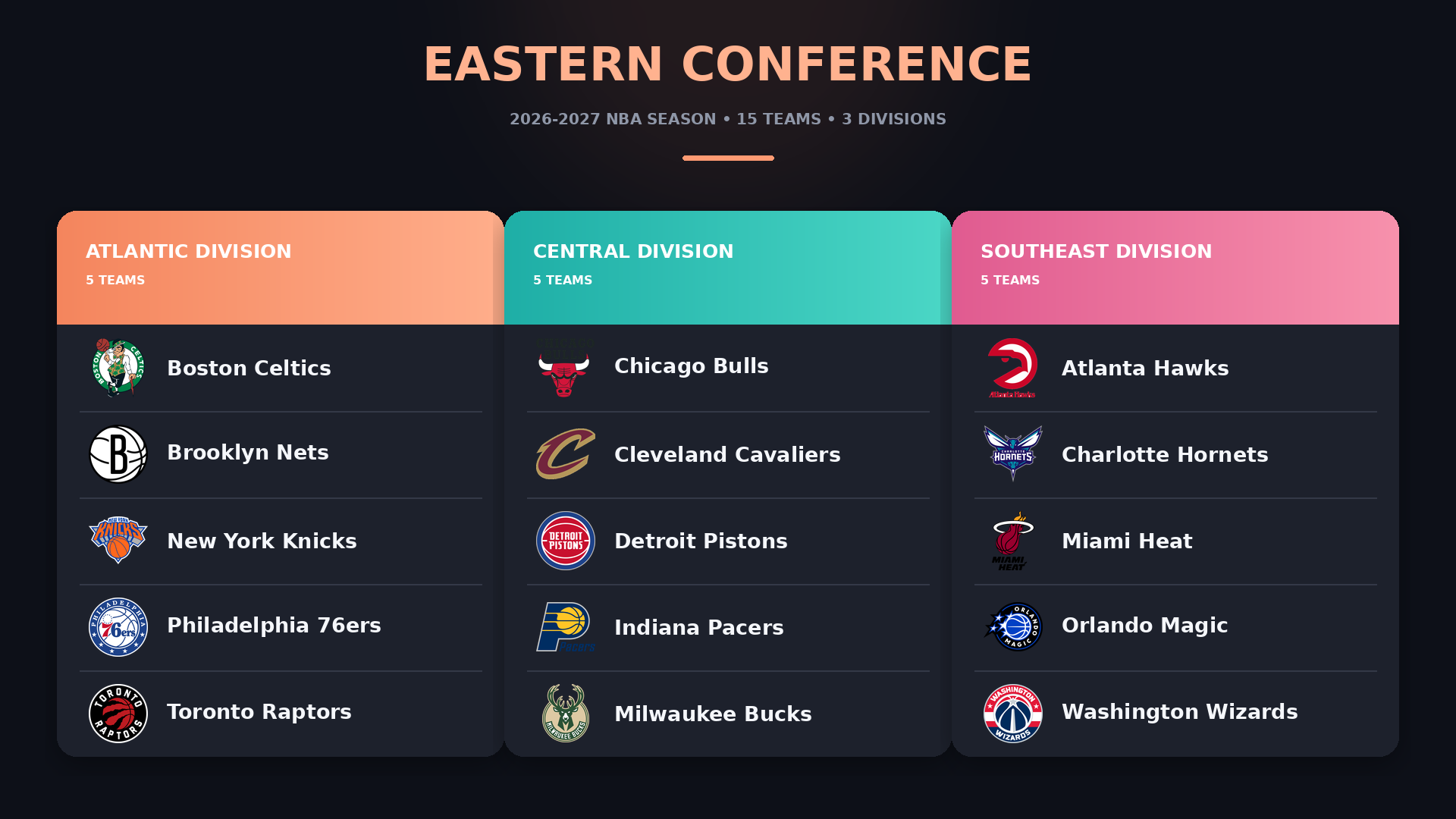
The NBA’s 30 teams are divided equally between the Eastern and Western Conferences, with 15 teams in each. Every conference contains three divisions of five teams.
The Eastern Conference consists of the Atlantic, Central and Southeast Divisions:
 The Western Conference consists of the Northwest, Pacific and Southwest Divisions:
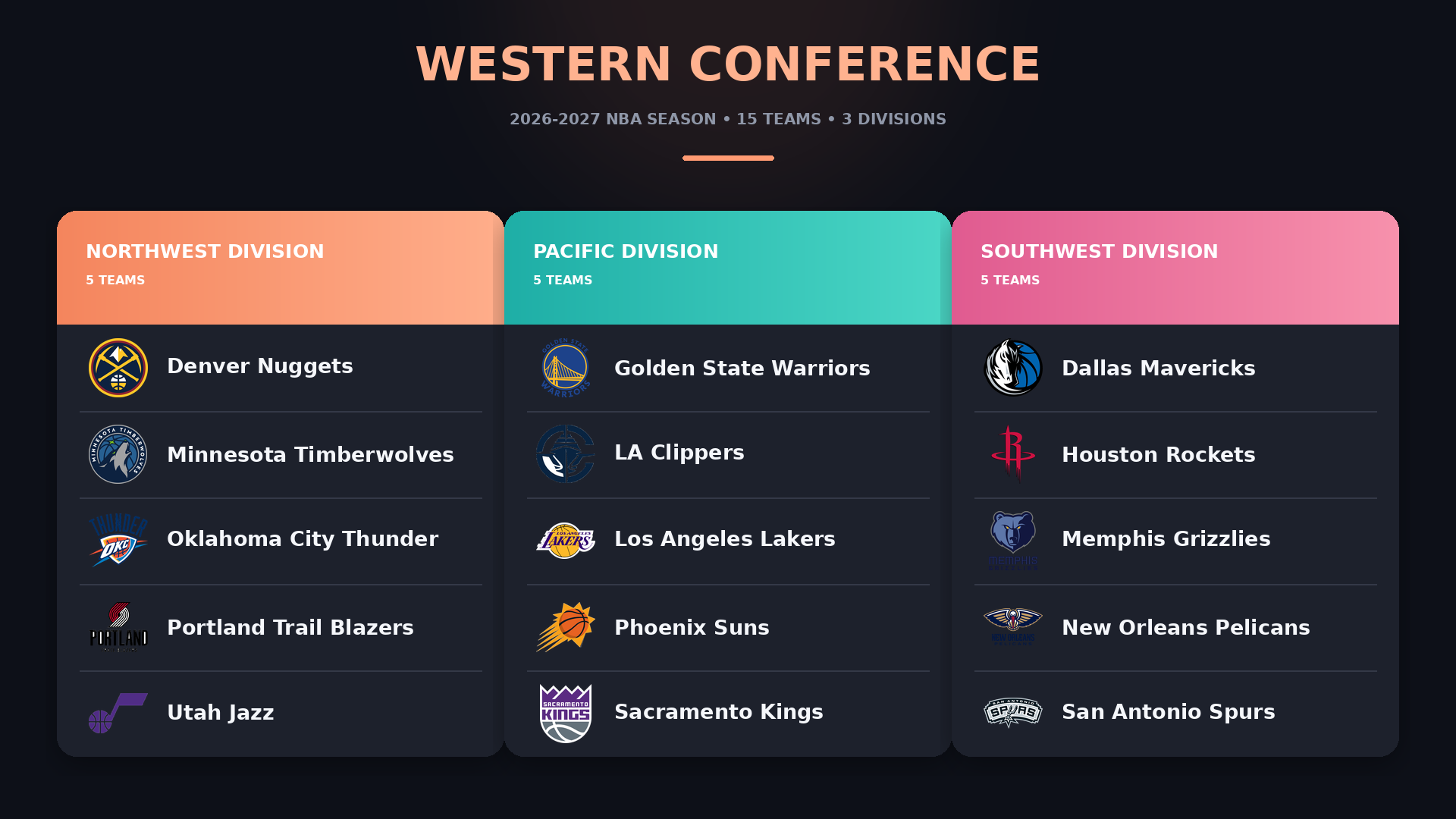 Conference standings determine which teams qualify directly for the playoffs and which enter the Play-In Tournament. Divisions provide an additional way to organize and compare teams throughout the season.
30 teams across the United States and Canada
The NBA consists of 30 teams spread across North America. Twenty-nine are based in the United States, while the Toronto Raptors are the league’s only Canadian team.
Although most games are played in the teams’ regular home arenas, the 2026-2027 schedule also extends beyond the United States and Canada. The Denver Nuggets and Indiana Pacers will meet in Mexico City on November 7, while the New Orleans Pelicans and San Antonio Spurs will play in Paris on January 14 and Manchester on January 17.
Venue information can therefore vary from one game to another. In API-NBA, each game can include an arena object containing its name, city, state and country, allowing applications to display the actual location rather than assuming that every team plays at its usual home arena.
{
  "arena": {
    "name": "ARENA_NAME",
    "city": "CITY",
    "state": "STATE",
    "country": "COUNTRY"
  }
}
Some arena fields can be null, so your application should handle missing location information.
Using the 2026-2027 NBA season with API-NBA
The two main values to keep in mind throughout this guide are league=standard and season=2026. They identify the main NBA competition and the season covered in this article. Both values are used for games and standings, while the season value is also reused for team and player statistics.
Before building your application around these values, call /leagues and /seasons to confirm that they are available. API-NBA uses league names rather than numeric competition IDs, while seasons are represented by four-digit YYYY values.
While waiting for the 2026-2027 season to begin, you can use a completed or active season returned by /seasons to test your integration. For example, the following request retrieves games from season 2025:
GET https://v2.nba.api-sports.io/games?league=standard&season=2025
Once the new season begins, simply change the season value to 2026.
The /games?league=standard&season=2026 endpoint then becomes the starting point for the integration. Its response provides game IDs, dates, statuses, arenas and participating teams that can be used in subsequent requests. Test the endpoints required by your project with a real league-season combination, and make your application handle empty responses and null fields.
Setting up your season database
Although this article focuses on the 2026-2027 season, the following examples use season=2025, which already provides populated responses for testing. Replace it with 2026 once the new season begins.
Start by retrieving the games associated with the main NBA competition and season:
GET https://v2.nba.api-sports.io/games?league=standard&season=2025
The response can include games from different stages of the season, each identified by a unique id. Every game object contains its league, season, dates, stage, status, periods, arena, participating teams and scores, along with additional information such as officials, ties and lead changes when available.
Store each game id, as it is required to retrieve team statistics and can also be used to request player statistics for that matchup. Do not infer a game’s state from date.end, scores or other nullable fields. Use status.short:
1- Not started2- Live3- Finished4- Postponed5- Delayed6- Canceled
{
  "response": [
    {
      "id": "GAME_ID",
      "league": "LEAGUE",
      "season": "SEASON",
      "date": {
        "start": "START_DATE",
        "end": "END_DATE",
        "duration": "DURATION"
      },
      "stage": "STAGE",
      "status": {
        "short": "STATUS_CODE",
        "long": "STATUS"
      },
      "arena": {
        "name": "ARENA_NAME",
        "city": "CITY",
        "state": "STATE",
        "country": "COUNTRY"
      },
      "teams": {
        "visitors": {
          "id": "VISITORS_TEAM_ID",
          "name": "VISITORS_TEAM"
        },
        "home": {
          "id": "HOME_TEAM_ID",
          "name": "HOME_TEAM"
        }
      },
      "scores": {
        "visitors": {
          "points": "VISITORS_POINTS"
        },
        "home": {
          "points": "HOME_POINTS"
        }
      }
    }
  ]
}
Some values can be null or empty, and quarter scores inside linescore are returned as strings. Your database and parsing logic should handle these response types exactly as returned.
Endpoints overview
The endpoints below provide the building blocks for a schedule, live scoreboard, standings table, team comparison or player statistics page. The examples continue to use season=2025 so they return populated data while the 2026-2027 season is still approaching.
To retrieve every game associated with the season:
GET https://v2.nba.api-sports.io/games?league=standard&season=2025
Add date to retrieve the games scheduled on a particular day:
GET https://v2.nba.api-sports.io/games?league=standard&season=2025&date=2025-10-04
For games currently in progress, use:
GET https://v2.nba.api-sports.io/games?live=all
The status.short value indicates whether a game has not started, is live, has finished or is affected by another condition. Use the game id to retrieve one specific matchup:
GET https://v2.nba.api-sports.io/games?id=15465
Previous meetings between two teams are available through the h2h filter:
GET https://v2.nba.api-sports.io/games?h2h=28-17
To retrieve the team statistics for a game:
GET https://v2.nba.api-sports.io/games/statistics?id=15465
"response": [
        {
            "team": {
                "id": 17,
                "name": "Los Angeles Lakers",
                "nickname": "Lakers",
                "code": "LAL",
                "logo": "https://upload.wikimedia.org/wikipedia/commons/3/3c/Los_Angeles_Lakers_logo.svg"
            },
            "statistics": [
                {
                    "fastBreakPoints": null,
                    "pointsInPaint": null,
                    "biggestLead": null,
                    "secondChancePoints": null,
                    "pointsOffTurnovers": null,
                    "longestRun": null,
                    "points": 81,
                    "fgm": 23,
                    "fga": 74,
                    "fgp": "31",
                    "ftm": 29,
                    "fta": 37,
                    "ftp": "78",
                    "tpm": 6,
                    "tpa": 35,
                    "tpp": "17",
                    "offReb": 11,
                    "defReb": 35,
                    "totReb": 46,
                    "assists": 10,
                    "pFouls": 25,
                    "steals": 9,
                    "turnovers": 22,
                    "blocks": 7,
                    "plusMinus": "-22",
                    "min": "240:00"
                }
            ]
        },
...
This response contains one statistical entry for each team, including shooting, rebounds, assists, steals, turnovers, blocks, fouls and other game-level metrics.
Season standings require both the league and season:
GET https://v2.nba.api-sports.io/standings?league=standard&season=2025
"response": [
        {
            "league": "standard",
            "season": 2025,
            "team": {
                "id": 2,
                "name": "Boston Celtics",
                "nickname": "Celtics",
                "code": "BOS",
                "logo": "https://upload.wikimedia.org/wikipedia/en/8/8f/Boston_Celtics.svg"
            },
            "conference": {
                "name": "east",
                "rank": 2,
                "win": 0,
                "loss": 0
            },
            "division": {
                "name": "atlantic",
                "rank": 1,
                "win": 0,
                "loss": 0,
                "gamesBehind": null
            },
            "win": {
                "home": 30,
                "away": 26,
                "total": 0,
                "percentage": "0.000",
                "lastTen": 8
            },
            "loss": {
                "home": 11,
                "away": 15,
                "total": 0,
                "percentage": "0.000",
                "lastTen": 2
            },
    ...
The response contains conference and division rankings, home and away records, winning percentages, last-ten records, games behind and current streak information. Add team, conference or division when you only need part of the standings.
Team profiles can be retrieved with:
GET https://v2.nba.api-sports.io/teams?league=standard
For the overall statistics of one team during a season:
GET https://v2.nba.api-sports.io/teams/statistics?id=2&season=2025
The optional stage parameter can be used when statistics need to be limited to a particular stage.
Retrieve the players associated with a team and season using:
GET https://v2.nba.api-sports.io/players?season=2025&team=2
To retrieve every available player line for a particular game:
GET https://v2.nba.api-sports.io/players/statistics?game=15465
For one player’s game-by-game statistics during the season:
GET https://v2.nba.api-sports.io/players/statistics?id=897&season=2025
Together, these endpoints provide everything needed to build schedules, live scoreboards, standings tables, team comparisons and detailed player performance pages for the NBA season.
Code examples
The following examples use Node.js with Axios. The first example retrieves every game currently available for league=standard and season=2025. Replace 2025 with 2026 once the new season begins:
const axios = require('axios');

const API_KEY = 'YOUR_API_KEY_HERE';
const BASE_URL = 'https://v2.nba.api-sports.io';

async function getSeasonSchedule() {
  try {
    const response = await axios.get(`${BASE_URL}/games`, {
      params: {
        league: 'standard',
        season: 2025
      },
      headers: {
        'x-apisports-key': API_KEY
      }
    });

    const games = response.data.response;

    console.log(`${games.length} games found`);

    games.forEach((game) => {
      const start = new Date(game.date.start).toLocaleString('en-US', {
        dateStyle: 'medium',
        timeStyle: 'short',
        timeZone: 'UTC'
      });

      const visitorsScore = game.scores.visitors.points ?? '-';
      const homeScore = game.scores.home.points ?? '-';
      const arena = game.arena?.name ?? 'Arena unavailable';

      console.log(`${start} UTC`);
      console.log(
        `${game.teams.visitors.name} ${visitorsScore} - ` +
        `${homeScore} ${game.teams.home.name}`
      );
      console.log(`Status: ${game.status.long}`);
      console.log(`Arena: ${arena}`);
      console.log('---');
    });
  } catch (error) {
    console.error(
      'Unable to retrieve the schedule:',
      error.response?.data || error.message
    );
  }
}

getSeasonSchedule();
The second example retrieves games currently in progress:
const axios = require('axios');

const API_KEY = 'YOUR_API_KEY_HERE';
const BASE_URL = 'https://v2.nba.api-sports.io';

async function getLiveGames() {
  try {
    const response = await axios.get(`${BASE_URL}/games`, {
      params: {
        live: 'all'
      },
      headers: {
        'x-apisports-key': API_KEY
      }
    });

    const games = response.data.response;

    if (games.length === 0) {
      console.log('No NBA games are currently live.');
      return;
    }

    console.log(`${games.length} live game(s)`);

    games.forEach((game) => {
      const visitorsScore = game.scores.visitors.points ?? 0;
      const homeScore = game.scores.home.points ?? 0;
      const period = game.periods.current ?? 0;
      const clock = game.status.clock ?? 'Clock unavailable';

      console.log(
        `${game.teams.visitors.name} ${visitorsScore} - ` +
        `${homeScore} ${game.teams.home.name}`
      );
      console.log(`Period: ${period} | Clock: ${clock}`);
      console.log('---');
    });
  } catch (error) {
    console.error(
      'Unable to retrieve live games:',
      error.response?.data || error.message
    );
  }
}

getLiveGames();
To keep a scoreboard updated, run the live request on a controlled server-side interval that matches your available request quota. Cache each response and share it with every connected user instead of allowing each browser or mobile client to call API-NBA independently.
Conclusion
The 2026-2027 NBA season will provide months of games, live scores, standings, and team and player statistics to follow. With API-NBA, you have the endpoints required to build a season schedule, live scoreboard, standings table, team comparison or player statistics page.
You can begin developing and validating your integration with season=2025, then switch to season=2026 once the new season begins. Check the API-NBA documentation for the complete list of endpoints, parameters and response structures.
If you have not already joined API-SPORTS, create your free API-NBA account and start testing your requests with the Live Tester.
The API-SPORTS Team