 API-FOOTBALL

The FIFA World Cup 2026 group stage is now complete. Across the opening phase of the tournament, each match produced more than just a final score: goals, cards, substitutions, lineups, team statistics and individual player performances all help explain how each result happened.
For sports apps or match centers, this is where a simple recap can become much more valuable. A group stage page can first show the full list of results, then let users open detailed match reports for every fixture.
With API-Football, this workflow can be built around the /fixtures endpoint. First, you retrieve the fixtures and scores from the group stage. Then, using the ids= parameter, you can request enriched fixture data including lineups, events, statistics and players in a single call.
1- FIFA World Cup 2026 group stage recap
The group stage is the first major data moment of the tournament. It gives fans the full picture of the opening round: which teams won, which matches changed the standings, and which fixtures shaped the qualification race.
Below is a quick recap of the FIFA World Cup 2026 group stage outcomes:
Group A
- Qualified: Mexico, South Africa
- Eliminated: Korea Republic, Czechia
Group B
- Qualified: Switzerland, Canada, Bosnia & Herzegovina
- Eliminated: Qatar
Group C
- Qualified: Brazil, Morocco
- Eliminated: Scotland, Haiti
Group D
- Qualified: USA, Australia, Paraguay
- Eliminated: Türkiye
Group E
- Qualified: Germany, Ivory Coast, Ecuador
- Eliminated: Curaçao
Group F
- Qualified: Netherlands, Japan, Sweden
- Eliminated: Tunisia
Group G
- Qualified: Belgium, Egypt
- Eliminated: Iran, New Zealand
Group H
- Qualified: Spain, Cabo Verde
- Eliminated: Uruguay, Saudi Arabia
Group I
- Qualified: France, Norway, Senegal
- Eliminated: Iraq
Group J
- Qualified: Argentina, Austria, Algeria
- Eliminated: Jordan
Group K
- Qualified: Colombia, Portugal, DR Congo
- Eliminated: Uzbekistan
Group L
- Qualified: England, Croatia, Ghana
- Eliminated: Panama
This section focuses only on which teams advanced and which teams were eliminated. Detailed standings, scores and match data can then be retrieved through API-Football.
2- Retrieving the fixture IDs for the group stage
First, you need the IDs of the fixtures you want to cover. That is the role of /fixtures, combined with the league, season, from and to parameters.
For example, to retrieve World Cup fixtures across the group stage period:
GET https://v3.football.api-sports.io/fixtures?league=1&season=2026&from=2026-06-11&to=2026-06-28
 "response": [
        {
            "fixture": {
                "id": 1489369,
                "referee": "Wilton Pereira Sampaio, Brazil",
                "timezone": "UTC",
                "date": "2026-06-11T19:00:00+00:00",
                "timestamp": 1781204400,
                "periods": {
                    "first": 1781204400,
                    "second": 1781208000
                },
                "venue": {
                    "id": 1069,
                    "name": "Estadio Azteca",
                    "city": "Mexico City"
                },
                "status": {
                    "long": "Match Finished",
                    "short": "FT",
                    "elapsed": 90,
                    "extra": 8
                }
            },
            "league": {
                "id": 1,
                "name": "World Cup",
                "country": "World",
                "logo": "https://media.api-sports.io/football/leagues/1.png",
                "flag": null,
                "season": 2026,
                "round": "Group Stage - 1",
                "standings": true
            },
            "teams": {
                "home": {
                    "id": 16,
                    "name": "Mexico",
                    "logo": "https://media.api-sports.io/football/teams/16.png",
                    "winner": true
                },
                "away": {
                    "id": 1531,
                    "name": "South Africa",
                    "logo": "https://media.api-sports.io/football/teams/1531.png",
                    "winner": false
                }
            },
   ...
The response returns the fixtures available in the selected period. For a group stage recap, the main fields are already enough to display the essential information: teams, score, match status, venue, date and round. Using from and to makes the workflow more efficient for tournament coverage: instead of requesting fixtures day by day, you can retrieve the group stage fixtures over a defined date range, then extract the IDs you need for detailed match reports.
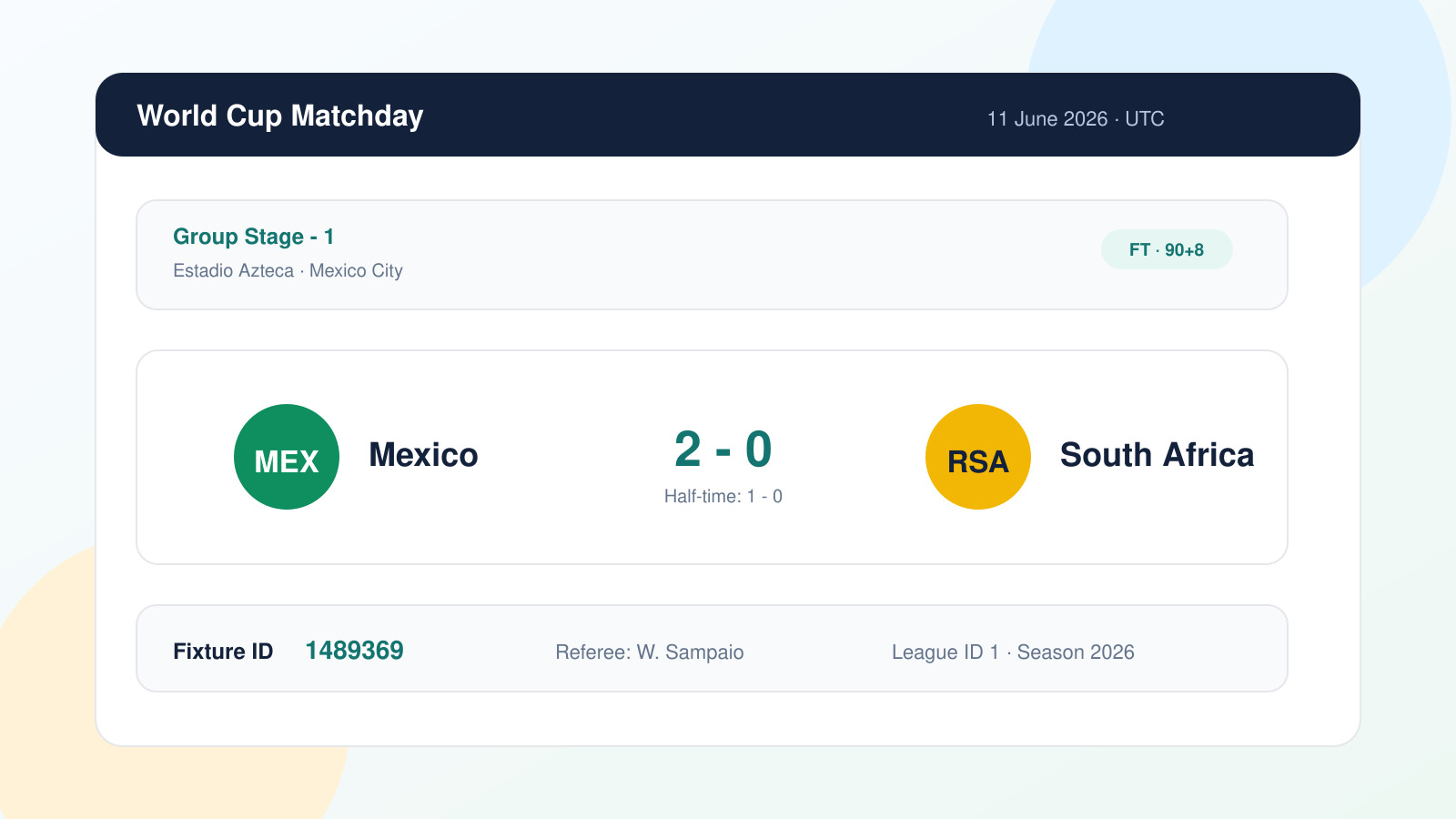 The most important field for the next step is the
 fixture.id. It is the key used to retrieve the enriched match data.
3- Turning group stage results into match reports
A group stage recap answers the first question “what were the results?” and a complete match report answers the next one “how did each match unfold?”.
With API-Football, these blocks can be retrieved from selected fixtures using the ids parameter.
GET https://v3.football.api-sports.io/fixtures?ids=1489369
"response": [
        {
            "fixture": {
                "id": 1489369,
                "referee": "Wilton Pereira Sampaio, Brazil",
                "timezone": "UTC",
                "date": "2026-06-11T19:00:00+00:00",
                "timestamp": 1781204400,
                "periods": {
                    "first": 1781204400,
                    "second": 1781208000
                },
                "venue": {
                    "id": 1069,
                    "name": "Estadio Azteca",
                    "city": "Mexico City"
                },
                "status": {
                    "long": "Match Finished",
                    "short": "FT",
                    "elapsed": 90,
                    "extra": 8
                }
            },
            "league": {
                "id": 1,
                "name": "World Cup",
                "country": "World",
                "logo": "https://media.api-sports.io/football/leagues/1.png",
                "flag": null,
                "season": 2026,
                "round": "Group Stage - 1",
                "standings": true
            },
            "teams": {
                "home": {
                    "id": 16,
                    "name": "Mexico",
                    "logo": "https://media.api-sports.io/football/teams/16.png",
                    "winner": true
                },
                "away": {
                    "id": 1531,
                    "name": "South Africa",
                    "logo": "https://media.api-sports.io/football/teams/1531.png",
                    "winner": false
                }
            },
            "goals": {
                "home": 2,
                "away": 0
            },
   ...
Unlike a broad /fixtures query by league, season or date, a request using ids can return detailed blocks for selected fixtures: lineups for formations and squads, events for the match timeline, statistics for team stats, and players for individual statistics.
ids accepts multiple fixture IDs separated by a dash, which makes it useful for loading detailed data for selected matches from the group stage.
GET https://v3.football.api-sports.io/fixtures?ids=1538999-1539000
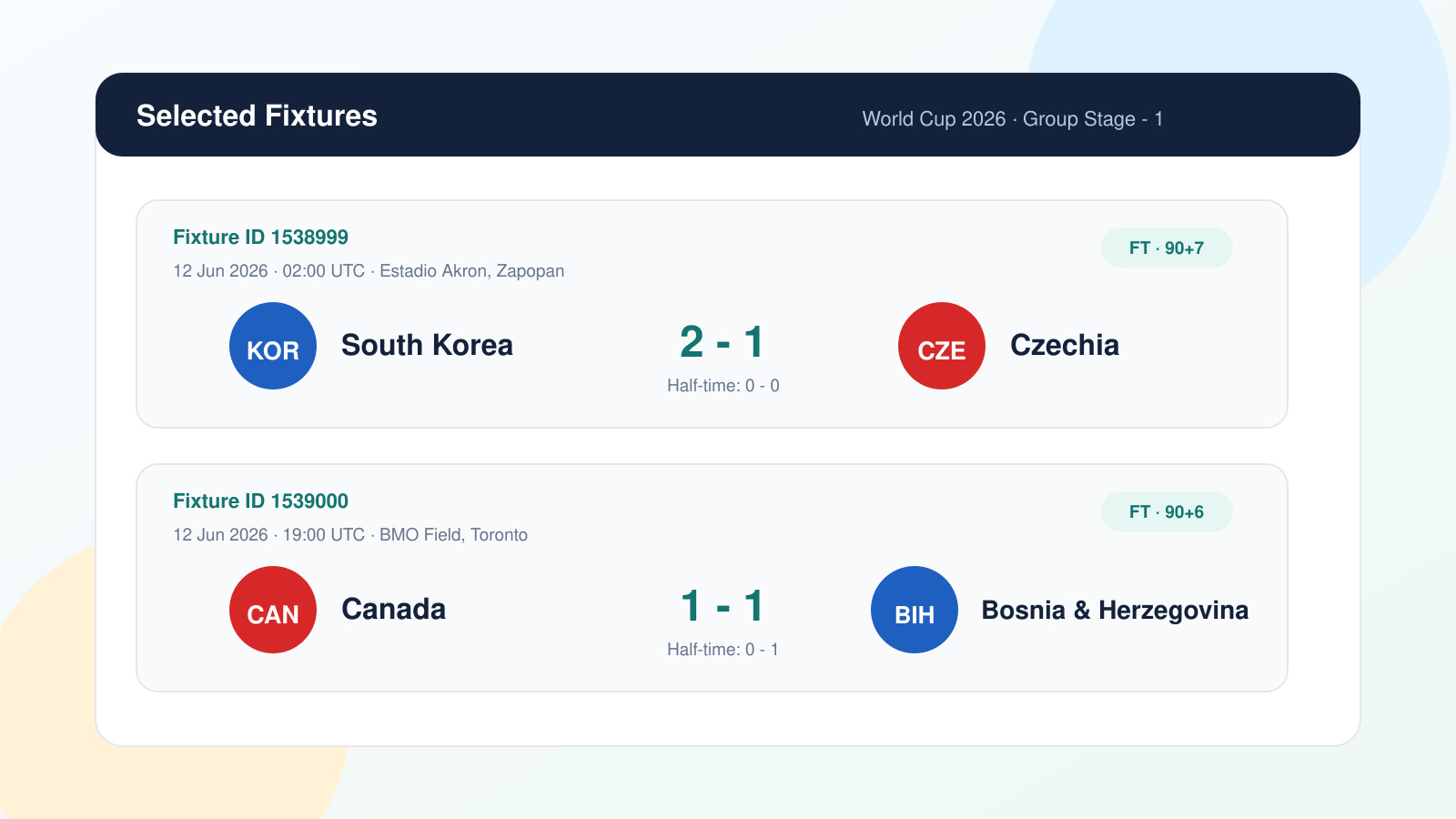
4- Navigating the enriched fixture response
The response from ids is structured around the same fixture object, enriched with the data blocks needed to build a complete match report.
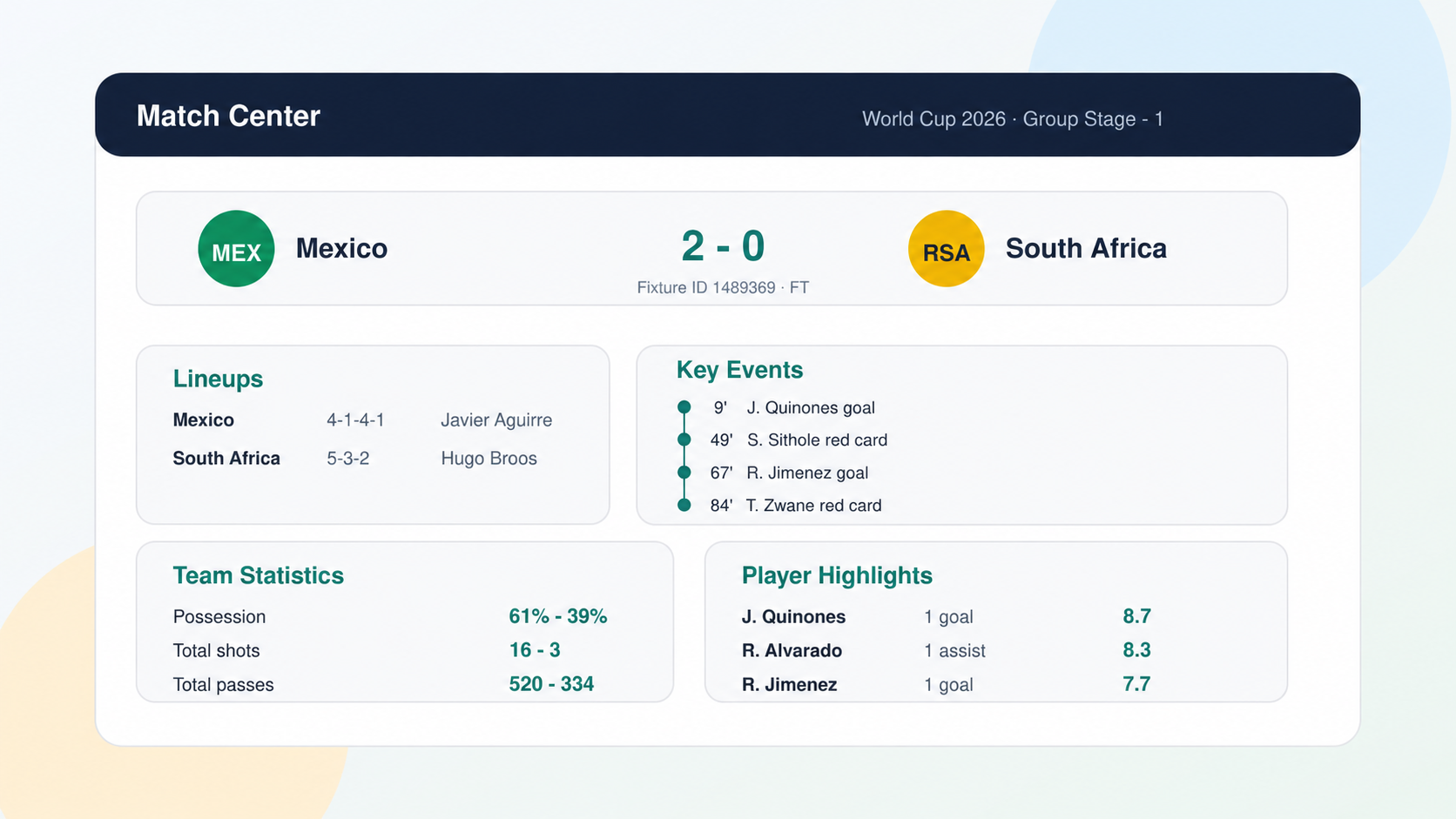
The main block, including fixture, league, teams, goals and score, is enough to build the match header: team names, logos, half-time score, full-time score, venue, date, referee and competition stage.
lineups returns one object per team with the formation, coach, starting eleven and substitutes. It is the foundation for displaying a visual lineup or a structured squad list.
...

"lineups": [
                {
                    "team": {
                        "id": 16,
                        "name": "Mexico",
                        "logo": "https://media.api-sports.io/football/teams/16.png",
                        "colors": {
                            "player": {
                                "primary": "298b77",
                                "number": "ffffff",
                                "border": "298b77"
                            },
                            "goalkeeper": {
                                "primary": "d54882",
                                "number": "ebebeb",
                                "border": "d54882"
                            }
                        }
                    },
                    "coach": {
                        "id": 27707,
                        "name": "Javier Aguirre",
                        "photo": "https://media.api-sports.io/football/coachs/27707.png"
                    },
                    "formation": "4-1-4-1",
                    "startXI": [
                        {
     ...
events returns the match timeline in chronological order. Each event is linked to a minute, a team and a player. The detail field gives the exact type of event, such as Normal Goal, Yellow Card, Red Card or Substitution.
...

"events": [
                {
                    "time": {
                        "elapsed": 9,
                        "extra": null
                    },
                    "team": {
                        "id": 16,
                        "name": "Mexico",
                        "logo": "https://media.api-sports.io/football/teams/16.png"
                    },
                    "player": {
                        "id": 35532,
                        "name": "J. Quinones"
                    },
                    "assist": {
                        "id": 266345,
                        "name": "E. Lira"
                    },
                    "type": "Goal",
                    "detail": "Normal Goal",
                    "comments": null
                },
                {
                    "time": {
                        "elapsed": 17,
                        "extra": null
                    },
                    "team": {
                        "id": 1531,
                        "name": "South Africa",
                        "logo": "https://media.api-sports.io/football/teams/1531.png"
                    },
                    "player": {
                        "id": 3287,
                        "name": "Teboho Mokoena"
                    },
                    "assist": {
                        "id": null,
                        "name": null
                    },
   ...
This block is what powers the match timeline in a match center: goals, cards, substitutions and other key moments.
statistics contains the overall team statistics. Values are returned as type and value pairs, one entry per team, making them easy to compare side by side.
...

"statistics": [
                {
                    "team": {
                        "id": 16,
                        "name": "Mexico",
                        "logo": "https://media.api-sports.io/football/teams/16.png"
                    },
                    "statistics": [
                        {
                            "type": "Shots on Goal",
                            "value": 4
                        },
                        {
                            "type": "Shots off Goal",
                            "value": 7
                        },
                        {
                            "type": "Total Shots",
                            "value": 16
                        },
                        {
                            "type": "Blocked Shots",
                            "value": 5
                        },
                        {
                            "type": "Shots insidebox",
                            "value": 9
                        },
                        {
                            "type": "Shots outsidebox",
                            "value": 7
                        },
                        {
                            "type": "Fouls",
                            "value": 12
                        },
       ...
This can be used to add context to the final score: which team created more chances, controlled possession, committed more fouls or defended under pressure.
players goes down to the individual level. It can include ratings, minutes played, shots, passes, duels, interceptions, fouls and other player-level statistics.
...

"players": [
                {
                    "team": {
                        "id": 16,
                        "name": "Mexico",
                        "logo": "https://media.api-sports.io/football/teams/16.png",
                        "update": "2026-06-16T04:05:03+00:00"
                    },
                    "players": [
                        {
                            "player": {
                                "id": 270774,
                                "name": "Raúl Rangel",
                                "photo": "https://media.api-sports.io/football/players/270774.png"
                            },
                            "statistics": [
                                {
                                    "games": {
                                        "minutes": 90,
                                        "number": 1,
                                        "position": "G",
                                        "rating": "7.2",
                                        "captain": false,
                                        "substitute": false
                                    },
                                    "offsides": null,
                                    "shots": {
                                        "total": null,
                                        "on": null
                                    },
                                    "goals": {
                                        "total": null,
                                        "conceded": 0,
                                        "assists": 0,
                                        "saves": 2
                                    },
          ...
This is useful when a match report needs to go beyond the goalscorer and highlight individual performances.
5- Applying the pattern to the full group stage
Once the group stage is complete, the same workflow can be applied to every fixture in the recap.
First, retrieve the fixtures for the relevant matchday. Then, extract the fixture IDs and request the enriched data with ids.
async function getDayMatchReports(leagueId, season, date) {
  const ids = await getFixtureIdsByDate(leagueId, season, date);

  if (ids.length === 0) return [];

  return getMatchReports(ids.slice(0, 20));
}

async function buildReports(leagueId, season, date) {
  const fixtures = await getDayMatchReports(leagueId, season, date);

  return fixtures.map(parseMatchReport);
}
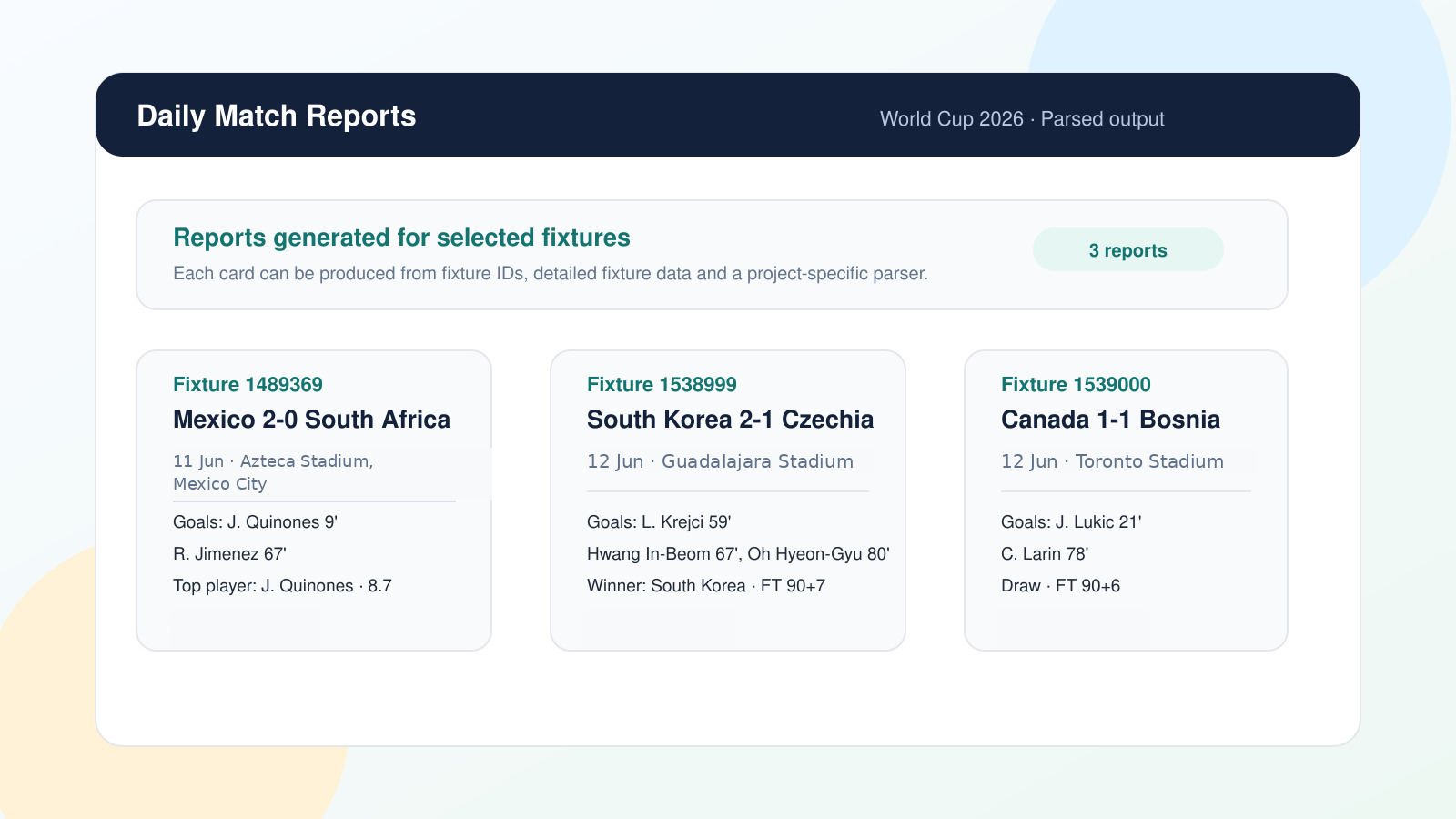
In this example, getMatchReports calls /fixtures?ids=..., while parseMatchReport is the project-specific function used to normalize the API response for your front end, CMS or match center.
During busy group stage matchdays, several fixtures can be covered together as long as the request stays within the ids limit. The same logic can then be reused for the knockout rounds, from the round of 16 to the final.
Conclusion
The FIFA World Cup 2026 group stage is a strong use case for match center coverage. A simple results recap gives readers the full picture of the opening phase, while enriched fixture data turns each result into a complete match report.
With API-Football, the workflow remains straightforward: use /fixtures to retrieve the group stage fixtures and scores, then use ids to load lineups, events, team statistics and player statistics for selected matches.
Once this parsing logic is in place, the same structure can be reused throughout the tournament, from the group stage recap to the knockout rounds and the final.
The API-SPORTS Team