 API-FOOTBALL

The 2026 Ice Hockey World Championship will take place in Switzerland and bring together the best national teams in international hockey. Beyond the competition itself, it is also a great opportunity to work with data.
In this article, we will take a closer look at the tournament and then see how to use the data with API-SPORTS.
Tournament format and schedule
The championship will be held in Switzerland, with games played in Zurich and Fribourg. It will feature 16 teams and follow a well-established format: two groups of 8 teams, a group stage where each team plays every other team in its group, and the top 4 teams from each group qualify for the quarter-finals. From there, the competition moves into a single-elimination knockout stage all the way to the final, where the world title is decided.
The 16 teams in detail:
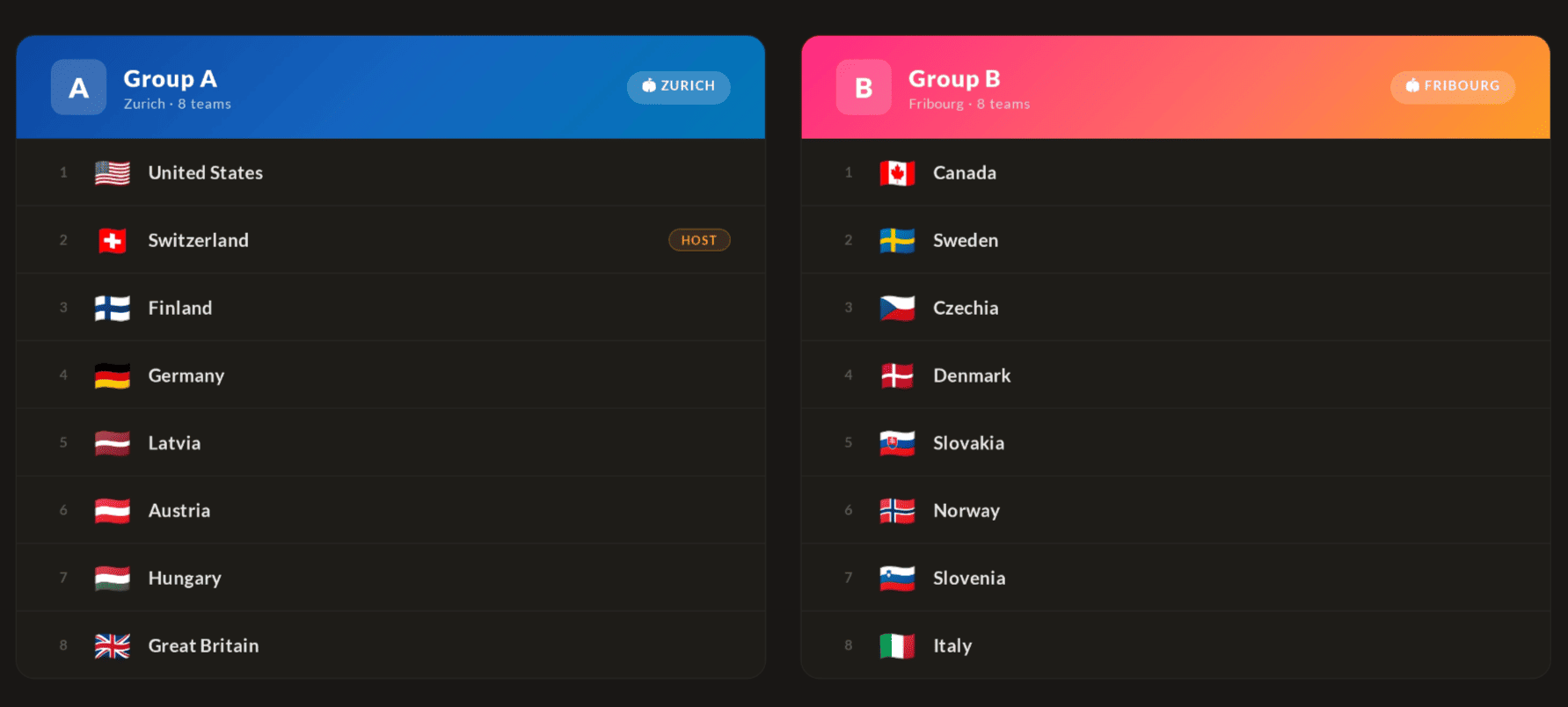
Here is the schedule of matches:
- From May 15 to 26: preliminary round
- May 28: quarter-finals
- May 30: semi-finals
- May 31: bronze medal game and gold medal game
With the top hockey nations involved, the tournament promises a very high level of play and tightly contested games, resulting in a wealth of statistics and interesting metrics to work with.
Using the Ice Hockey World Championship with API-SPORTS
The rest of this article focuses on the Hockey API endpoints that are most useful if you want to follow the World Championship programmatically or build your own interface on top of the data.
1- Key basics before you start
Before calling the API, you need a few essential elements. First, you need your API key, which must be sent with every request through the x-apisports-key header. You can find your key directly from your profile on the API-SPORTS dashboard. Next, you need to know your request limits. Depending on your plan, you have a certain number of calls per day, per minute, and per second. Keeping this limit in mind encourages you to cache data that does not change frequently. For more information, you can consult our guide “HOW RATELIMIT WORKS”.
The documentation also plays a central role. It describes the available endpoints, their parameters, the returned objects, as well as the update frequency. Checking it helps you avoid errors caused by missing parameters or structural changes. You can find it here.
2- Retrieving teams and games for the World Championship
The parameter league=111 corresponds to the Ice Hockey World Championship, and season=2026 targets this year’s edition.
The request /teams?league=111&season=2026 lets you retrieve the list of national teams participating in the tournament:
"response": [
        {
            "id": 1335,
            "name": "Austria",
            "logo": "https://media.api-sports.io/hockey/teams/1335.png",
            "national": true,
            "founded": null,
            "colors": [],
            "arena": {
                "name": null,
                "capacity": null,
                "location": null
            },
            "country": {
                "id": 2,
                "name": "Austria",
                "code": "AT",
                "flag": "https://media.api-sports.io/flags/at.svg"
            }
        },
        {
            "id": 1321,
            "name": "Canada",
            "logo": "https://media.api-sports.io/hockey/teams/1321.png",
            "national": true,
            "founded": null,
            "colors": [],
            "arena": {
                "name": null,
                "capacity": null,
                "location": null
            },
            "country": {
                "id": 4,
                "name": "Canada",
                "code": "CA",
                "flag": "https://media.api-sports.io/flags/ca.svg"
            }
        },
   ...
To get the tournament schedule and follow the games, you can use the request /games?league=111&season=2026:
"response": [
        {
            "id": 396676,
            "date": "2026-05-15T14:20:00+00:00",
            "time": "14:20",
            "timestamp": 1778854800,
            "timezone": "UTC",
            "week": null,
            "timer": null,
            "status": {
                "long": "Not Started",
                "short": "NS"
            },
            "country": {
                "id": 34,
                "name": "World",
                "code": null,
                "flag": null
            },
            "league": {
                "id": 111,
                "name": "World Championship",
                "type": "Cup",
                "logo": "https://media.api-sports.io/hockey/leagues/111.png",
                "season": 2026
            },
            "teams": {
                "home": {
                    "id": 1335,
                    "name": "Austria",
                    "logo": "https://media.api-sports.io/hockey/teams/1335.png"
                },
                "away": {
                    "id": 1338,
                    "name": "Hungary",
                    "logo": "https://media.api-sports.io/hockey/teams/1338.png"
                }
            },
    ...
As the tournament approaches and progresses, this endpoint will be updated with scheduled games, live games, and final results.
3- Key endpoints to follow the tournament
To fully leverage the tournament data, you will typically combine several endpoints that cover different aspects: standings, team statistics, head-to-head, in-game-events, and odds.
3.1- Standings
The /standings endpoint is central for following the group stage and the overall progression of the World Championship. It already returns the information about groups and stages directly inside the response, so you usually do not need to call /standings/stages or /standings/groups separately just to display the current tables:
GET / https://v1.hockey.api-sports.io/standings?league=111&season=2026
"response": [
        [
            {
                "position": 1,
                "stage": "World Championship - Regular Season",
                "group": {
                    "name": "Group A"
                },
                "team": {
                    "id": 1324,
                    "name": "Finland",
                    "logo": "https://media.api-sports.io/hockey/teams/1324.png"
                },
                "league": {
                    "id": 111,
                    "name": "World Championship",
                    "type": "cup",
                    "logo": "https://media.api-sports.io/hockey/leagues/111.png",
                    "season": 2026
                },
                "country": {
                    "id": 34,
                    "name": "World",
                    "code": null,
                    "flag": null
                },
                "games": {
                    "played": 0,
                    "win": {
                        "total": 0,
                        "percentage": "0.000"
                    },
                    "win_overtime": {
                        "total": 0,
                        "percentage": "0.000"
                    },
                    "lose": {
                        "total": 0,
                        "percentage": "0.000"
                    },
                    "lose_overtime": {
                        "total": 0,
                        "percentage": "0.000"
                    }
                },
                "goals": {
                    "for": 0,
                    "against": 0
                },
                "points": 0,
                "form": null,
                "description": "Promotion - World Championship (Play Offs: Quarter-finals)"
            },
      ...
Each group is represented as an array of teams inside response, and each standing row includes both the stage and the group information. This means you can iterate through the groups from this single endpoint to build your group tables.
3.2- Team statistics
If you want to go further than standings and look at team performance in more detail, you can use the /teams/statistics endpoint. It lets you retrieve team statistics for a given league and season, which is useful for comparing national teams during the tournament and building more detailed performance views:
GET / https://v1.hockey.api-sports.io/teams/statistics?league=111&season=2026&team=XXX
This endpoint can be used to display metrics such as wins, losses, goals scored, goals conceded, or other team-level indicators. For the example below, we’ll use the ID for the Finland team:
"response": {
        "country": {
            "id": 34,
            "name": "World",
            "code": null,
            "flag": null
        },
        "league": {
            "id": 111,
            "name": "World Championship",
            "type": "cup",
            "logo": "https://media.api-sports.io/hockey/leagues/111.png",
            "season": 2026
        },
        "team": {
            "id": 1324,
            "name": "Finland",
            "logo": "https://media.api-sports.io/hockey/teams/1324.png"
        },
        "games": {
            "played": {
                "home": 0,
                "away": 0,
                "all": 0
            },
            "wins": {
                "home": {
                    "total": 0,
                    "percentage": null
                },
                "away": {
                    "total": 0,
                    "percentage": null
                },
                "all": {
                    "total": 0,
                    "percentage": null
                }
            },
            "loses": {
                "home": {
                    "total": 0,
                    "percentage": null
                },
                "away": {
                    "total": 0,
                    "percentage": null
                },
                "all": {
                    "total": 0,
                    "percentage": null
                }
            }
        },
        "goals": {
            "for": {
                "total": {
                    "home": 0,
                    "away": 0,
                    "all": 0
                },
                "average": {
                    "home": "0.0",
                    "away": "0.0",
                    "all": "0.0"
                }
            },
            "against": {
                "total": {
                    "home": 0,
                    "away": 0,
                    "all": 0
                },
                "average": {
                    "home": "0.0",
                    "away": "0.0",
                    "all": "0.0"
                }
            }
        }
    }
}
3.3- Head-to-head stats between teams
To display information about the latest encounters between two national teams, you can use the head-to-head parameter on the /games endpoint:
GET / https://v1.hockey.api-sports.io/games/h2h?h2h=XXXX-XXXX
This will returns the games played between the two teams. For the example below, we’ll use the IDs for the Austria and Finland teams:
 "response": [
        {
            "id": 317271,
            "date": "2013-05-11T13:15:00+00:00",
            "time": "13:15",
            "timestamp": 1368278100,
            "timezone": "UTC",
            "week": null,
            "timer": null,
            "status": {
                "long": "Finished",
                "short": "FT"
            },
            "country": {
                "id": 34,
                "name": "World",
                "code": null,
                "flag": null
            },
            "league": {
                "id": 111,
                "name": "World Championship",
                "type": "Cup",
                "logo": "https://media.api-sports.io/hockey/leagues/111.png",
                "season": 2013
            },
            "teams": {
                "home": {
                    "id": 1324,
                    "name": "Finland",
                    "logo": "https://media.api-sports.io/hockey/teams/1324.png"
                },
                "away": {
                    "id": 1335,
                    "name": "Austria",
                    "logo": "https://media.api-sports.io/hockey/teams/1335.png"
                }
            },
            "scores": {
                "home": 7,
                "away": 2
            },
   ...
3.4- In-game events
To go further than the score and follow what happens during a game, you can use the /games/events endpoint:
GET / https://v1.hockey.api-sports.io/games/events?game=XXXX
This endpoint gives you the list of events associated with a specific game, allowing you to build a timeline of key actions for live tracking or post-game analysis.
3.5- Odds
Finally, if you are interested in betting or predictive content, the /odds endpoint provides the odds offered for each game:
GET / https://v1.hockey.api-sports.io/odds?league=111&season=2026
You can use it to display pre-game odds, compare markets, or enrich your match previews with additional context.
4- Code examples
Here are a few concrete examples showing how to use the World Championship data in your code.
4.1- Track a team in the tournament
Find a team ID by its name, then fetch all its games in the championship:
const API_KEY = 'YOUR_API_KEY';
const BASE_URL = "https://v1.hockey.api-sports.io/";
const headers = { "x-apisports-key": API_KEY };
const LEAGUE = 111;
const SEASON = 2026;

async function findTeam(name) {
  const { data } = await axios.get(`${BASE_URL}/teams`, {
    headers,
    params: { search: name, league: LEAGUE, season: SEASON }
  });

  const team = data.response[0];
  console.log(`Found: ${team.name} (ID: ${team.id})`);
  return team;
}

async function getTeamGames(teamId) {
  const { data } = await axios.get(`${BASE_URL}/games`, {
    headers,
    params: { league: LEAGUE, season: SEASON, team: teamId }
  });

  data.response.forEach(game => {
    const date   = new Date(game.date).toLocaleString('en-US', {
      timeZone: 'Europe/Zurich',
      dateStyle: 'medium',
      timeStyle: 'short'
    });
    const home   = game.teams.home.name;
    const away   = game.teams.away.name;
    const score  = `${game.scores.home ?? '-'} - ${game.scores.away ?? '-'}`;
    const status = game.status.short;

    console.log(`[${date}] ${home} vs ${away} | ${score} | ${status}`);
  });
}

// Usage
(async () => {
    const canada = await findTeam('Canada');
    await getTeamGames(canada.id);
})();
4.2- Live scores
The Hockey API uses specific statuses for live games (P1, P2, OT, etc.). You filter them on the client side and refresh every 30 seconds:
const LIVE_STATUSES = ['P1', 'P2', 'P3', 'OT', 'BT', 'PT'];

async function getLiveGames() {
  const { data } = await axios.get(`${BASE_URL}/games`, {
    headers,
    params: { league: LEAGUE, season: SEASON }
  });

  const live = data.response.filter(g => LIVE_STATUSES.includes(g.status.short));

  if (live.length === 0) {
    console.log('No live games at the moment.');
  } else {
    live.forEach(game => {
      const home  = game.teams.home.name;
      const away  = game.teams.away.name;
      const score = `${game.scores.home ?? '-'} - ${game.scores.away ?? '-'}`;
      const period = game.status.short;

      console.log(`[${period}] ${home} ${score} ${away}`);
    });
  }

  setTimeout(getLiveGames, 30000);
}

(async () => {
    getLiveGames();
})();
4.3- Standings by group from a single call
Since the /standings endpoint already returns groups inside the response, you can directly loop over them to display the tables by group, without making separate calls to /standings/group:
async function getGroupStandings() {
  const { data } = await axios.get(`${BASE_URL}/standings`, {
    headers,
    params: { league: LEAGUE, season: SEASON }
  });

  data.response.forEach(group => {
    console.log(`n--- ${group[0]?.group?.name ?? 'Group'} ---`);

    group.forEach(({ position, team, games, points }) => {
      console.log(
        `${position}. ${team.name.padEnd(20)}` +
        ` | GP: ${games.played}` +
        ` | W: ${games.win.total}` +
        ` | L: ${games.lose.total}` +
        ` | Pts: ${points}`
      );
    });
  });
}
Conclusion
The Ice Hockey World Championship is an excellent playground for working with sports data. With the API-SPORTS Hockey API, the key information about teams, games, standings, odds, head-to-head stats, and in-game events is available through simple and consistent endpoints, making it easy to build your own tools to follow the tournament.
To go further, check out our article “HOW TO GET STARTED WITH API-FOOTBALL: THE COMPLETE BEGINNER'S GUIDE”. And if you haven’t already, create your free account here.
The API-SPORTS Team