 API-FOOTBALL

Today, we're going to see how to get started with API-Football from scratch. Whether you've never touched an API before or you're a seasoned developer picking up a new data source, this guide is for you. We'll go from signing up and getting your key all the way through every endpoint the API has to offer, explained in plain language, with real use cases and practical advice to avoid the most common mistakes.
API-Football covers more than 1 200 leagues and cups worldwide, from the Premier League and La Liga down to the Kazakh Premier League and the Copa Libertadores. Real-time livescores, historical match data, standings, player statistics, bookmaker odds, and predictions, all of it through a clean, consistent REST API. And a single account gives you access to all 12 API-Sports products (football, basketball, Formula 1, rugby, volleyball, and more) at no extra charge.
All you need to follow along is a free account. No credit card required. The full reference documentation lives at api-football.com/documentation-v3, but by the end of this guide you'll have a much better grasp of the whole system than the documentation alone provides.
Let's begin
Here's what we'll cover:
Getting your API key — signup and finding your key in the dashboard
Making your first call — cURL, JavaScript, and Python
Testing without code — the built-in Live Tester and Postman
Understanding how requests work — rate limits, error codes, pagination, and a few gotchas worth knowing before you start building
Complete endpoint walkthrough — every endpoint, organized by purpose, explained as real use cases
Practical tips for building real applications without burning your quota unnecessarily
Getting your API key
Head to dashboard.api-football.com/register. Fill in your name, email, and password or just click Sign Up with Google to skip the form entirely. Either way, a confirmation email will arrive in your inbox. Click the link inside, and you'll land in your dashboard with your free plan activated immediately.
To find your API key, go to Account → My Access in the left sidebar. That string of characters blurred in the top-right corner is your api-key (hover over it to reveal it). Copy it and keep it somewhere safe, it goes into every request you make. If you ever suspect it's been exposed somewhere, you can regenerate it from the same page.
About the plans
The free tier gives you 100 requests per day and access to every endpoint without exception. The difference between plans is purely about volume and historical range, not features. Paid plans unlock deeper historical archives. The free plan covers recent seasons, which is more than enough for getting started.
For development and prototyping, 100 requests per day is genuinely sufficient. When you're ready to go to production, you can choose the right plan for you :
- Pro plan at $19/month gives you 7,500 daily requests,
- Ultra at $29/month gives 75,000,
- Mega at $39/month gives 150,000.
All plans include all endpoints, all data types, no paywalled features.
Making your first API call
The base URL for every request is https://v3.football.api-sports.io/. Everything in this API is GET-only, there are no POST, PUT, or DELETE operations anywhere. Authentication happens through a single request header: x-apisports-key set to your API key. That's it. No OAuth, no token exchange, no expiry management.
Let's make our first call. We'll hit /countries, which returns the list of countries the API has league data for. No parameters required, no complexity, just a clean request and a real response to look at.
cURL
curl --request GET
  --url 'https://v3.football.api-sports.io/countries'
  --header 'x-apisports-key: YOUR_API_KEY_HERE'
JavaScript (Fetch API)
const response = await fetch('https://v3.football.api-sports.io/countries', {
  method: 'GET',
  headers: {
    'x-apisports-key': 'YOUR_API_KEY_HERE',
  },
});

const data = await response.json();
console.log(data);
Python
import requests

url = "https://v3.football.api-sports.io/countries"
headers = {
    "x-apisports-key": "YOUR_API_KEY_HERE"
}

response = requests.get(url, headers=headers)
print(response.json())
Replace YOUR_API_KEY_HERE with the key from your dashboard and run it. Here's what comes back:
{
  "get": "countries",
  "parameters": [],
  "errors": [],
  "results": 163,
  "paging": {
    "current": 1,
    "total": 1
  },
  "response": [
    {
      "name": "Albania",
      "code": "AL",
      "flag": "https://media.api-sports.io/flags/al.svg"
    },
    {
      "name": "Algeria",
      "code": "DZ",
      "flag": "https://media.api-sports.io/flags/dz.svg"
    }
  ]
}
Understanding the response structure
Every single response from API-Football uses this exact same wrapper, regardless of which endpoint you call. Let's decode it once here, because once you understand it, every endpoint becomes easy.
The get field echoes back the endpoint path that was called, useful when you're handling multiple calls in parallel and want to confirm which response is which. parameters echoes back whatever filters you passed in the request. errors is an array that's empty on success. If something went wrong, you'll find descriptive messages here before anything else. results gives you the count of items in the current response page. paging tells you whether there are more pages available. And response is where your actual data lives.
The pattern to internalize: check errors first, then read paging to know if you have everything, then drill into response for your data. Every endpoint, every time.
Testing endpoints without code
Before writing any application logic, spend time exploring endpoints interactively. This is one of the highest-leverage things you can do early on.
The Dashboard Live Tester
The fastest option is the Live API Tester built into your dashboard at dashboard.api-football.com. No setup. No external tools. Select an endpoint from the list, fill in parameters using the form fields, and hit the call button. You get the full JSON response in your browser instantly.
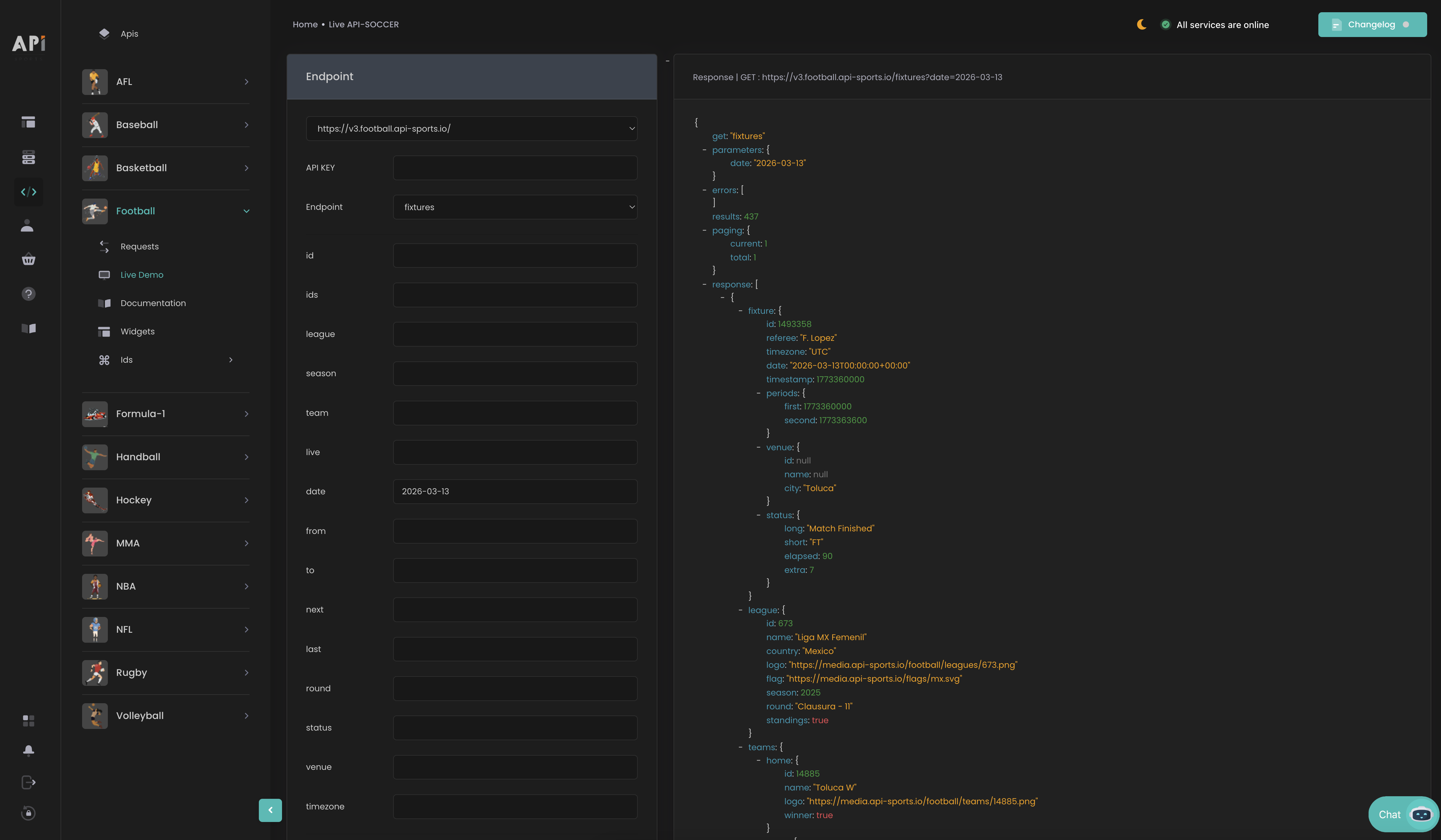
We strongly recommend spending real time here before writing your first integration. You'll see which fields are sometimes null for certain leagues, what paginated responses look like, how parameter combinations interact, and which endpoints need coverage checks before calling. Understanding the response shapes before you start writing parsing logic saves hours of debugging later.
Postman
If you prefer a dedicated API client, Postman works perfectly. Create a new GET request, paste your full endpoint URL (e.g., https://v3.football.api-sports.io/leagues?country=England&season=2025), go to the Headers tab and add x-apisports-key with your key as the value, then click Send. Postman lets you save requests into organized collections and quickly adjust parameters, particularly useful when you're exploring /fixtures with its many filtering combinations.
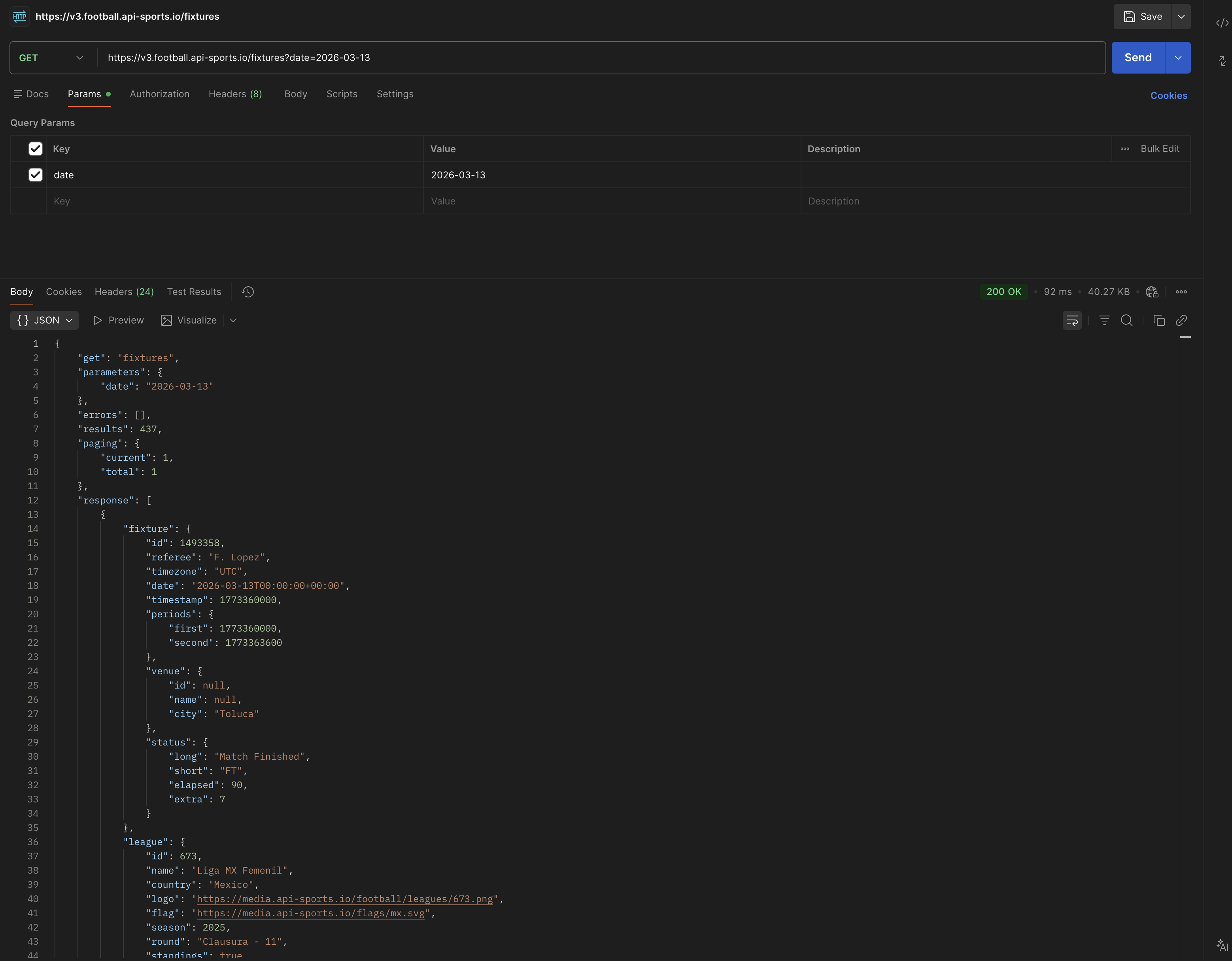
In either tool, focus on three things: results to know how many items came back, errors to know if something went wrong, and paging to know whether you're looking at incomplete data.
Understanding how requests work
Rate limits
Your plan has two types of limits running simultaneously. The daily quota is the total number of requests you can make in a 24-hour period, 100 on the free plan, up to 150,000 on Mega. The per-minute cap is a ceiling on how fast you can fire requests, regardless of which plan you're on.
Both limits are reported in the response headers of every single API call, which means you can read them in your application code. x-ratelimit-requests-remaining tells you how many requests you have left today. X-Ratelimit-Remaining tells you how many you can fire before hitting the per-minute cap. Build the habit of checking these headers, especially on the free plan, where those 100 daily requests disappear quickly during active development.
If you consistently exceed the per-minute limit through tight loops or bursting, your access can be temporarily or permanently blocked by the firewall without prior warning. Don't hammer the API, and don't retry failed requests in rapid succession.
Error codes
A 200 response means everything worked and data came back. It is entirely possible to have a 200 status code but no data in the results field.
This may be due to :
- an incorrect parameter (season=2054),
- a parameter that does not exist,
- a normal lack of data (a call to the lineups or statistics for a match that has not yet taken place or will take place in several days)
429 is a request blocked by ratelimit, Please refer to our article on how Ratelimit works.
499 is a request timeout and 500 is a server error. Both are rare. Both are safe to retry once after a short wait.
When something does go wrong, the errors array in the response body is more informative than the HTTP status code alone. Always log the full error message in development, it usually tells you exactly which parameter was invalid or which combination is not allowed.
Pagination
When paging.total is greater than 1 in a response, more pages of results are waiting. Add page=2, page=3, etc. to your query string to fetch them.
The /players endpoint paginates at 20 results per page.
The /odds endpoint paginates at 10 per page.
Always check paging on your first call before assuming you got the full dataset, it's a common source of silently incomplete data in applications.
The timezone parameter
Several endpoints, most notably /fixtures and /injuries accept a timezone parameter. When you include it, all timestamps in the response are automatically converted to that timezone. This means users in different countries see match kickoff times in their local time without any manual conversion on your end. The /timezone endpoint gives you the full list of 425 valid timezone strings (Europe/Paris, America/New_York, Asia/Tokyo, etc.). Always validate timezone strings against this list, passing an unrecognized value will result in an error.
A practical implementation pattern: detect the user's timezone in the browser (Intl.DateTimeFormat().resolvedOptions().timeZone), validate it against the cached timezone list, and pass it as the timezone parameter on fixture requests. Users in Tokyo will see kickoffs in JST, users in London will see GMT or BST depending on the time of year, all handled automatically.
Logos and images are free
Calls to team logos, league logos, and country flag images do not count toward your daily quota. They're served separately and are completely free. However, the media CDN does enforce per-second and per-minute rate limits, so don't fetch them dynamically on every page render. Download them once, cache on your side, and serve from your own storage. Your app will be faster and you'll never hit CDN throttling.
Complete endpoint walkthrough
Now let's walk through every endpoint, not as a spec sheet, but as a guided tour. We've grouped them by purpose so the relationships between endpoints make sense, and we'll explain each one as a real use case rather than a list of parameters.
Setting the stage, Reference data
Before you can query anything interesting, you need IDs: league IDs, team IDs, season years. These first endpoints exist to give you that foundation. Think of them as bootstrap data, call them once, store the results, and refresh only occasionally. None of them will burn significant quota.
A good application architecture pattern: on first launch (or once daily), make a small batch of reference calls, /countries, /leagues?current=true, and the specific teams you care about and store the results in a local database or cache. From that point on, you're only making calls for live data. This keeps your daily quota focused on the endpoints that actually need to be fresh.
/timezone
Purely reference data. Call it once, store the 425 timezone strings locally, and use them to validate or populate a timezone picker in your UI. The list never changes.
/countries
Returns every country the API has league data for, the country name, its alpha code (FR for France, GB-ENG for England, IT for Italy), and a CDN URL for the country's flag SVG. You can filter by exact name, by code, or do a partial name search with search (minimum 3 characters). These can be combined.
The typical use case is building a country selector, or confirming the exact country name string before querying /leagues, the name field must match exactly, so it's worth double-checking.
/leagues
This is where your real work starts. /leagues gives you the full catalog of 1 200+ competitions, leagues, cups, qualifying rounds, friendlies. Each with its numeric ID, name, country, logo, and a seasons array covering every year that competition has data available for.
The most important thing to understand here is the coverage object nested inside each season entry. It's a collection of boolean flags telling you exactly what data types are available for that competition in that specific season. The flags cover events, lineups, fixture statistics, player statistics, standings, players, top scorers, top assists, top cards, injuries, predictions, and odds.
Before calling any downstream endpoint, always check the relevant coverage flag first. If standings is false for the league-season you're working with, calling /standings won't give you anything useful. If injuries is false, don't call /injuries. The coverage object is your early-warning system, it tells you what the API can actually deliver before you make a single wasted call.
Two nuances worth knowing: for competitions that haven't started yet, all flags will be false. They'll flip to true once the season gets underway. And a flag set to true indicates the API aims to collect that data, but it doesn't guarantee 100% availability for every single match in that competition, especially for smaller leagues where data collection can lag behind.
There may also be a delay between when a new season is officially announced and when it appears in the API with fixture data populated. For cup competitions in particular, fixtures are added progressively as the participating teams become known after each round.
You can filter /leagues by country, by type (League or Cup), by season to see competitions from a specific year, or by passing current=true to get only competitions currently in progress. The search parameter does a name search (minimum 3 characters). You can also pass a team ID to see which leagues a specific team participates in. Useful for building a "competitions this team is active in" list on a team profile page.
# All currently active English competitions
curl --request GET
  --url 'https://v3.football.api-sports.io/leagues?country=England¤t=true'
  --header 'x-apisports-key: YOUR_API_KEY_HERE'
All league IDs are also browsable on the dashboard at dashboard.api-football.com/soccer/ids/leagues handy when you already know the competition you want.
/leagues/seasons
Returns a flat array of all available season years across the entire API, something like [2008, 2010, 2011, 2012, ..., 2025]. No parameters needed. Use it to populate a season selector dropdown or to validate season values before passing them to other endpoints. It updates when new leagues are added to the API.
Seasons are represented by their starting year: the 2025/2026 Premier League season is 2025. A league that runs entirely within one calendar year (like MLS or the J.League) uses just that year.
Teams and venues
Now that we have league IDs and season years in hand, let's look at teams.
/teams
One critical property of team IDs: they're persistent across all competitions and seasons. Whether Arsenal is in the Premier League, the FA Cup, the Champions League, or a pre-season tournament, their team ID stays the same. This makes team IDs your most stable long-term reference. Store them once and use them indefinitely.
You need to pass at least one parameter. The most common pattern is league + season to get all teams in a given competition. You can also fetch a single team by id, filter by country, or search by name with search (minimum 3 characters). The response gives you each team's name, three-letter code, founding year, country, whether it's a national team, the logo URL, and the venue it plays at.
All team IDs are browsable on the dashboard at dashboard.api-football.com/soccer/ids/teams.
/teams/statistics
Where /teams gives you profile data, /teams/statistics gives you performance data for a specific competition and season. All three of league, season, and team are required. What comes back is a comprehensive season summary: fixtures played with home and away breakdowns, wins, draws, losses, goals scored and conceded, clean sheets, and the number of matches in which the team failed to score. There's a form string showing the most recent results and a biggest object containing the team's biggest win and heaviest defeat of the season.
The optional date parameter is worth highlighting: pass a date and the stats are calculated from the start of the season up to that point, not from today. This is great for historical "how were they doing at Christmas?" type features, or for showing how a team's defensive record improved or declined across a season.
This endpoint gives you aggregated totals. For match-by-match data, that's /fixtures, the two complement each other well for team pages.
/venues
Stadiums. Pass at least one of id, name, city, or country, and you get back the venue's full address, capacity, surface type (grass, artificial turf, etc.), and an image URL when available.
Most of the time you won't query this separately, the /teams response already includes basic venue details. But if you're building something around stadium data specifically, capacity comparisons across a league, surface type analysis for weather-related performance differences, finding all grounds in a given city, this endpoint has what you need.
The heart of the API : Fixtures
Everything in API-Football ultimately connects back to fixtures. A fixture ID is the master key that unlocks events, lineups, match statistics, player performances, odds, and predictions for any specific game. Let's walk through the full fixtures family in depth. This is the section worth reading slowly.
/fixtures/rounds
Before we get into fixtures themselves, let's cover rounds. For any league-season combination, /fixtures/rounds gives you the ordered list of round names. Pass league and season (both required) and you get an array of strings: ["Regular Season - 1", "Regular Season - 2", ...] for league competitions, or ["Round of 16", "Quarter-finals", "Semi-finals", "Final"] for knockout tournaments.
Add current=true to get back only the round currently in progress, no hardcoding, no manual updates needed. You can then pass that round name directly into /fixtures as the round filter to get only that matchday's games.
/fixtures
This is the most important endpoint in the API, and the one you'll spend the most time with. One URL, countless use cases, the behavior changes entirely depending on which parameters you combine. Let's walk through the patterns that matter.
Building a livescore feed: Pass live=all and you get every match in progress across all leagues globally, right now. To focus on specific competitions, pass hyphens-separated league IDs: live=39-2-140. This is your real-time heartbeat for a livescore app. Poll it every 15 seconds during match windows if you need near-real-time accuracy, or every minute if you can tolerate a small delay.
# All live matches right now, across all leagues
curl --request GET
  --url 'https://v3.football.api-sports.io/fixtures?live=all'
  --header 'x-apisports-key: YOUR_API_KEY_HERE'
Showing today's matches: Pass date=2026-03-13 and you get every match scheduled globally for that date. Combine with league to scope it to one competition. Add timezone=Europe/Paris and all kickoff times come back in your users' local zone automatically.
Team schedule and recent results: Pass team=33&next=10 for a team's next 10 upcoming fixtures, or team=33&last=5 for their 5 most recent results. These are the go-to patterns for any team profile or form display. The next parameter is particularly powerful combined with a league filter if you want the team's schedule within a specific competition.
Full season fixture list: Pass league=39&season=2025 and you get all 380 Premier League fixtures for that season, past results, today's matches, and future fixtures in a single response. For large leagues this is a lot of data, so adding a round filter to paginate through it matchday by matchday is good practice.
Date range view: Use from=2026-03-01&to=2026-03-31 together to pull all fixtures within a specific window. Perfect for a monthly calendar view or a week-ahead schedule widget.
Batch fixture fetch: Pass ids=868078-868079-868080 (up to 20 IDs separated by hyphens) when you need to refresh the state of a specific set of matches. Say, the ones your users are actively watching.
Now that we've covered the query patterns, let's talk about what each fixture in the response gives you. You get the fixture ID save this, it's the input for every sub-endpoint. You also get the referee name, date and time, venue, the current status code with elapsed minutes, league details, home and away teams with their logos, the current score, and the full score breakdown: halftime, full time, extra time, and penalties.
On status codes there are 16 of them and they cover every possible match state. The ones you'll use most often:
NS(not started yet),1H(first half in play),HT(halftime),2H(second half in play),ET(extra time),P(penalty shootout),FT(full time),AET(after extra time),PEN(decided by penalties),PST(postponed),CANC(cancelled),SUSP(suspended mid-match).
During a live match, status.elapsed gives you the current minute. status.short gives you the code for quick logic checks. status.long gives you the human-readable version for display.
The fixture endpoint updates every 15 seconds during live matches. For future fixtures, once-a-day polling is entirely sufficient.
One field that catches developers off guard: fixture.timestamp. This is the Unix timestamp of the kickoff time in UTC. If you need to show kickoff times in your own timezone without using the API's timezone parameter, this Unix timestamp is your most reliable base for manual conversion. The fixture.date field is an ISO 8601 string with timezone offset included, which most date libraries can parse directly.
Also worth noting: when a match is postponed or cancelled, the fixture remains in the API with the status updated to PST or CANC. It's not removed. So if you're displaying a fixture list and filtering by status, make sure your NS filter doesn't accidentally hide postponed games that users might be looking for. A common pattern is to display PST and CANC fixtures in a distinct visual state rather than hiding them.
# Premier League fixtures on a specific date
curl --request GET
  --url 'https://v3.football.api-sports.io/fixtures?league=39&season=2025&date=2026-03-07'
  --header 'x-apisports-key: YOUR_API_KEY_HERE'
/fixtures/headtohead
When you want historical context between two specific clubs, all the encounters between Liverpool and Manchester City, or Barcelona and Real Madrid across all competitions, this is the endpoint. The only required parameter is h2h, formatted as two team IDs separated by a hyphen: h2h=40-50. The order of the two IDs doesn't matter; you'll get all historical matches regardless of which team was home or away. The response uses the exact same fixture structure as /fixtures.
You can refine the results in several useful ways: last=10 limits to the most recent 10 encounters; league shows only head-to-head games in a specific competition; season scopes to a single season; from/to focuses on a date range. This endpoint is the foundation for pre-match analysis pages showing "last 5 meetings" summaries before a big game, or historical context sections on team rivalry pages.
Note that results span all competitions by default. A Champions League meeting, a domestic cup fixture, and a league match will all appear together unless you add a league filter.
/fixtures/statistics
Once a match is underway or completed, you can pull per-team statistics for it. Pass the fixture ID (required) and you get back two blocks of data, one for each team, covering:
- shots on target,
- shots off target,
- total shots,
- blocked shots,
- shots inside and outside the box,
- fouls conceded,
- corner kicks,
- offsides,
- ball possession percentage,
- yellow cards,
- red cards,
- goalkeeper saves,
- total passes,
- accurate passes, and pass accuracy percentage.
Not every league tracks every statistic. For smaller competitions you'll encounter null values for stats that aren't being collected. That's expected behavior, handle nulls gracefully in your UI rather than assuming a value will always be present. You can optionally pass a team ID to get only one side's stats, or a type string if you only need a specific stat. Updates come every minute during live matches, making this suitable for a live stats ticker running alongside your scoreboard.
The Ball Possession stat comes back as a percentage string like "56%", not a number. If you're doing calculations with it or just want to display a possession bar, strip the % character and parse as an integer. The two teams' possession values won't always add up to exactly 100 due to rounding; build your UI to tolerate that.
/fixtures/events
This is your match timeline endpoint, every goal, card, and substitution in chronological order. Pass the fixture ID and you get each event with the minute it happened, the team and player involved, the event type (Goal, Card, or subst), and a detail field specifying exactly what kind:
- Normal Goal,
- Own Goal,
- Penalty,
- Missed Penalty,
- Yellow Card,
- Red Card,
- Yellow-Red Card (second booking).
Goals also come with an assist field identifying the player who set it up.
You can filter the events response by team (only one side's events), by player (events involving a specific player), or by type (only goals, only cards, only substitutions). That last filter is useful when building a dedicated goal notification system, pass type=Goal and you drop all the card and substitution noise. The timeline updates every 15 seconds, making it suitable for real-time push notifications and live commentary feeds.
For events in injury time or extra time, check the time.extra field. A goal in the 90+4 minute will show time.elapsed = 90 and time.extra = 4. Display both in your UI showing just "90" for injury-time goals is a common mistake that frustrates football fans.
/fixtures/lineups
Lineups give you both teams' starting elevens, the formation each team is using, bench players, and the coaching staff for a specific match. Pass the fixture ID and you get the formation as a string like "4-3-3", the starting eleven with each player's grid position on the pitch (useful for rendering visual formation diagrams), the substitute bench, and the head coach's details.
The most important thing to understand about this endpoint: lineups typically become available 20 to 40 minutes before kickoff, depending on the competition and when clubs officially submit their team sheets to the match officials. This window varies by league, some competitions publish lineups as early as 75 minutes before kickoff; others barely make the 30-minute mark. Don't poll this endpoint hours before a match hoping to find data, you won't, and you'll burn requests unnecessarily. A good pattern is to start checking for lineups as part of your pre-match polling cycle, beginning about 30 minutes before kickoff, checking once every 10 to 15 minutes until data appears. Note : For some competitions, lineups are available only after the game, within 24 to 72 hours.
Once lineups are confirmed, drop the polling frequency. Lineups rarely change after they're officially submitted.
You can optionally filter by team to get only one side's lineup, or pass type=Starting XI to exclude the bench.
Each player in startXI has a player.grid value formatted like "2:1", row and column position on a notional pitch grid. Row 1 is the goalkeeper end. You can map these coordinates directly to positions on a pitch SVG without needing any custom positioning logic.
Note : This data may not be available for all competitions
/fixtures/players
If lineups tell you who played, /fixtures/players tells you how each of them performed. Pass a fixture ID and you get individual match statistics for every player who appeared, starters and substitutes alike. The per-player data is rich:
- minutes played,
- position played,
- a 0–10 performance rating,
- whether they entered as a substitute,
- shots (total and on target),
- goals,
- assists,
- total and key passes with accuracy,
- tackles,
- interceptions,
- duels won and total,
- successful dribbles,
- fouls committed and drawn,
- yellow and red cards,
- penalty stats (scored, missed, conceded).
The performance rating field is worth calling out, it's a numerical score that you can display directly as a player grade, or use to sort players by performance across a matchday to build something like a "player of the week" feature. The endpoint updates every minute during live matches and is the core data source for detailed match center pages, post-match player report cards, and fantasy football scoring systems.
For fantasy football integrations, the fields that matter most are usually goals.total, goals.assists, cards.yellow, cards.red, shots.on, passes.key, tackles.total, and rating. All of those are available in a single /fixtures/players call per match, no secondary calls to the player endpoint needed to score a full lineup.
Standings
season is the only required parameter, but in practice you'll always combine it with league to get a specific table. Pass them both and you get the current standings for that competition with every team's full record.
Each standing entry gives you the team's current rank, their points total, and goalsDiff (goal difference). But the most immediately useful field for UI features is form a string like "WWDLW" showing the outcome of the team's last five matches in order from oldest to most recent. W is a win, D is a draw, L is a loss. You can render this directly as colored dots or pills in your standings table without any additional processing.
The standings response also includes separate home and away records for every team. For each team you get a home object and an away object, each with their own played, wins, draws, losses, and goals scored/conceded figures. This data is gold if you're building performance analysis features. Some teams are dramatically better at home than away, and this split makes that immediately visible without any secondary API calls.
The description field contains the zone label for that position in the table: things like "Promotion - Champions League (Group Stage)", "Relegation - Championship", or blank for mid-table positions. This is what you use to color-code standings rows, Champions League spots in green, relegation zone in red, promotion playoff spots in orange. There's also a status field ("same", "up", or "down") showing whether a team moved since the last update.
Standings update every hour, so polling more frequently than that wastes quota for zero benefit.
// Premier League standings, 2025 season (league ID: 39)
const response = await fetch(
  'https://v3.football.api-sports.io/standings?league=39&season=2025',
  {
    headers: {
      'x-apisports-key': 'YOUR_API_KEY_HERE',
    },
  }
);

const data = await response.json();
const table = data.response[0].league.standings[0];
Note the nested structure: response[0].league.standings[0]. The extra depth exists because some competitions have multiple standing groups, ie the UEFA Champions League group stage has eight groups, each with its own table. For those competitions, standings is an array with one entry per group. For regular domestic leagues with a single table, you just take standings[0].
You can also pass just a team ID alongside season to get a specific team's current standing without pulling the full table, useful for displaying "Arsenal are currently 2nd in the Premier League" on a team profile page without loading all 20 rows.
Players and coaches
/players
The /players endpoint gives you both profile information and detailed season statistics for individual players. You'll always need at least one valid parameter combination: id + season for a specific player in a specific year, league + season for all players in a competition, or team + season for a squad's full roster. The search parameter (minimum 3 characters) is useful for building player autocomplete search.
Each player in the response comes with their profile :
- name,
- age,
- nationality,
- height,
- weight,
- photo URL,
- a boolean indicating whether they're currently injured
including their full season statistics across every competition they appeared in. Statistics include
- appearances,
- minutes played,
- goals,
- assists,
- shots,
- passes (with key passes and accuracy percentage),
- tackles,
- dribbles,
- fouls,
- yellow and red cards,
- detailed penalty stats (scored, missed, saved by the goalkeeper).
Pagination is critical here. Results come back 20 per page. If you're fetching all players for a league like the Premier League, which has 500+ registered players across all its clubs, that's more than 25 sequential API calls. Always check paging.total on your first call and loop through. The statistics inside each player response are grouped by competition. A player who appeared in the Premier League, the FA Cup, and the Champions League will have three separate stat blocks. If you need combined totals, sum across those competition blocks yourself.
The player injured boolean in the profile is a lightweight current availability flag. It's updated as injury information comes in, so you can use it to mark unavailable players on roster lists without calling /injuries for every individual player.
async function getAllPlayers(leagueId, season, apiKey) {
  let page = 1;
  let allPlayers = [];

  while (true) {
    const response = await fetch(
      `https://v3.football.api-sports.io/players?league=${leagueId}&season=${season}&page=${page}`,
      {
        headers: {
          'x-apisports-key': apiKey,
        },
      }
    );

    const data = await response.json();
    allPlayers = allPlayers.concat(data.response);

    if (page >= data.paging.total) break;
    page++;
  }

  return allPlayers;
}
For applications that need full league rosters, run this as an off-peak background job and cache the results. Don't do it in real-time request cycles.
/players/topscorers, /players/topassists, /players/topyellowcards, /players/topredcards
These four endpoints return the top 20 players in a league-season combination ranked by goals, assists, yellow cards, or red cards respectively. Both league and season are required for all four.
The key thing to understand: these don't just return a headline number. Each of the 20 players comes back with their full statistical profile, exactly what you'd get from the /players endpoint for that player. So if you're building a top scorers leaderboard and want to show each player's shots-per-goal ratio or assist count alongside their goals tally, everything is already in the response. No second call needed.
# Premier League top scorers, 2025 season
curl --request GET
  --url 'https://v3.football.api-sports.io/players/topscorers?league=39&season=2025'
  --header 'x-apisports-key: YOUR_API_KEY_HERE'
/players/squads
If you just need to know who's on a team's current registered roster, no season stats needed /players/squads is the quickest path. Pass a team ID (required; no season parameter available here) and you get the full squad:
- each player's ID,
- name,
- age,
- shirt number,
- position,
- photo URL.
This is perfect for populating a team roster page quickly or building a player picker before loading full stats.
Compared to calling /players?team=X&season=2025 which paginates and costs multiple API calls, a single /players/squads?team=X gives you the complete registered roster in one shot. Use it when you need names and IDs, not statistics.
/coachs
Coaches have their own dedicated endpoint, and it covers more ground than you might expect. Pass a coach id, a team ID to get whoever is currently managing that club, or a search term (minimum 3 characters) to look someone up by name. The response gives you the coach's profile name, age, nationality, photo, current team, plus their complete career history: every club they've managed with start and end dates for each stint.
You'll also need a coach's numeric ID if you want to call /trophies or /sidelined for them, so this endpoint is often a stepping stone toward those.
Transfers, trophies, injuries, and sidelined
/transfers
Pass either a player ID or a team ID and you get the complete transfer history. Each entry shows the transfer date, the type (a fee formatted as a string like "€45M", or "Free", "Loan", "N/A"), and both clubs involved, origin (teams.out) and destination (teams.in). Use this for player transfer timelines, club transfer activity pages, or market value context widgets alongside player profiles. The transfer type field is worth noting: it can be a money amount ("€45M"), "Free" for a Bosman-style move, "Loan" for a temporary move, or "N/A" when the details aren't publicly known.
/trophies
Pass a player ID or a coach ID and you get their complete trophy history. Each entry shows the competition name, the country, the season, and the result: "Winner", "Runner-up", "3rd Place", and so on. Exactly what you'd want to enrich a player or manager profile page.
/injuries
Your pre-match availability report. Pass league + season for a broad overview of injured and suspended players across a competition, a specific fixture ID for the injury report tied to a particular match, team for one club's absentees, an individual player ID, or a date to see the injury situation on a specific day. The timezone parameter works here too.
Each entry gives you the player's name and team, the fixture context, and two key fields: type (Injury or Suspension) and reason (the specific nature "Knee Injury", "Hamstring Strain", "Suspended 3 matches"). Updates come every 4 hours.
The most powerful use of this endpoint is the fixture parameter: pass a specific fixture ID and you get the injury and suspension report specifically for that match. This is the cleanest way to show team availability on a match preview page without needing to cross-reference player IDs against the full league injury list.
Before querying injuries for a competition, check the coverage.injuries flag in the /leagues response. If it's false, the API doesn't collect injury data for that league-season combination, and you won't get anything back.
/sidelined
Where /injuries shows current unavailability tied to upcoming fixtures, /sidelined gives you the long-term historical record for one person. Pass a player ID or coach ID and you get every injury and suspension they've had, each with its type, start date, and end date (the end date may be "Unknown" for ongoing issues or cases where no return date was confirmed). This is the endpoint for injury history analysis, durability scoring, or adding a player's injury timeline to their profile page.
The combination of /sidelined and /fixtures/players is particularly powerful for building player availability profiles: how many matches has a player missed through injury this season, and how has their performance rating trended when they do play? Those are two endpoints and a bit of local calculation.
Predictions and odds
/predictions
The predictions endpoint gives you the API's own algorithmic forecast for a specific upcoming fixture. Pass a fixture ID (required) and you get back a comprehensive set of outputs: a predicted winner with team name and a short commentary string, a win_or_draw boolean, an under_over prediction (e.g., "Over 2.5"), predicted goal totals for home and away, a human-readable advice string (something like "Win or draw for Arsenal"), and a percent object showing probability breakdowns for a home win, draw, and away win.
The response also includes a comparison block with detailed metric comparisons between the two clubs :
- attack strength,
- defence strength,
- poisson distribution estimates,
- head-to-head records
- a set of recent h2h fixtures bundled directly in the same response. It's a substantial amount of contextual data in a single call.
This isn't bookmaker odds, it's the API's statistical model, updated every hour. Use it for match preview "our prediction" widgets, automated pre-match analysis text, or to add a data-driven angle to upcoming fixture listings.
A practical note on coverage: not every league and fixture has predictions available. Check the coverage.predictions flag in the /leagues response before building a predictions widget for a competition, and handle the case where no prediction data comes back gracefully.
/odds - Pre-match odds
At this point, let's talk about odds. The /odds endpoint returns bookmaker pre-match odds for upcoming fixtures. You can filter by fixture, by league + season, by date, by a specific bookmaker ID, or by a bet type ID. All parameters are optional, but combining at least two of them is good practice to keep responses focused.
The 7-day history limit is the most important thing to know about this endpoint. Only the last seven days of odds data is retained. Query for odds on a fixture from eight days ago and you'll get nothing back. This is by design, not a bug but it's a meaningful constraint if you're building any kind of odds tracking, arbitrage detection, or historical odds analysis. If you need that data, you must capture it as it comes in. You can't retrieve it retroactively.
Odds are typically available 1 to 14 days before a fixture and update every 3 hours. Results are paginated at 10 per page for a full matchday's worth of fixtures across a league, that means multiple paginated calls. Plan accordingly.
To filter by bookmaker, first call /odds/bookmakers to get the numeric IDs. To filter by bet type, call /odds/bets to get the list of pre-match bet types ex: Match Winner, Both Teams to Score, Over/Under 2.5 Goals, Correct Score, and many others.
/odds/live - In-play odds
For real-time in-play betting features, /odds/live gives you live odds for matches currently in progress. Filter by fixture, league, or bet type.
Note that unlike the pre-match endpoint, season is not available as a parameter here.
The response includes live-specific status flags that don't exist in pre-match odds: stopped is true when the referee has halted play; blocked is true when the bookmaker has temporarily suspended betting on this match; finished is true when the fixture hasn't started yet or has already ended. There's also a main flag on individual bet values, when a bookmaker offers multiple identical values for the same bet, main marks the one to use as the primary.
The critical point about live odds: no historical data is stored whatsoever. Once a match ends and drops off the endpoint (usually 5 to 20 minutes after the final whistle), that odds data is gone permanently. If your application needs to analyze odds movement during a match, you must capture the data in real time as it streams. You can't reconstruct it later. Fixtures appear on the live endpoint between 5 and 15 minutes before kickoff. Updates come every 5 to 60 seconds, with 5 seconds being typical.
The bet ID gotcha, read this carefully
This is the most common source of confusion with odds in this API, and it's not obvious from the documentation. There are two completely separate bet type ID systems:
IDs from
/odds/betsare for pre-match odds only. Pass them as thebetparameter when calling/odds.IDs from
/odds/live/betsare for live odds only. Pass them as thebetparameter when calling/odds/live.
These two ID sets are not interchangeable. A bet=1 in the pre-match system and bet=1 in the live system refer to completely different bet types. If you accidentally swap them, using pre-match bet IDs in a live odds call or vice versa, you'll get wrong results or empty responses with no obvious error message explaining why. Keep these two bet ID lists in completely separate reference objects in your code, clearly labeled, and always be deliberate about which system you're working with.
/odds/bookmakers, /odds/bets, and /odds/live/bets
These three are pure reference endpoints, call them once, cache the results, and use the IDs they return to filter your odds queries. /odds/bookmakers gives you all available bookmakers with their numeric IDs and names. /odds/bets gives you the complete list of pre-match bet types with IDs. /odds/live/bets gives you the parallel live bet type list. All three accept optional id or search parameters. They update a few times per week at most, so once-daily caching is more than sufficient.
Endpoint quick reference
Now that we've been through every endpoint in detail, here's a summary organized by how you'd actually use them in production, update frequency, when to cache, and what you get back:
Reference data — call once, cache permanently or weekly:
/timezone— 425 timezone strings. Static./countries— country names, codes, flag URLs. Rarely changes./leagues/seasons— array of available season years. Updates when new leagues are added./odds/bookmakers— bookmaker IDs and names. Updates a few times per week./odds/bets— pre-match bet type IDs. Updates a few times per week./odds/live/bets— live bet type IDs. Updates every 60 seconds but changes rarely.
Bootstrap per application/competition — cache daily:
/leagues— competition IDs, coverage flags, season metadata./teams— team IDs, names, logos, venue info./players/squads— current registered squad for a team.
Updated throughout the day — poll hourly or on demand:
/standings— updates every hour./injuries— updates every 4 hours./coachs— updates daily./teams/statistics— updates twice daily./predictions— updates every hour./odds— updates every 3 hours; 7-day history only.
Pre-match window — start polling 90 minutes before kickoff:
/fixtures/lineups— typically available 30–60 minutes before kickoff.
Live data — poll every 15–60 seconds during matches:
/fixtures(withlive=...) — scores, status, elapsed time./fixtures/events— goals, cards, substitutions./odds/live— in-play odds; no history stored.
Per-minute during matches:
/fixtures/statistics— shots, possession, corners, passes./fixtures/players— individual player stats and ratings.
Putting it all together, three real workflows
Now that we've been through all the endpoints, let's look at how they connect in practice. Here are three complete workflows that cover the most common use cases.
Workflow 1: Building a livescore app
Let's trace exactly what you'd do to build a livescore page for the Premier League.
First, you call /leagues?country=England¤t=true to find the Premier League's ID, or you look it up in the dashboard IDs page. It's 39. Store that.
Next, every day before any matches start, you call /fixtures?league=39&season=2025&date=2026-03-13 (today's date) to get the full list of matches scheduled for that day. From this response you have all the fixture IDs, kickoff times, teams, and venues. Store these and render your pre-match fixture list.
Once matches are live, you switch to polling fixtures?live=39 every 15 to 60 seconds. This gives you real-time score updates, match status, and elapsed minutes for every in-progress game. When you see status.short change from NS to 1H, you know the match has kicked off. When goals.home or goals.away changes, a goal has been scored.
When you want to add a goal timeline to a specific match, you call /fixtures/events?fixture=FIXTURE_ID. This gives you every goal with the minute, the scorer, and the assist. Call it whenever you detect a score change in the main fixture poll, or on a 15-second polling cycle during the match.
For a stats panel (shots, possession, corners, etc...) add /fixtures/statistics?fixture=FIXTURE_ID on a per-minute polling cycle. Handle null values gracefully because not all leagues provide all stats.
After the match ends (status FT), call /fixtures/players?fixture=FIXTURE_ID once to get all player ratings and individual match stats for your post-match report.
That's five endpoints working together to power a complete livescore product: /leagues, /fixtures, /fixtures/events, /fixtures/statistics, and /fixtures/players.
Workflow 2: A pre-match match preview page
Say you want to build a match preview feature that appears 24 hours before every fixture. Here's the call sequence:
Start with /fixtures?league=39&season=2025&next=10 to find upcoming fixtures. Or if you already know the fixture ID, skip straight to the sub-endpoints.
For the head-to-head history block, call /fixtures/headtohead?h2h=TEAM_A-TEAM_B&last=5. This gives you the last five meetings between the two clubs, with scores, competition context, and venue.
For current league form, call /standings?league=39&season=2025. From the response you can pull each team's form string and their position in the table, no additional formatting needed.
For team season stats, call /teams/statistics?league=39&season=2025&team=TEAM_ID for each team. This gives you goals per game, clean sheet percentages, and win rates, useful for a pre-match stats comparison panel.
For the prediction widget, call /predictions?fixture=FIXTURE_ID. The advice, percent breakdown, and under_over prediction are ready to display.
For odds comparison, call /odds?fixture=FIXTURE_ID to pull lines from multiple bookmakers. Remember this is paginated at 10 per page, so you may need a second call if there are many bookmakers listed.
Finally, starting 90 minutes before kickoff, begin polling /fixtures/lineups?fixture=FIXTURE_ID every 10 minutes until the lineups appear.
Seven endpoints, all feeding the same match preview page. Each adds a distinct layer of context that keeps users on the page.
Workflow 3: A player stats and profile page
For a player profile feature, the entry point is /players?search=Saka&season=2025 to find the player by name and get their ID. Once you have the ID, everything else flows from it.
Call /players?id=PLAYER_ID&season=2025 to get the full season stats: goals, assists, minutes, passing accuracy, defensive contributions. The response includes stats across all competitions the player appeared in, grouped by competition, so you can show separate Premier League and Champions League stat lines if you want.
For career transfer history, call /transfers?player=PLAYER_ID. Each entry shows the clubs, the transfer type, and the date.
For trophies, call /trophies?player=PLAYER_ID. Each entry in the cabinet comes back with the competition, season, and placement.
For injury history, call /sidelined?player=PLAYER_ID to show their full record of injuries and suspensions with dates.
For recent match ratings, after each fixture you can pull /fixtures/players?fixture=FIXTURE_ID to capture that player's individual match performance rating and store those over time to build a rating trend chart.
That's a complete player profile built from five endpoints: /players, /transfers, /trophies, /sidelined, and /fixtures/players.
Practical tips for building with API-Football
All that's left is to put this into practice. Here are the lessons that save the most time.
Use the Live Tester before writing a single line of integration code. For every new endpoint you plan to use, open the dashboard Live Tester first and try it with realistic parameters. You'll immediately see which fields are sometimes null, whether there are multiple levels of nesting you didn't expect, how pagination looks, and whether the coverage you need is actually available for your target league. This 10-minute exercise consistently prevents hours of debugging later.
Cache your reference data aggressively. Countries, timezones, seasons, league IDs, team IDs, bookmaker IDs, pre-match bet type IDs, live bet type IDs, none of these change frequently. Fetch them once at application startup (or daily), store them, and don't re-fetch on every user request. This is one of the highest-impact optimizations you can make for quota efficiency.
Always check /leagues coverage before building features for a new competition. The coverage object tells you upfront whether standings, injuries, odds, predictions, or player stats are available for that league-season combination. If they're not, save yourself the wasted calls and build your UI accordingly, a clear "standings not available for this competition" message is better than a silent empty state or a spinner that never resolves.
Keep a local map of league IDs you care about. The first time you work with a competition, look up its ID (via /leagues or the dashboard), store it in a constants file or config, and never look it up again. League IDs are stable and don't change between seasons, the Premier League is always 39, La Liga is always 140, the Champions League is always 2. Hardcode the ones you use regularly.
The fixture ID is your master key. Almost every interesting data point in the API is gated behind a fixture ID. Lineups, events, statistics, player performances, odds, predictions, all of them take a fixture ID as primary input. Once you have fixture.id from a /fixtures call, you can fan out to all the sub-endpoints. Build your data model around fixture IDs as the central entity, and everything else follows naturally from there.
Match your polling intervals to each endpoint's update frequency. Polling /standings every 30 seconds wastes quota for zero benefit, it only updates hourly. Polling /fixtures every 5 seconds for matches that haven't kicked off yet is equally wasteful. The right intervals are: 15 seconds for live fixture data, events, and live odds; 1 minute for match statistics and player stats; 1 hour for standings; once per day for reference data and scheduled fixture lists.
Build backpressure into your live polling if you're tracking many simultaneous matches. If you're watching 50 live fixtures and calling /fixtures/events every 15 seconds for each, that's 200 calls per minute. Monitor the rate limit headers in every response, and when X-Ratelimit-Remaining drops low, back off gracefully rather than retrying in a tight loop. A request queue with a small delay between calls is much safer than fire-and-forget.
Store team and league logos locally. They're free and don't count against quota, but the media CDN has per-second and per-minute rate limits. Serving logos dynamically on every page render will eventually hit throttling and slow your app down. Download them to your own storage once and refresh on a weekly or monthly basis.
Keep pre-match and live bet IDs in separate namespaces in your code. If you work with odds, this deserves its own convention in your codebase. Name your constants clearly: PRE_MATCH_BET_MATCH_WINNER = 1 vs LIVE_BET_MATCH_WINNER = X. Mix them up and you'll have a confusing bug that's hard to diagnose because the API won't tell you explicitly what went wrong.
Read the paging object on every call that could return multiple pages. This sounds obvious, but it's one of the most common sources of silently incomplete data in applications built on this API. A call to /players?league=39&season=2025 without checking paging.total will give you only the first 25 players and look perfectly valid. Nothing will break. You'll just be missing 95% of the data. Make it a habit.
Don't over-engineer your live polling setup on day one. Start by polling /fixtures?live=all on a 60-second interval. One call gives you scores, status, and elapsed time for every live match globally. Only layer in more granular polling, events every 15 seconds, stats every minute, once you've confirmed the basic data flow works and you know your quota budget. Build incrementally.
Test with a real league on a day with active matches. Many endpoints behave differently when matches are actually in progress. Live fixture status codes, active odds, lineup availability, these are all behaviors that only appear during live match windows. Schedule a testing session during a Premier League or Champions League matchday and run through the live endpoints with real data. It's the only way to catch integration issues before your application is in production and users are watching live games.
Conclusion
And there you have it! a complete tour of API-Football from account creation to every endpoint in the catalog. We've covered getting a free API key, making your first requests in three languages, testing interactively with the Live Tester, understanding rate limits and pagination, and walking through all 25+ endpoints in conversational language, what each one is actually for, what it gives you, when to use it, and where the traps are.
The API is designed around a natural data hierarchy: country → league → season → fixture → specific data type. Follow that flow and IDs are always where you expect them. The key insight is that /leagues is your starting point for any new competition, it gives you the league ID, the coverage flags, and the season list in one call. From there, everything else slots into place.
The best next step from here is to pick one concrete use case you want to build and start with the free plan. A livescore widget, a standings table for one league, a top scorers leaderboard, a match detail page, any of these will get you hands-on with real data quickly. The API makes sense fastest when you're building something real, because that's when the endpoint relationships we've described above click into place: you need the league ID before you can get fixtures, you need a fixture ID before you can get events and lineups, you need a player ID before you can pull a career profile.
The 100 free daily requests cover a lot of ground for exploration. Use the Live Tester to validate data shapes before committing to an implementation. Check coverage flags before building features for a new league. And when you're ready to scale, upgrading is straightforward, the data structures stay exactly the same across all plans, so there's nothing to change in your code except the key you authenticate with.
One final note: build incrementally. Start with one league, one feature, a handful of endpoints. Get that solid before expanding to more competitions, more data types, and higher polling frequencies. The developers who run into problems early are usually the ones who try to cover everything at once before they've internalized how the data flows together. Go step by step, use the Live Tester at each stage, and you'll be shipping something real faster than you expect.
Feel free to check out our other tutorials on building full applications with API-Football, there are dedicated guides on livescore apps, standings trackers, player comparison tools, and odds integrations that pick up right where this one leaves off. And if you run into issues, the chat support in your dashboard is always there to help.