 API-FOOTBALL

Building a football application usually starts with one simple question: how can you retrieve all the useful data for a league? With API-FOOTBALL, the answer is not to rely on a single endpoint, but to build a clean workflow around the league ID, the season and the available coverage. Once you have the league ID and season, you can combine several endpoints to retrieve teams, standings, fixtures, results, player data and match details.
In this guide, “all data” refers to the core data needed for a league-season application. Optional datasets such as predictions, odds, injuries or career records require additional endpoints and depend on the available coverage and your product requirements. This guide explains how to structure that workflow and how to avoid unnecessary API calls when building a league page, dashboard or match center.
To follow the examples, you will need your API key, available in the profile section of your dashboard. If you don’t have an account yet, you can create one for free here. Send your key with each request through the x-apisports-key header:
curl --request GET
  --url 'https://v3.football.api-sports.io/leagues?id=39&season=2021'
  --header 'x-apisports-key: YOUR_API_KEY_HERE'
In this tutorial, we will use the English Premier League, ID 39, and season 2021, which represents the 2021/22 season. The same workflow applies to any league supported by the API.
This exact season is not available on the Free Plan in 2026. Free access covers seasons from Year-4 through Year-2, which currently means 2022, 2023 and 2024. If you use the Free Plan, replace 2021 with an available season and use the fixture IDs returned for that season, as the sample IDs and responses below will be different. You can check the seasons available with your plan from your dashboard.
For testing, send these requests from a terminal, a backend or an API client such as Postman. In a production web application, never expose your API key in frontend code, a public repository or a public URL. Store it in an environment variable and route API requests through your backend or a protected proxy.
1- Start with the league and season
Before requesting fixtures, standings or players, you need the correct league ID and season. The /leagues endpoint is the best starting point because it returns the competition metadata together with the available coverage for the selected season.
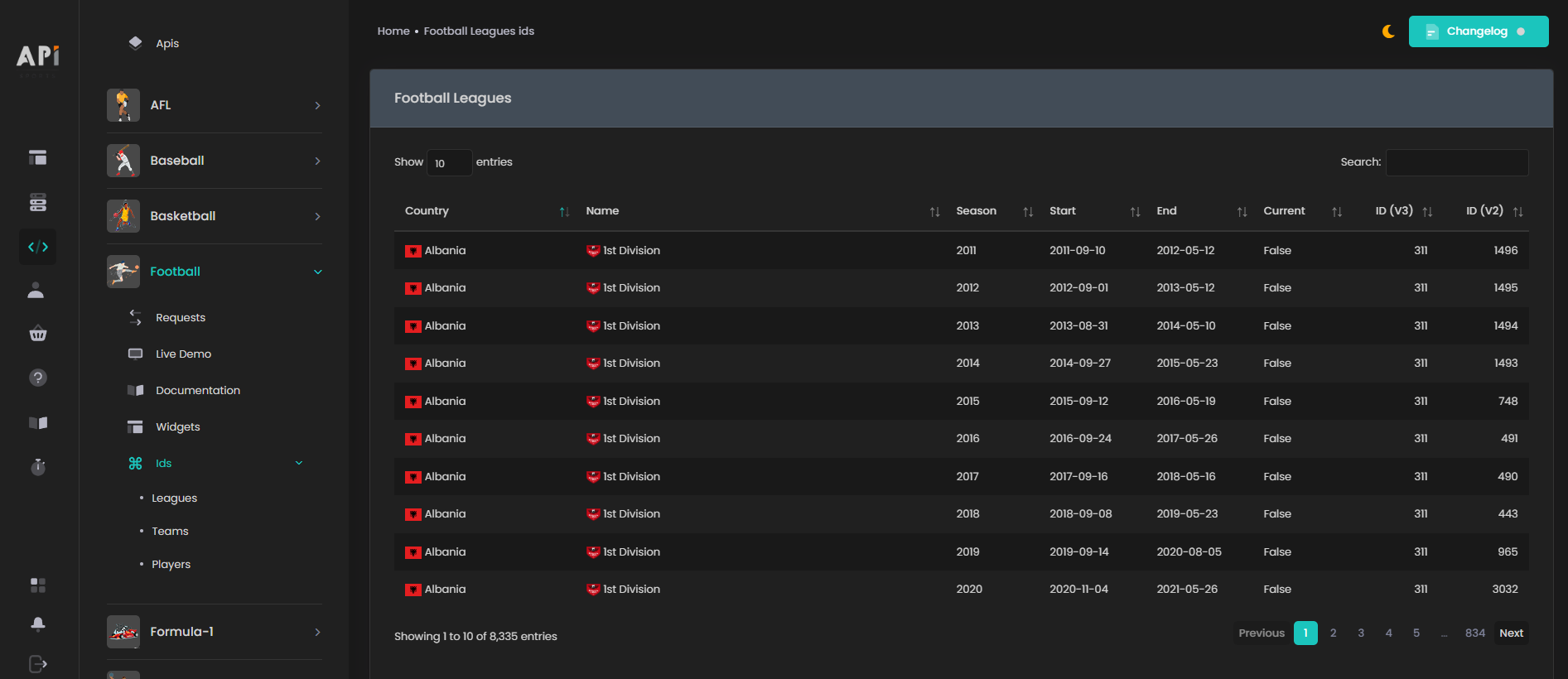
You can quickly find league IDs and available seasons from the IDs Dashboard.
GET https://v3.football.api-sports.io/leagues?id=39&season=2021
"response": [
        {
            "league": {
                "id": 39,
                "name": "Premier League",
                "type": "League",
                "logo": "https://media.api-sports.io/football/leagues/39.png"
            },
            "country": {
                "name": "England",
                "code": "GB-ENG",
                "flag": "https://media.api-sports.io/flags/gb-eng.svg"
            },
            "seasons": [
                {
                    "year": 2021,
                    "start": "2021-08-13",
                    "end": "2022-05-22",
                    "current": false,
                    "coverage": {
                        "fixtures": {
                            "events": true,
                            "lineups": true,
                            "statistics_fixtures": true,
                            "statistics_players": true
                        },
                        "standings": true,
                        "players": true,
                        "top_scorers": true,
                        "top_assists": true,
                        "top_cards": true,
                        "injuries": true,
                        "predictions": true,
                        "odds": false
                    }
                }
            ]
        }
    ]
}
The coverage object indicates which types of data API-FOOTBALL aims to provide for the selected competition and season, including events, lineups, player statistics, predictions and odds. Checking these values first helps you avoid unnecessary API calls.
However, a coverage value set to true does not guarantee that the corresponding data will be available for every fixture. Availability can vary between matches, and some fields may be missing or null, so your application should always handle incomplete data gracefully.
2- Retrieve the teams
Once you have the league ID and season, the next step is usually to retrieve the teams participating in that competition. Team IDs are reused across many other endpoints.
GET https://v3.football.api-sports.io/teams?league=39&season=2021
"response": [
        {
            "team": {
                "id": 33,
                "name": "Manchester United",
                "code": "MUN",
                "country": "England",
                "founded": 1878,
                "national": false,
                "logo": "https://media.api-sports.io/football/teams/33.png"
            },
            "venue": {
                "id": 556,
                "name": "Old Trafford",
                "address": "Sir Matt Busby Way",
                "city": "Manchester",
                "capacity": 76212,
                "surface": "grass",
                "image": "https://media.api-sports.io/football/venues/556.png"
            }
        },
        {
            "team": {
                "id": 34,
                "name": "Newcastle",
                "code": "NEW",
                "country": "England",
                "founded": 1892,
                "national": false,
                "logo": "https://media.api-sports.io/football/teams/34.png"
            },
            "venue": {
                "id": 562,
                "name": "St. James' Park",
                "address": "St. James' Street",
                "city": "Newcastle upon Tyne",
                "capacity": 52758,
                "surface": "grass",
                "image": "https://media.api-sports.io/football/venues/562.png"
            }
        },
  ...
This endpoint can return team IDs, names, logos, country information and venue information. Team IDs become a common link across the API. You'll reuse them for fixtures, squads, players and team-specific data.
The /teams endpoint provides team and venue information, but it does not include the team’s aggregated performance statistics for the selected season. If your application also needs form, goals, clean sheets, wins, draws and losses, use /teams/statistics for each team:
GET https://v3.football.api-sports.io/teams/statistics?league=39&season=2021&team=33
This endpoint requires a team ID, so retrieving these statistics for the entire league requires one request per team. Store the results and refresh them according to your application’s needs instead of requesting them on every page view.
3- Retrieve the standings
For most league-based applications, standings are one of the core blocks.
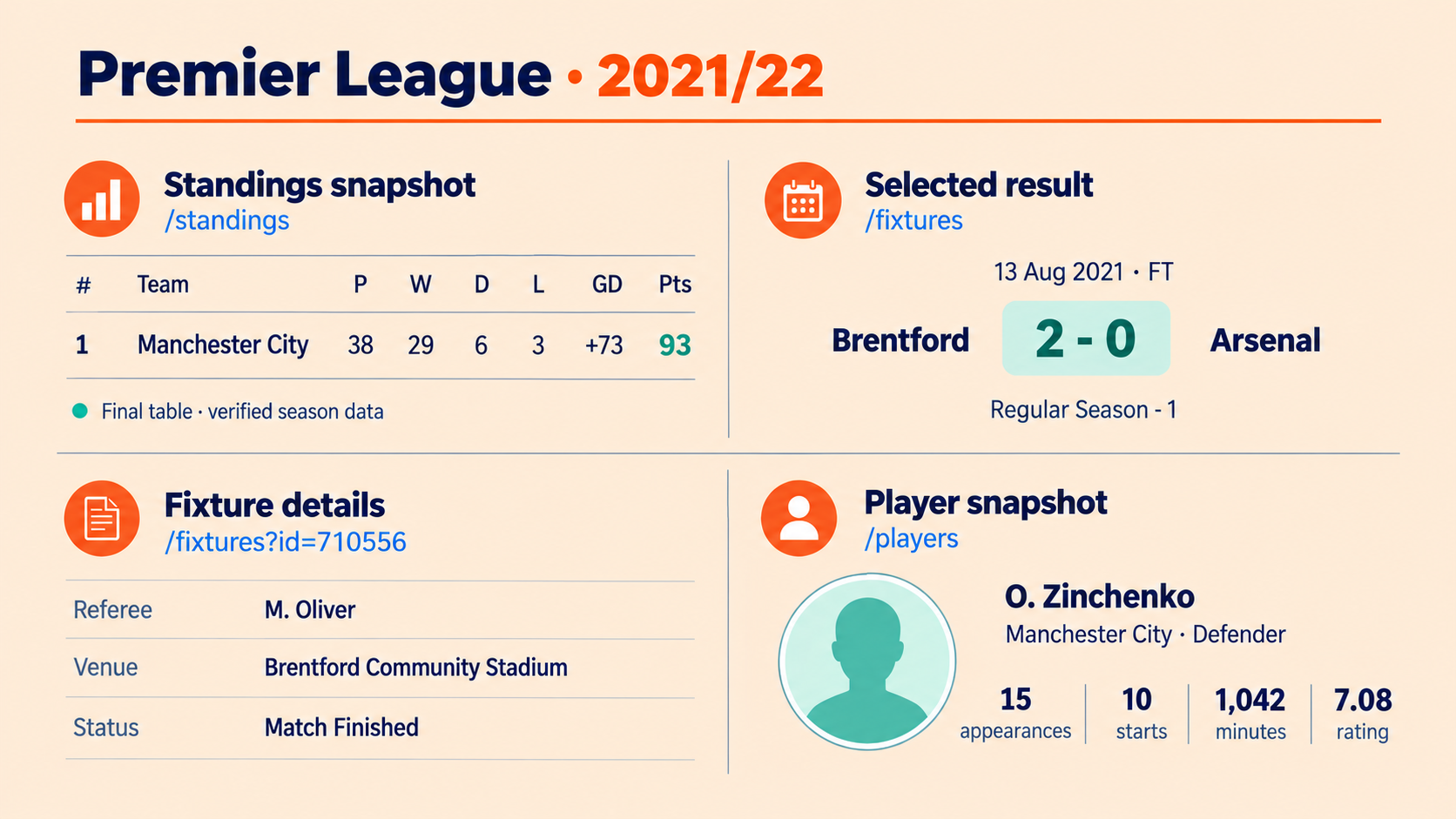
GET https://v3.football.api-sports.io/standings?league=39&season=2021
"response": [
        {
            "league": {
                "id": 39,
                "name": "Premier League",
                "country": "England",
                "logo": "https://media.api-sports.io/football/leagues/39.png",
                "flag": "https://media.api-sports.io/flags/gb-eng.svg",
                "season": 2021,
                "standings": [
                    [
                        {
                            "rank": 1,
                            "team": {
                                "id": 50,
                                "name": "Manchester City",
                                "logo": "https://media.api-sports.io/football/teams/50.png"
                            },
                            "points": 93,
                            "goalsDiff": 73,
                            "group": "Premier League",
                            "form": "WDWWW",
                            "status": "same",
                            "description": "Promotion - Champions League (Group Stage)",
                            "all": {
                                "played": 38,
                                "win": 29,
                                "draw": 6,
                                "lose": 3,
                                "goals": {
                                    "for": 99,
                                    "against": 26
                                }
                            },
                            "home": {
                                "played": 19,
                                "win": 15,
                                "draw": 2,
                                "lose": 2,
                                "goals": {
                                    "for": 58,
                                    "against": 15
                                }
                            },
                            "away": {
                                "played": 19,
                                "win": 14,
                                "draw": 4,
                                "lose": 1,
                                "goals": {
                                    "for": 41,
                                    "against": 11
                                }
                            },
           ...
The standings response can include rank, team, points, goal difference, form, status, description and home/away records. Standings normally change after completed matches or administrative updates, so they are good candidates for caching instead of being requested on every page view.
4- Retrieve fixtures and results
The /fixtures endpoint is the central endpoint for schedules, live matches and results. Each fixture includes information such as the match ID, date, venue, status, teams and score, making it the starting point for match-related workflows:
GET https://v3.football.api-sports.io/fixtures?league=39&season=2021
"response": [
        {
            "fixture": {
                "id": 710556,
                "referee": "M. Oliver",
                "timezone": "UTC",
                "date": "2021-08-13T19:00:00+00:00",
                "timestamp": 1628881200,
                "periods": {
                    "first": 1628881200,
                    "second": 1628884800
                },
                "venue": {
                    "id": 10503,
                    "name": "Brentford Community Stadium",
                    "city": "Brentford, Middlesex"
                },
                "status": {
                    "long": "Match Finished",
                    "short": "FT",
                    "elapsed": 90,
                    "extra": null
                }
            },
            "league": {
                "id": 39,
                "name": "Premier League",
                "country": "England",
                "logo": "https://media.api-sports.io/football/leagues/39.png",
                "flag": "https://media.api-sports.io/flags/gb-eng.svg",
                "season": 2021,
                "round": "Regular Season - 1",
                "standings": true
            },
            "teams": {
                "home": {
                    "id": 55,
                    "name": "Brentford",
                    "logo": "https://media.api-sports.io/football/teams/55.png",
                    "winner": true
                },
                "away": {
                    "id": 42,
                    "name": "Arsenal",
                    "logo": "https://media.api-sports.io/football/teams/42.png",
                    "winner": false
                }
            },
            "goals": {
                "home": 2,
                "away": 0
            },
 ...
You can also target a smaller period with from and to:
GET /fixtures?league=39&season=2021&from=2021-08-13&to=2021-08-15
This is useful when you want to reduce response size and focus only on a specific matchday, week or date range.
5- Retrieve detailed match data
Once you have a fixture ID, you can enrich that fixture with detailed information such as events, lineups, team statistics and player statistics, depending on the available coverage.
GET https://v3.football.api-sports.io/fixtures?id=710556
Unlike a broad /fixtures query by league, season or date, a request using id can include four embedded detail blocks in the fixture response:
eventslineupsstatisticsplayers
This approach lets you progressively enrich a simple fixture list into a complete match center without making four separate detail calls for every fixture.
If your plan supports the ids parameter, you can retrieve detailed data for up to 20 fixtures in one request. Separate the fixture IDs with hyphens:
GET https://v3.football.api-sports.io/fixtures?ids=710556-710557-710558
For a full-season import, first retrieve the fixture IDs, filter out matches that have not started when you only need post-match details, split the IDs into groups of 20 and respect your plan's rate limit between requests. This avoids one request per detail endpoint for every match.
6- Retrieve player data
If the selected league has player coverage, you can retrieve player statistics for a league and season.
GET https://v3.football.api-sports.io/players?league=39&season=2021
"response": [
        {
            "player": {
                "id": 641,
                "name": "O. Zinchenko",
                "firstname": "Oleksandr",
                "lastname": "Zinchenko",
                "age": 29,
                "birth": {
                    "date": "1996-12-15",
                    "place": "Radomyshl",
                    "country": "Ukraine"
                },
                "nationality": "Ukraine",
                "height": "175",
                "weight": "64",
                "injured": false,
                "photo": "https://media.api-sports.io/football/players/641.png"
            },
            "statistics": [
                {
                    "team": {
                        "id": 50,
                        "name": "Manchester City",
                        "logo": "https://media.api-sports.io/football/teams/50.png"
                    },
                    "league": {
                        "id": 39,
                        "name": "Premier League",
                        "country": "England",
                        "logo": "https://media.api-sports.io/football/leagues/39.png",
                        "flag": "https://media.api-sports.io/flags/gb-eng.svg",
                        "season": 2021
                    },
                    "games": {
                        "appearences": 15,
                        "lineups": 10,
                        "minutes": 1042,
                        "number": null,
                        "position": "Defender",
                        "rating": "7.080000",
                        "captain": false
                    },
     ...
Player profile fields such as age can reflect the current database state, while the nested statistics object is filtered by the requested season.
The /players endpoint is paginated, so the first response does not contain every player. Always read paging.current and paging.total before deciding whether another request is required. To retrieve the second page, add the page parameter:
GET https://v3.football.api-sports.io/players?league=39&season=2021&page=2
Continue requesting pages until paging.current equals paging.total, but only within the limits of your plan. The Free Plan provides access to the first three pages. If paging.total is greater than 3, a complete league-wide player statistics import requires a plan that provides access to the remaining pages.
If you only need the current registered players of a team, without historical season statistics, you can use:
GET https://v3.football.api-sports.io/players/squads?team=33
This request returns the team’s current squad in one response, but it does not replace /players when you need statistics for a specific historical season.
This endpoint can power player lists, profile pages, season statistics and rankings. You can also retrieve dedicated leaderboards such as top scorers and top assists:
GET https://v3.football.api-sports.io/players/topscorers?league=39&season=2021
GET https://v3.football.api-sports.io/players/topassists?league=39&season=2021
7- Validate every response
Before using or caching an API response, make sure it is valid. An HTTP response alone is not enough to confirm that the requested data is available.
After decoding the JSON response:
- Check that
errorscontains no entries - Read
resultsto see how many items were returned - Inspect
pagingon endpoints that can return several pages - Verify that
responsecontains the expected data
An empty response can be normal when no data is available, but it can also result from an incorrect parameter, an unavailable season or an unsupported parameter combination. Only cache responses after these checks have passed.
8- Use caching to reduce calls
When building a league application, not every type of data needs the same refresh rate. League metadata and season team lists rarely change. Standings change after matches or administrative updates. Live fixtures need more frequent updates. Player rankings can be refreshed less often than live scores.
A practical caching strategy could be:
- Cache league metadata for a long period
- Cache team lists for the season
- Refresh standings after matchdays
- Refresh scheduled fixtures periodically and live fixtures more frequently
- Cache player rankings and update them periodically
- Load detailed match data only when a user opens a match or when your application needs to store a completed match report
This makes your application faster and helps you control API usage. Cache durations should follow the update frequency documented for each endpoint and the needs of your application.
Conclusion
Building a complete league application with API-FOOTBALL requires a structured workflow. Start by identifying the competition and season, then check the available coverage before retrieving teams, standings and fixtures. You can then add team statistics, player statistics and detailed match data according to the needs of your application.
When retrieving players, follow the pagination only as far as your plan allows. When retrieving detailed data for several matches, use the ids parameter only if it is supported by your plan. Always validate the errors, paging and response fields before using or caching the result. Combined with a suitable caching strategy, this workflow can power league dashboards, match centers and football applications while keeping API usage under control.
For more information about available endpoints and parameters, consult the API-FOOTBALL documentation and create a free account if you have not already done so.
The API-SPORTS Team