 API-FOOTBALL

The FIFA World Cup 2026 means 48 teams, 16 stadiums and 39 days of competition. That’s a lot of data to work with and that’s exactly what we’re going to do with API-Football.
In this guide, we’ll walk you through the endpoints you need and how to use them.
You’ll need an API-Football account and a basic understanding of REST APIs.
The example use Node.JS with AXIOS, but every endpoint is a simple HTTP GET request (Python, PHP, Ruby or cURL work just as well).
The full API documentation is available here.
Tournament format and schedule
For the first time in its history, the World Cup is hosted by three countries: Canada, Mexico and the United States. It will run from June 11 to July 19, with 48 nations represented and 104 matches played.
The format changes to 12 groups of 4 teams. 48 teams in total instead of 32 in previous editions. The qualification rules are as follows: the top two teams from each group advance, along with the eight best third-placed teams. That gives us 32 qualifiers who face off in the round of 32 before moving on to the round of 16.
Here is how the 104 matches break down:
- June 11-27: Group stage with 72 matches
- June 28-July 3: Round of 32
- July 4-7: Round of 16
- July 9-11: Quarter-finals
- July 14-15: Semi-finals
- July 18-19: Third-place match and final
The 12 groups in detail
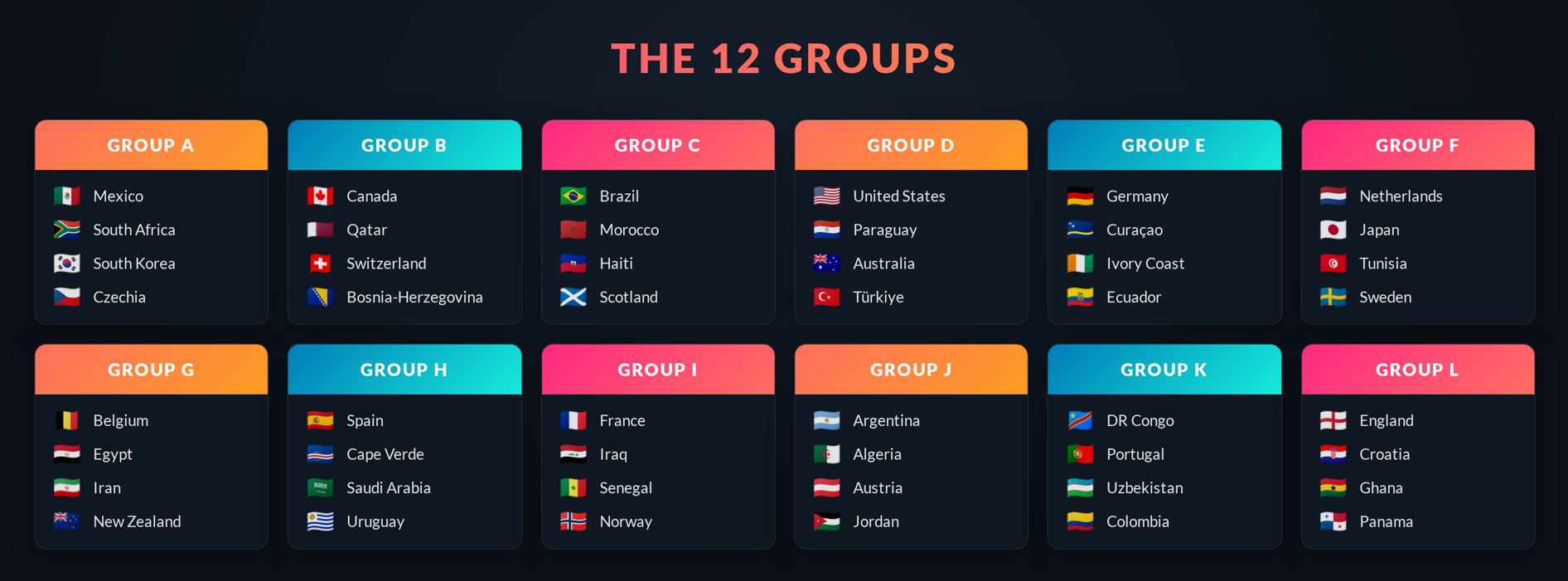
16 stadiums across 3 countries
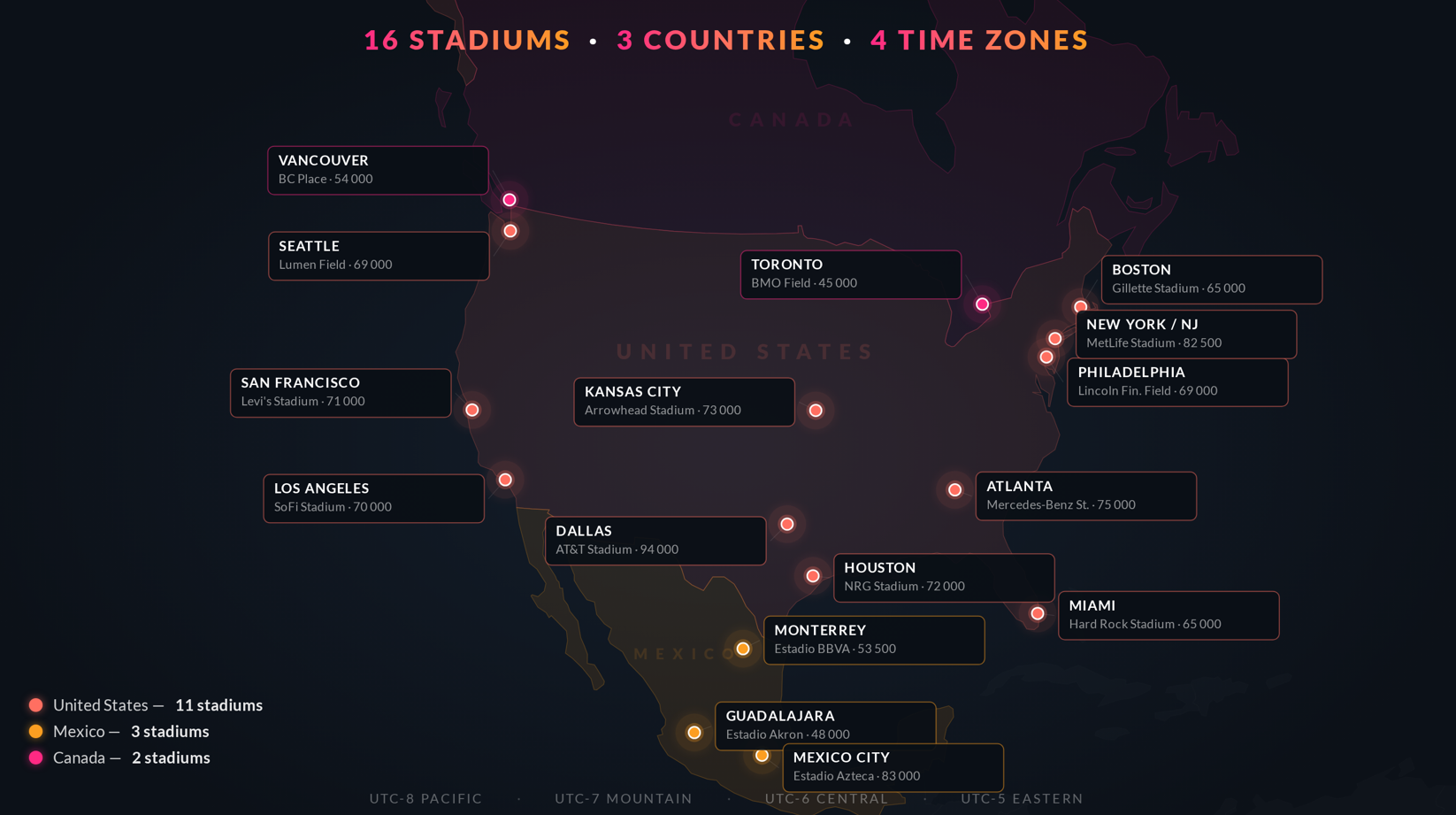 The 16 stadiums are spread across all three host countries, covering four time zones.
Using the World Cup with API-Football
The two key identifiers to keep in mind throughout this guide: league=1 and season=2026 . They appear in almost every call we’ll make.
Good news: the schedule is already live. Matches are made available as the tournament progresses, so you can start building without waiting for June 11.
1- Setting up your tournament database
For any league or cup, the leagues endpoint returns a coverage object that tells you which data types are supported for that competition.
In other words, coverage answers the question: “What types of data can I expect for this event?”
1.1- Check available data for league=1 and season=2026
GET <https://v3.football.api-sports.io/leagues?id=1&season=2026>
Inspect the coverage object to verify which data is supported for league=1 and season=2026.
A true flag means that data type is supported for this competition, but availability may vary from match to match especially early in the tournament. You should get something like this:
 "coverage": {
    "fixtures": {
        "events": true,
        "lineups": true,
        "statistics_fixtures": true,
        "statistics_players": true
    },
    "standings": true,
    "players": true,
    "top_scorers": true,
    "top_assists": true,
    "top_cards": true,
    "injuries": true,
    "predictions": true,
    "odds": true
}
For the rest of this guide, assume that the endpoints described for the World Cup are available as long as the corresponding coverage is enabled in leagues for id=1 and season=2026.
1.2- Retrieve essential information
The request fixtures?league=1&season=2026 lets you retrieve the schedule with all 104 matches. Each one has its fixture_id along with date, time (UTC), venue and status. Save these, they appear in almost every subsequent call. Matches will be added as the tournament progresses.
The 48 teams can be retrieved with teams?league=1&season=2026. Each team has a team_id, name, country and logo URL:
{
    "get": "teams",
    "parameters": {
        "league": "1",
        "season": "2026"
    },
    "errors": [],
    "results": 48,
    "paging": {
        "current": 1,
        "total": 1
    },
    "response": [
        {
            "team": {
                "id": 1,
                "name": "Belgium",
                "code": "BEL",
                "country": "Belgium",
                "founded": 1895,
                "national": true,
                "logo": "https://media.api-sports.io/football/teams/1.png"
            },
            "venue": {
                "id": 173,
                "name": "Stade Roi Baudouin",
                "address": "Avenue de Marathon 135/2, Laken",
                "city": "Brussel",
                "capacity": 50093,
                "surface": "grass",
                "image": "https://media.api-sports.io/football/venues/173.png"
            }
    ...
Round names can be retrieved with /fixtures/rounds?league=1&season=2026. This returns the list of stages and rounds: "Group stage", "Quarter-finals", … Useful for building navigation tabs and filters in your application. You can also pass current=true to get only the active round:
{
    "get": "fixtures/rounds",
    "parameters": {
        "league": "1",
        "season": "2026"
    },
    "errors": [],
    "results": 3,
    "paging": {
        "current": 1,
        "total": 1
    },
    "response": [
        "Group Stage - 1",
        "Group Stage - 2",
        "Group Stage - 3"
    ]
  }
2- Endpoints overview
The endpoints below can help you build a live score tracker, group standings, team and player pages, or a performance tracker. The building blocks are all there, assemble them however your project requires.
To get all live matches across all leagues: /fixtures?live=all. Data returned by /fixtures and /fixtures/events is updated every 15 seconds. Match status codes tell you exactly where things stand (1H, HT, 2H, …). Set your cache interval accordingly for live matches so you don’t miss important events:
GET <https://v3.football.api-sports.io/fixtures?live=all>
To retrieve match details: /fixtures?id=FIXTURE_ID. The response includes 4 embedded objects: /events, /lineups, /statistics and /players. To process multiple matches at once, pass up to 20 IDs separated by a dash:
GET <https://v3.football.api-sports.io/fixtures?ids=ID1-ID2-ID3>
To display group standings: /standings?league=1&season=2026. This call returns all 12 group tables. Each row contains matches played, wins, draws, losses, goals for, goals against, goal difference, points and recent form. Standings are updated based on official results, following the competition’s refresh cycle:
GET <https://v3.football.api-sports.io/standings?league=1&season=2026>
You should get something like this:
"response": [
        {
            "league": {
                "id": 1,
                "name": "World Cup",
                "country": "World",
                "logo": "https://media.api-sports.io/football/leagues/1.png",
                "flag": null,
                "season": 2026,
                "standings": [
                    [
                        {
                            "rank": 1,
                            "team": {
                                "id": 770,
                                "name": "Czech Republic",
                                "logo": "https://media.api-sports.io/football/teams/770.png"
                            },
                            "points": 0,
                            "goalsDiff": 0,
                            "group": "Group A",
                            "form": null,
                            "status": "same",
                            "description": "Promotion - World Cup (Play Offs)",
                            "all": {
                                "played": 0,
                                "win": 0,
                                "draw": 0,
                                "lose": 0,
                                "goals": {
                                    "for": 0,
                                    "against": 0
                                }

 ...
To track the knockout bracket, use /fixtures filtered by league=1, season=2026 and round to display each round’s matches, along with /fixtures/rounds to retrieve the list and order of rounds.
To display squads and player profiles: /players?league=1&season=2026&page=1. Full player list, including position, nationality, age, height, weight and photo:
GET <https://v3.football.api-sports.io/players?league=1&season=2026&page=1>
To display coaches: /coachs?team=TEAM_ID. Returns the head coach’s nationality, age, career history and current team:
GET <https://v3.football.api-sports.io/coachs?team=40>
You should get something like this:
 "response": [
        {
            "id": 40,
            "name": "T. Tuchel",
            "firstname": "Thomas",
            "lastname": "Tuchel",
            "age": 52,
            "birth": {
                "date": "1973-08-29",
                "place": "Krumbach",
                "country": "Germany"
            },
            "nationality": "Germany",
            "height": "192 cm",
            "weight": "85 kg",
            "photo": "https://media.api-sports.io/football/coachs/40.png",
            "team": {
                "id": 10,
                "name": "England",
                "logo": "https://media.api-sports.io/football/teams/10.png"
            },
            "career": [
                {
                    "team": {
                        "id": 10,
                        "name": "England",
                        "logo": "https://media.api-sports.io/football/teams/10.png"
                    },
                    "start": "2025-01-01",
                    "end": null
                },
...
To display injuries and suspensions: /injuries?league=1&season=2026:
GET <https://v3.football.api-sports.io/injuries?league=1&season=2026>
To display player ratings per match: /fixtures/players?fixture=FIXTURE_ID. This call returns performance statistics along with a rating between 0-10 for every player who took part in the match:
GET <https://v3.football.api-sports.io/fixtures/players?fixture=FIXTURE_ID>
To display disciplinary records: /players/topyellowcards?league=1&season=2026:
GET <https://v3.football.api-sports.io/players/topyellowcards?league=1&season=2026>
To display match predictions: /predictions?fixture=FIXTURE_ID. Analyzes form, head-to-head records and historical data. Returns the predicted winner, estimated score and home, draw and away probabilities:
GET <https://v3.football.api-sports.io/predictions?fixture=FIXTURE_ID>
To display pre-match odds: /odds?fixture=FIXTURE_ID Only odds data from the last 7 days can be retrieved:
GET <https://v3.football.api-sports.io/odds?fixture=FIXTURE_ID>
To display live odds: /odds/live?fixture=FIXTURE_ID:
GET <https://v3.football.api-sports.io/odds/live?fixture=FIXTURE_ID>
To display head-to-head history: /fixtures/headtohead?h2h=TEAM_A-TEAM_B. Enter two team_id values separated by a dash to get the full head-to-head history between two nations. Here’s an example for “England VS Croatia”:
GET <https://v3.football.api-sports.io/fixtures/headtohead?h2h=10-3>
You should get something like this:
"response": [
        {
            "fixture": {
                "id": 132528,
                "referee": "Tasos Sidiropoulos, Greece",
                "timezone": "UTC",
                "date": "2018-11-18T14:00:00+00:00",
                "timestamp": 1542549600,
                "periods": {
                    "first": 1542549600,
                    "second": 1542553200
                },
                "venue": {
                    "id": null,
                    "name": "Wembley Stadium",
                    "city": "London"
                },
                "status": {
                    "long": "Match Finished",
                    "short": "FT",
                    "elapsed": 90,
                    "extra": null
                }
            },
            "league": {
                "id": 5,
                "name": "UEFA Nations League",
                "country": "World",
                "logo": "https://media.api-sports.io/football/leagues/5.png",
                "flag": null,
                "season": 2018,
                "round": "League A - 6",
                "standings": true
            },
...
3- Code examples
Here are 2 code examples you can put into practice.
3.1- Retrieve the full World Cup schedule:
**const axios = require('axios');

const API_KEY = 'YOUR_API_KEY_HERE';
const BASE_URL = 'https://v3.football.api-sports.io';

async function getWorldCupSchedule() {
  try {
    const response = await axios.get(`${BASE_URL}/fixtures`, {
      params: {
        league: 1,
        season: 2026
      },
      headers: {
        'x-apisports-key': API_KEY
      }
    });

    const fixtures = response.data.response;
    console.log(`Total fixtures: ${fixtures.length}`);

    fixtures.forEach(fixture => {
      const date = new Date(fixture.fixture.date).toLocaleString('en-US', {
        weekday: 'short',
        year: 'numeric',
        month: 'short',
        day: 'numeric',
        hour: '2-digit',
        minute: '2-digit',
        timeZoneName: 'short'
      });

      console.log(`[${fixture.league.round}] ${date}`);
      console.log(`  ${fixture.teams.home.name} vs ${fixture.teams.away.name}`);
      console.log(`  Venue: ${fixture.fixture.venue.name}, ${fixture.fixture.venue.city}`);
      console.log('---');
    });
  } catch (error) {
    console.error('Error fetching schedule:', error.message);
  }
}

getWorldCupSchedule();**
Run with node fetch-schedule.js: you’ll get the available matches with dates, teams and venue.
3.2- Retrieve live data:
const axios = require('axios');

const API_KEY = '**YOUR_API_KEY_HERE**';
const BASE_URL = 'https://v3.football.api-sports.io';

async function getLiveMatches() {
  try {
    // Retrieve ongoing fixtures using the status parameter
    const response = await axios.get(`${BASE_URL}/fixtures`, {
      params: {
        league: 1,
        season: 2026,
        status: '1H-HT-2H-ET-P-BT-LIVE'
      },
      headers: {
        'x-apisports-key': API_KEY
      }
    });

    const liveFixtures = response.data.response;

    if (liveFixtures.length === 0) {
      console.log('No World Cup matches currently live.');
      return;
    }

    console.log(`n${liveFixtures.length} match(es) live right now:n`);

    // Process the fixtures in batches of 20
    for (let i = 0; i < liveFixtures.length; i += 20) {
      const batch = liveFixtures.slice(i, i + 20);
      const fixtureIds = batch.map(f => f.fixture.id).join('-');

      // Retrieve the complete details (including events) for this batch
      const detailsResponse = await axios.get(`${BASE_URL}/fixtures`, {
        params: {
          ids: fixtureIds
        },
        headers: {
          'x-apisports-key': API_KEY
        }
      });

      const detailedFixtures = detailsResponse.data.response;

      for (const fixture of detailedFixtures) {
        const { id, status } = fixture.fixture;
        const { home, away } = fixture.teams;
        const { home: homeGoals, away: awayGoals } = fixture.goals;

        console.log(`[${status.elapsed}'] ${home.name}  ${homeGoals} - ${awayGoals}  ${away.name}`);
        console.log(`  Status: ${status.long}`);

        // The events are included in the fixtures response
        if (fixture.events && fixture.events.length > 0) {
          const goals = fixture.events.filter(e => e.type === 'Goal');

          if (goals.length > 0) {
            console.log('  Goals:');
            goals.forEach(goal => {
              console.log(`    ${goal.time.elapsed}' - ${goal.player.name} (${goal.team.name})`);
            });
          }
        }

        console.log('---');
      }
    }
  } catch (error) {
    console.error('Error fetching live data:', error.message);
  }
}

async function poll() {
  await getLiveMatches();
  setTimeout(poll, 15000);
}

poll();
This call fetches all World Cup matches. Simply filter by status to keep only those currently in progress.
Conclusion
As this guide has shown, the 2026 World Cup is a tournament of unprecedented scale. But the good news is: API-Football covers every match, from kickoff to the final whistle!
Everything we’ve covered (schedule, standings, bracket, …) is available right now via league=1 and season=2026. The data is already live and will continue to grow as the tournament approaches. Now is the perfect time to build a live score feed, a group tracker or a statistics dashboard. Your move!
Check out our guides “How to Get Started with API-FOOTBALL: The Complete Beginner's Guide” and “How to Get All Fixtures Data from One League”.
And if you haven’t already, create your API-Football account for free.
The API-SPORTS Team