 API-FOOTBALL

Creating and integrating widgets is now faster and easier than ever.
Built on the new modular design of Widgets v3, the Widget Builder lets you configure and preview widgets instantly.
Until now, building widgets required manually checking documentation, testing parameters, and editing code by hand. The Widget Builder changes all that by letting you build, test, and copy your widget code in seconds, all from your browser.
Build and preview instantly
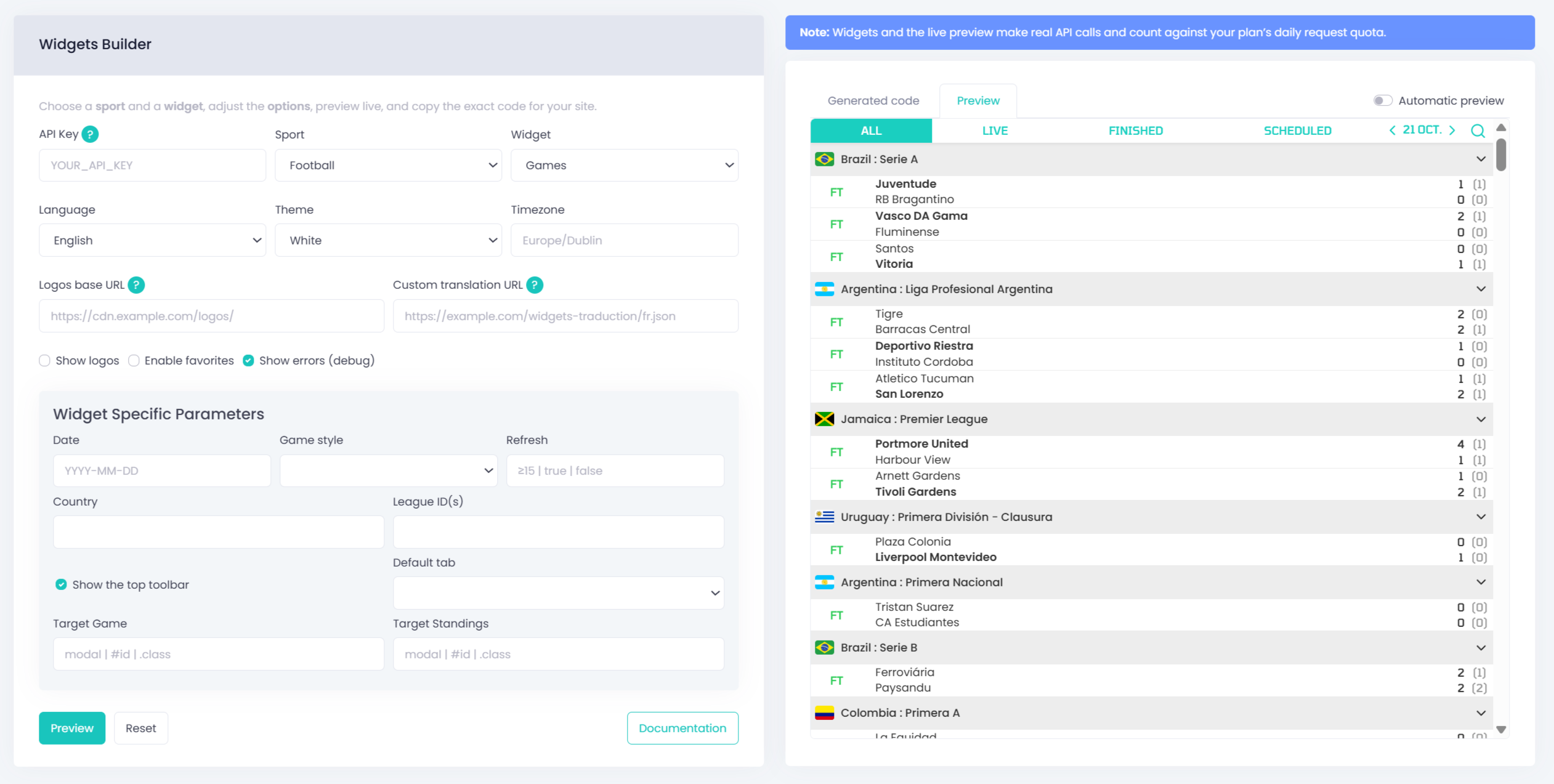
The Widget Builder provides a clean and intuitive interface that lets you:
- Select your sport and widget type (Football, Basketball, F1, MMA, and more)
- Configure all options through a simple form, with parameters that update dynamically depending on the selected sport and widget
- Preview your widget live in real time
- Copy ready-to-use code you can paste straight into your website
All widgets are compatible with the official Widgets v3 API, and the generated configuration is fully compliant with the latest attributes and data types.
Developer-friendly, but built for everyone
Even though it’s a developer tool, the Widget Builder was designed to be clear and easy to use for anyone.
Each field adapts dynamically to your selection, displaying only relevant options grouped logically by widget type. Parameters that require specific input (boolean, list, numeric, date) are automatically rendered as checkboxes, dropdowns, or date pickers.
You can test how a widget looks without constantly reloading the page by using the Automatic Preview toggle for real-time updates.
If you prefer to work manually, simply turn it off and use the Preview button for one-time updates. This option is ideal if you want to limit API calls during setup.
Save time and prevent errors
With the Widget Builder, there is no need to browse the documentation for every parameter.
All available attributes, values, and requirements are built directly into the interface.
The tool automatically validates refresh intervals, required IDs, and supported values so you can focus on creation rather than debugging.
Once you are happy with your configuration, the tool generates a complete, properly indented HTML snippet.
Simply copy and paste it into your website. No manual setup, no missing attributes, and no formatting issues.
A quick note on API key security and caching
By default, widgets make direct calls to the API using your personal API key, which means the key is visible in the widget code whenever someone loads your website. You can restrict your API key to specific domains in your API-SPORTS Dashboard, which limits where it can be used, but it does not hide it from the client side.
To completely protect your API key, you can set up a caching layer that serves widget data through a CDN such as Bunny.net.
This approach prevents the widget from calling the API directly and hides your key entirely from the client side. It also improves performance by reducing API requests and speeding up load times for users around the world.
Learn more in our step-by-step guide on how to optimize widgets with Bunny.net
Start building now
The API-SPORTS Widget Builder is available now in your dashboard.
Whether you want to embed live scores, standings, team stats, or head-to-head comparisons, this tool gives you everything you need to create and deploy widgets effortlessly.
Spend less time coding and more time creating great sports experiences.
Start building your first widget in seconds!